8
16/11/2021
f) Turning off the timer:
If you do not want to use the timer, you can
deactivate it by pressing the "ON" and "OFF"
buttons at the same time for several seconds.
Repeat the operation to reactivate the timer function.
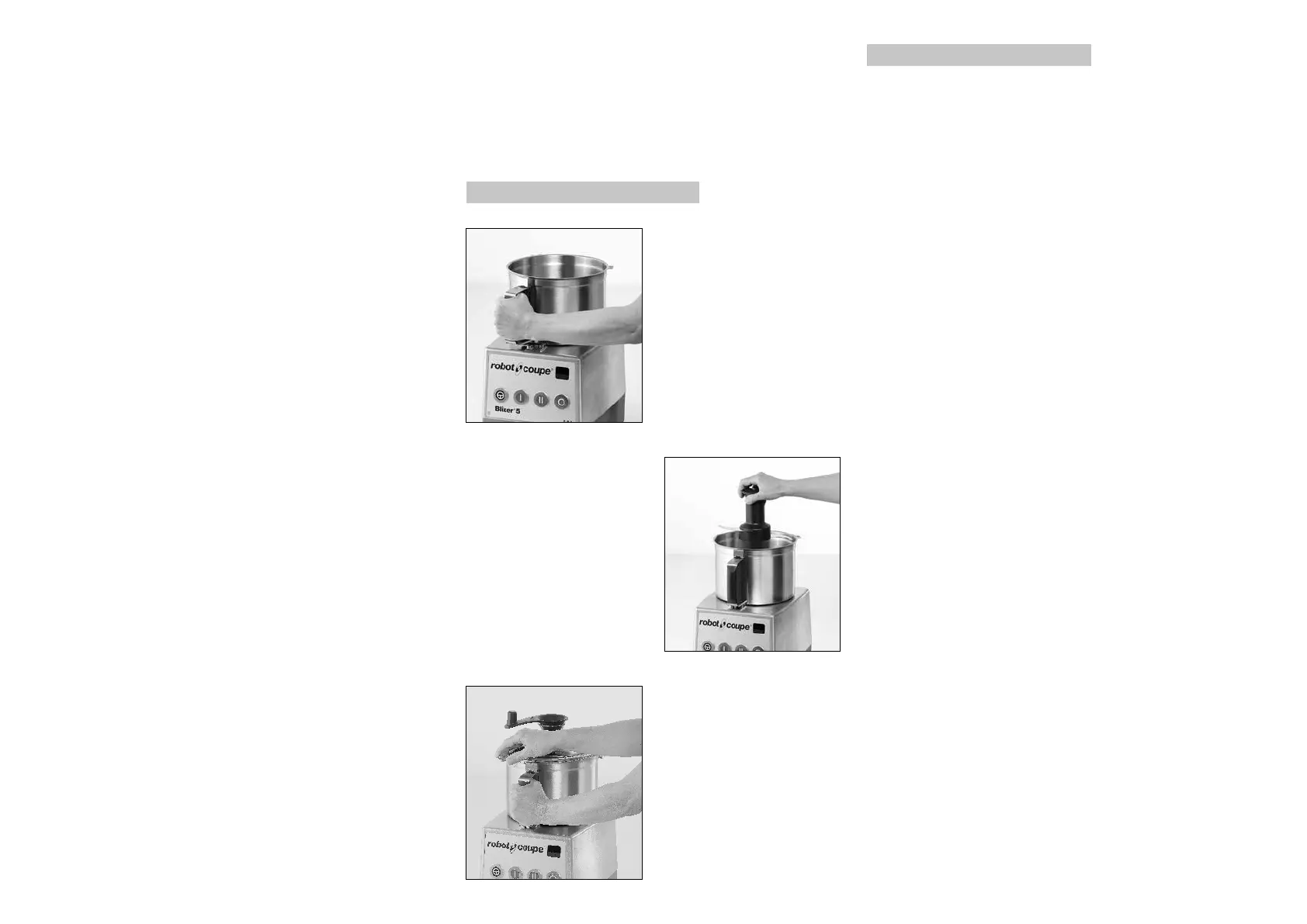
ASSEMBLY
1) With the motor base
facing you, position the
cutter bowl on the motor
base.
Turn the bowl to the right
until it locks.
2) Engage the blade on
the motor shaft and lower
it right to the bottom of
the bowl.
Make sure that it is
correctly positioned, by
rotating it in the bowl.
3) Put the lid equipped
with the Blixer® arm on
the bowl (see page 11)
and turn to the right until
locked in place.
The device is now ready
for use.
• TIMER
How the timer works
The timer has three 7-segment LED displays, two
timer adjustment buttons and a buzzer.
a) Countdown
When the food processor is switched on, the timer
usually displays 0.00 and can be set directly. This
is called Countdown Mode. The timer increments
one second at a time when the motor is operating.
Incrementation stops if the motor stops then
resumes when the motor starts again. In the case of
models Blixer® 5 V.V. and Blixer® 7 V.V., the food
processor automatically stops after 9 minutes and
the timer stops. In the case of models Blixer® 5 and
Blixer® 7, the food processor automatically stops
after 5 minutes and the timer stops.
b) Timer
Before starting, the user can adjust the processing
time to anywhere between 0.05 (5 seconds) and
9.00 (9 minutes) by pressing the + and − buttons.
When the motor starts, the timer increments one
second at a time. This is called Timer Mode.
Countdown stops if the motor stops and resumes
when the motor starts again. When the countdown
gets to 0.00, the processor stops and a buzzer
sounds. The time initially set is then displayed again.
c) Starting the processor with the Pulse button:
If the food processor is started using the Pulse button,
the timer goes into Countdown Mode when the Pulse
button is held down and returns to the previous timer
display when the Pulse button is released.
d) Standby Mode
If the food processor is not used for more than 10
minutes (motor not operating), the timer goes into
Standby Mode. Standby Mode can be cancelled by
pressing any button or the "ON" button.
OPERATION
• GENERAL OPERATION INSTRUCTIONS:
The blades are sharp. KEEP FINGERS AND HANDS
AWAY FROM BLADES. Always allow the blades to
come to a complete stop before removing the lid.
THE UNIT SHOULD BE OFF EXCEPT WHEN
PROCESSING IS UNDERWAY.
DO NOT allow the machine to run unattended.
Be sure your machine is properly assembled before
using.
Wash the bowl, blade assembly and lid after every
use. Do not store food in the bowl.
NOTE: Among other protections, the machine is
equipped with a manual reset overload circuit-
breaker. If the machine is overloaded or run too
long under heavy load conditions then the circuit-
breaker will trip. If this occurs, first remove the bowl
and reduce the amount of food being processed.
The reset button is located on the bottom left corner
of the motor base. Press the button in to reset the
overload protector.
It is recommended that the machine be operated on
a 50 % duty cycle. This is easily accomplished since
the preparation time (cleaning, coring, peeling, and
loading) takes longer than the processing time. This
will increase the life of your machine.
Learn to operate the machine using a start-stop
motion so the consistency of the product can be
controlled. Remember, it is important to start with
uniform pieces for uniform results.
The Blixer® will enable you to perform all your
cutting tasks in a minimum time; we recommend
therefore that you keep a close eye on the mixture
in order to obtain the desired results.



 To Next Page