Robustel GoRugged R3000 Wireline - 4 Ethernet Ports User Guide
RT_UG_R3000 Wireline- 4 Ethernet Ports _v.1.1.0 02.07.2015 86 / 116
Confidential
Select from “VPN”, “PPPoE”, “DynDNS” and “GPS”.
Select from “ON”, “Blink”.
For example, if “USR LED Type” is set as “VPN” and “Indication” is set as “Blink”,
when any VPN tunnel is up USR LED will blink.
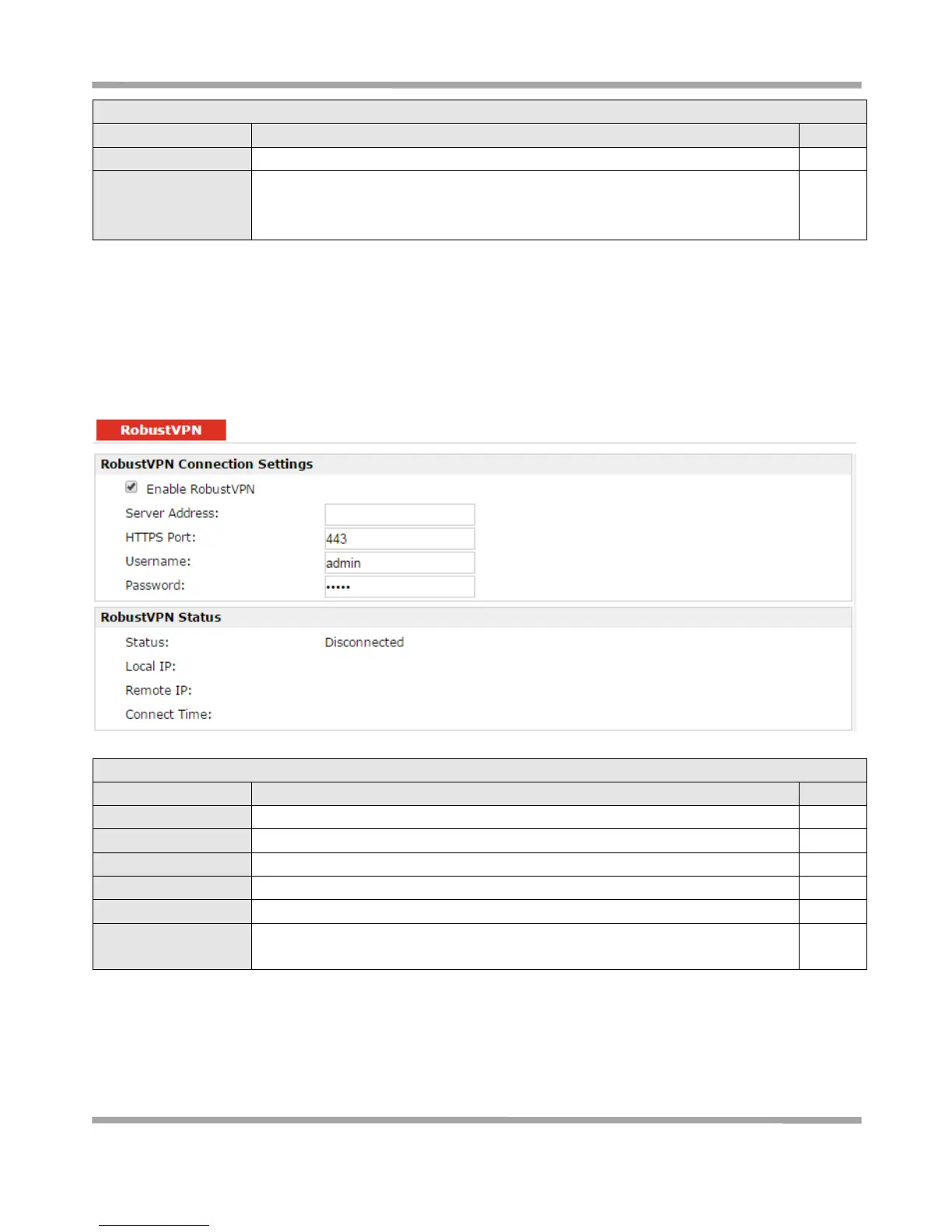
3.33 Configuration -> RobustVPN
This section allows users to configure the settings of RobustVPN, which is based on a hosted web service designed to
connect customer to their machines through Internet. The hosted acts as data transit platform and offer
communication originated by the customers to their machines. It is intended to be used in the industrial M2M
communication sector.
Click to enable RobustVPN.
Enter the IP address or Domain Name of RobustVPN server.
Enter the HTTPS Port of RobustVPN server.
Enter the Username of RobustVPN server.
Enter the Password of RobustVPN server.
Show status of RobustVPN, including connection status, Local IP, Remote IP and
Connect Time.
3.34 Administration -> Profile
This section allows users to import or export the configuration file, and restore the router to factory default setting.











 To Next Page