10
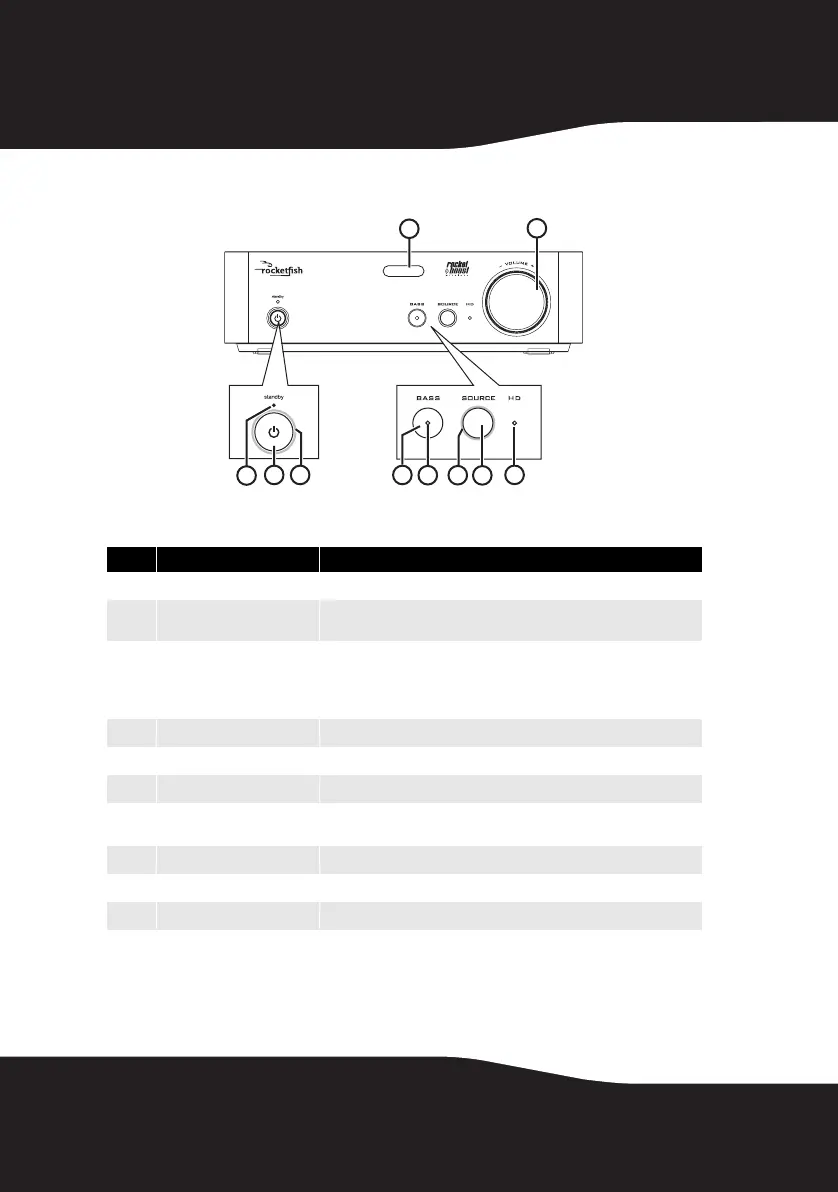
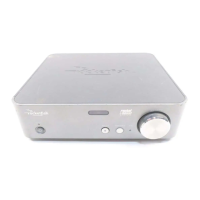
Receiver front panel
# Feature
1
Standby LED Turns red when receiver is in standby mode.
2
Power/Join button Press to turn the receiver on. Press and hold to initiate joining. Press
again to go to standby.
3
Power/Join indicator Lights steadily when powered on and successfully connected to a
Rocketboost network.
Blinks rapidly in joining mode.
Blinks slowly when unable to connect to a network.
4
BASS button Toggles Bass enhancement on or off.
5
Bass indicator Lights when the bass enhancement is activated.
6
SOURCE indicator Lights when the receiver is connected to an audio stream.
7
SOURCE button Selects the audio source from A or B on the sender or from any other
Rocketboost transmitter in the Rocketboost network.
8
HD indicator Lights when the receiver is receiving HD audio signals.
9
IR sensor window Receives the signal from the remote control.
10
VOLUME knob Controls the volume level.
TM
1
2
3
9
5
7
6
4
10
8
RF-RBKIT_09-0473_MAN_ENG_V1.fm Page 10 Thursday, August 27, 2009 6:44 PM


 To Next Page