18
Connecting the sender to an external audio source (such
as an iPod® or MP3 player)
Caution: Turn off your audio source players while connecting the units, and set their
volume level to minimum.
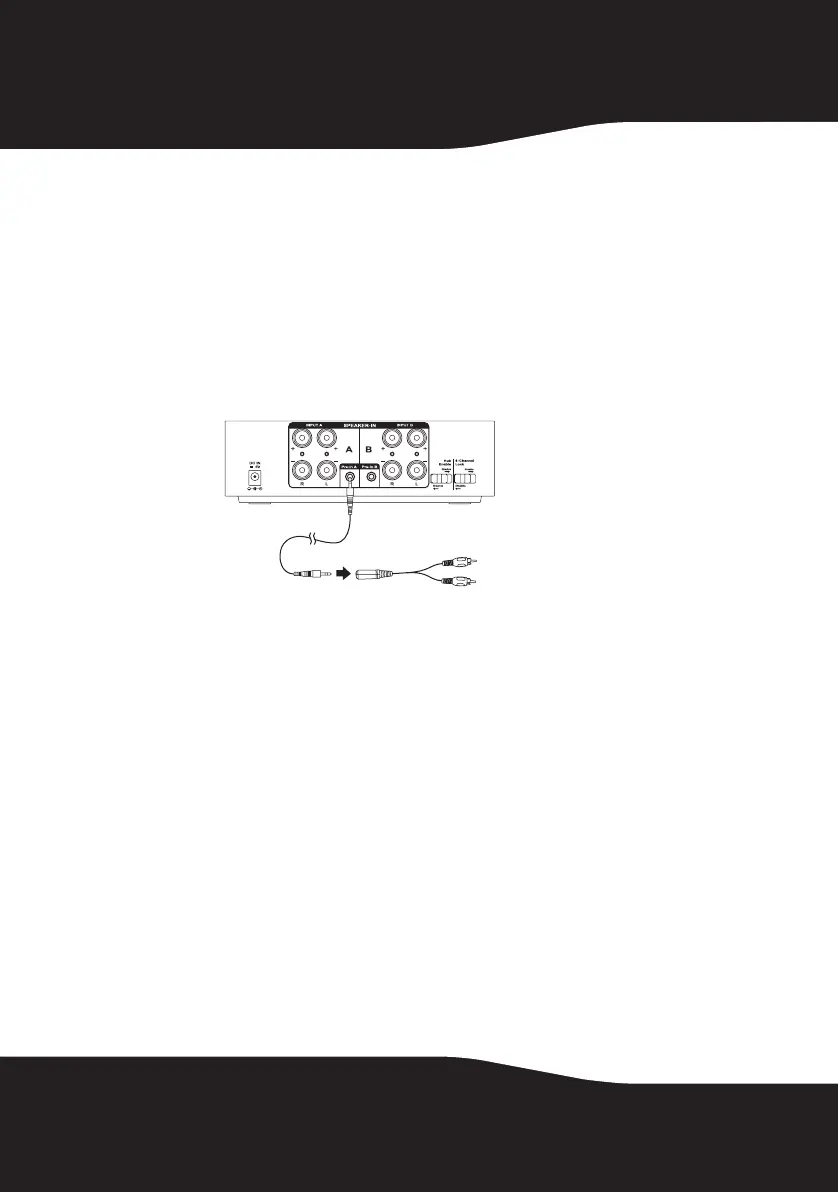
To connect the sender to an external audio source:
1 Connect an external audio source to the Pre-in A/B jack on the rear of
sender using a 3.5mm male-to-male stereo cable (provided) and a 6”,
3.5 mm, female-to-RCA stereo cable (provided).
• When your TV or digital audio player is connected to the Pre-in A/B
jack of the sender for other media entertainment, the corresponding
Speaker Input A/B terminals cannot be used. Once the 3.5 mm audio
cable is removed from the sender, the input type will switch back to
the Speaker Input A/B automatically.
• If you leave the 3.5mm audio cable connected to the Pre-in A/B jack,
you can switch the audio source from Speaker Input A/B terminals by
the remote control.
Note: For best audio quality, make sure that the volume setting on your MP3 player or
other device is turned up to at lease 80%.
Sender back
To phones/Line
Out/Audio Out jack
of your iPod, TV, DVD,
CD/PC/MP3 digital
audio player.
RF-RBKIT_09-0473_MAN_ENG_V1.fm Page 18 Thursday, August 27, 2009 6:44 PM


 To Next Page