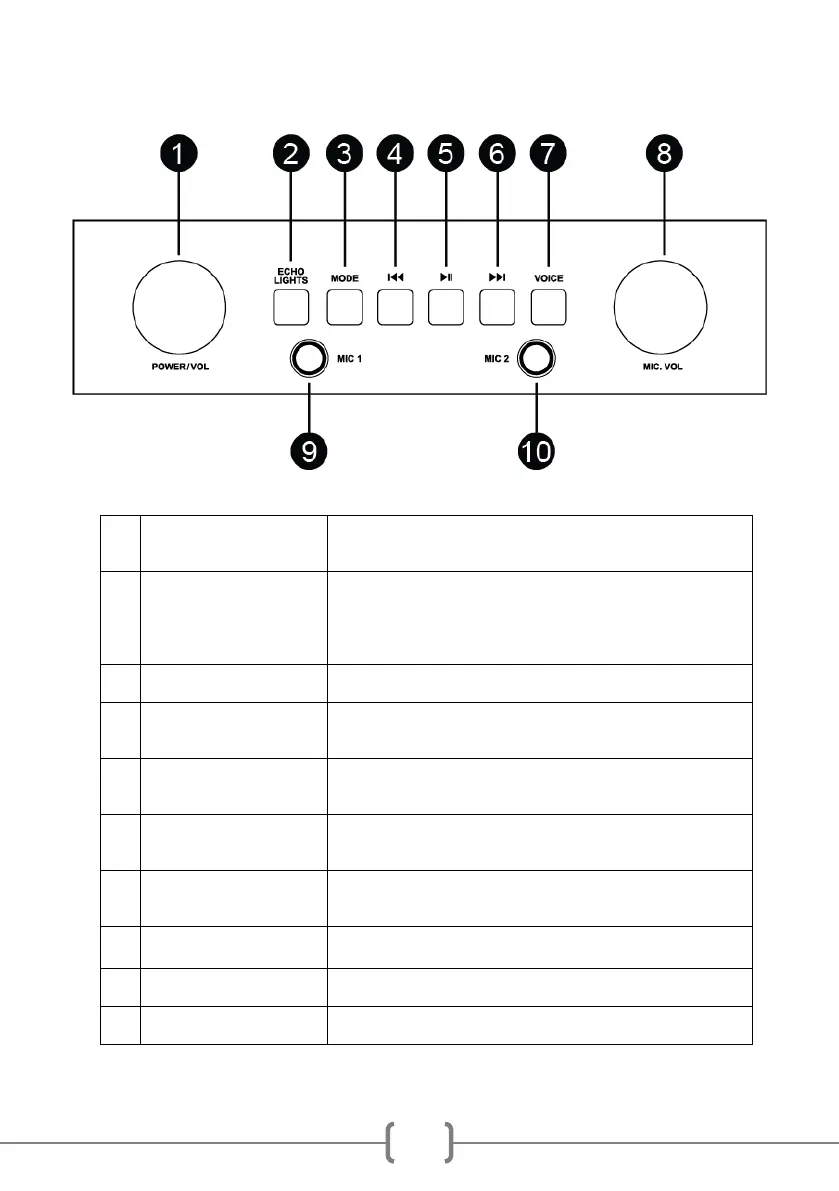
Location of Controls Front
Turn to power on or off. When powered on, turn to adjust the output
volume.
ECHO: Powers up in low echo mode. Press once for high echo,
press a third time to turn the echo off. Press again to turn the echo
back on.
LIGHTS: Press and hold button to turn the light show OFF. Press
and hold button to turn the light show back ON.
Press to select between input modes such as Bluetooth, AUX and
USB
Press once to go back to the start of the track. Press twice to select
the previous track. (Does not work in Aux mode)
Press to alternately pause and play the music.
NOTE: In AUX input mode, the music is muted but not paused.
Press to go to the start of the next track.
(Does not work in Aux mode)
Press to select a voice effect. There are 4 voice effects + normal
voice to choose from.
Turn to adjust the output volume of the plugged-in microphone/s
Plug in the microphone supplied here.
Plug in the microphone supplied here.



 To Next Page