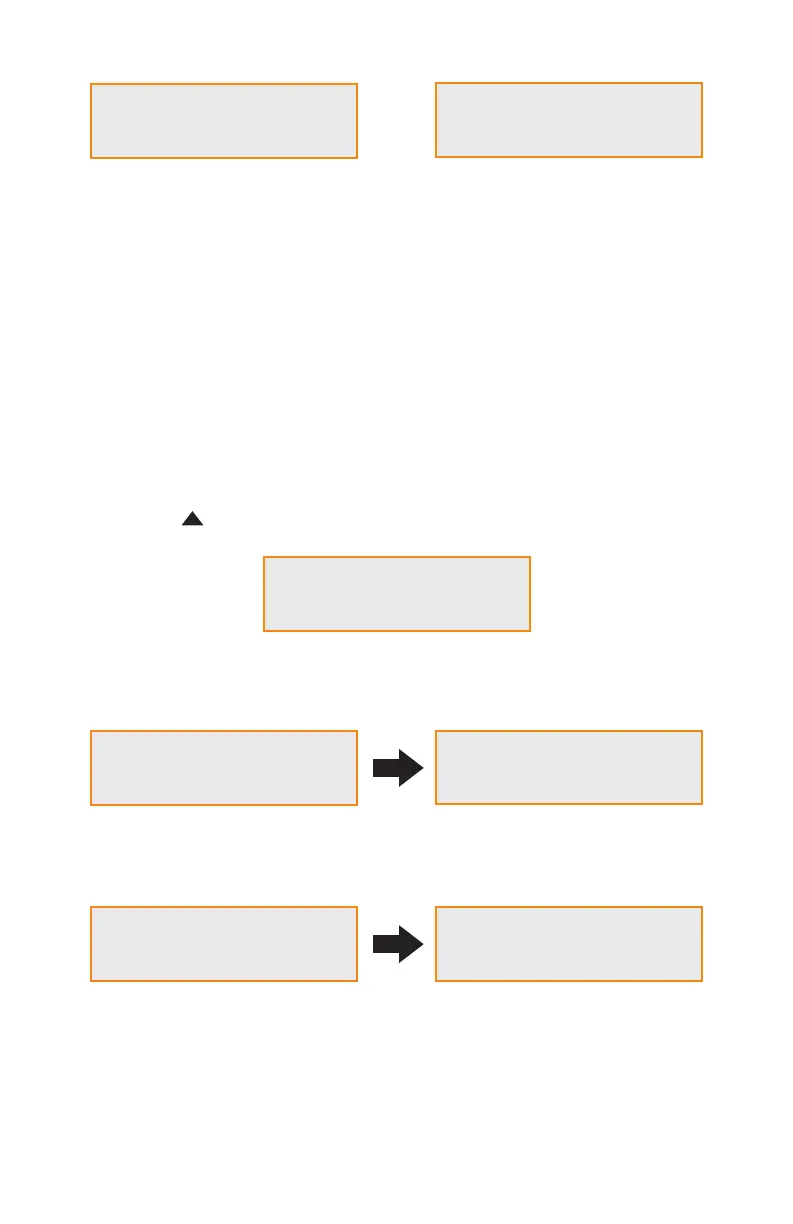
5. How to Switch the RAID Mode
Rocpro U32
RAID-1 vxxxxxx.x
Pri HDD : OK
Sec HDD : OK
Change to RAID-0
Ent = Yes Esc = No
Pri HDD : OK
Sec HDD : OK
RaidMode Changed
Please Reboot
Rocpro U32
RAID-0 vxxxxxx.x
System initializing Normal operational state
When the U32 has completed initializing, your computer’s operating system should recognize the
device automatically.
Please follow the formatting instructions given by the operating system to format the drives.
Once the formatting has been completed, the system is ready for use.
The default setting of ROCPRO™ U32 is RAID 1. To change the setting, please follow the steps below:
Step 1:
Press and hold the “ ” button while turning on the power until LCD display is showing as blew:
Step 2:
If you are sure to switch the RAID mode, press “ENT” to accept. If not, press “ESC”.
Step 3:
This display indicates that the switch has been done successfully. Please reboot the Rocpro™ U32.
Change to RAID-0
Ent = Yes Esc = No
page 6 - 10ROCPRO™ U32 Series User Manual












 To Next Page