EasyManua.ls Logo

RODE Microphones VideoMic NTG - User Manual

RODE Microphones VideoMic NTG
17 pages
Print Icon
To Next Page IconTo Next Page
Loading...
VideoMic
NTG
VideoMic NTG
USER GUIDE & SUPPORT
The VideoMic NTG is RØDE's most versatile VideoMic ever. Bringing the signature
broadcast-quality sound of the NTG shotgun mic range to a compact, feature-packed
VideoMic, it's the perfect audio solution for every kind of content creator.
Here's everything you need to know about using your VideoMic NTG.
Question and Answer IconNeed help?

Do you have a question about the RODE Microphones VideoMic NTG and is the answer not in the manual?

Summary

Getting Started with VideoMic NTG

Product Features Overview

An introduction to the VideoMic NTG's key features and capabilities.

Understanding Controls and Indicators

Power and Function Button

Details the manual on/off function and auto-power feature for the microphone.

Pad and Safety Channel

Explains the -20dB pad and safety track for distortion-free audio recording.

EQ Controls Explained

Describes the high-pass filters (75Hz, 150Hz) and high-frequency boost.

Peak Warning Light

Explains the red LED indicating clipping and how to mitigate it.

Power LED and USB Output

Covers power status LED indicators and the functions of the USB output.

Connectivity and Usage

Recording with VideoMic NTG

Guidance on using the microphone for direct recording into devices.

3.5 mm Output and Auto-sensing

Details the 3.5mm TRRS output, auto-sensing, and headphone monitoring.

iPhone and iPad Compatibility

Guides on connecting the mic to iOS devices using SC15/SC19 cables.

Using High-pass Filters and Windshields

Tips on using filters with windshields for optimal audio in various conditions.

Setting Your Gain Correctly

Instructions on adjusting the microphone's gain for optimal signal levels.

Advanced Features and Maintenance

Battery and Auto-power Function

Explains the internal battery life, charging, and auto-power behavior.

Shock Mount and Mounting

Details the shock mount, cable management, sliding rail, and mounting options.

Firmware Updates and RØDE Central

Guide to using the RØDE Central app for firmware and mic management.

RØDE Connect Compatibility

Information on using the VideoMic NTG with RØDE Connect software.

Streaming with WS-Chroma

Guidance on using the mic for streaming and chroma keying.

Summary

Getting Started with VideoMic NTG

Product Features Overview

An introduction to the VideoMic NTG's key features and capabilities.

Understanding Controls and Indicators

Power and Function Button

Details the manual on/off function and auto-power feature for the microphone.

Pad and Safety Channel

Explains the -20dB pad and safety track for distortion-free audio recording.

EQ Controls Explained

Describes the high-pass filters (75Hz, 150Hz) and high-frequency boost.

Peak Warning Light

Explains the red LED indicating clipping and how to mitigate it.

Power LED and USB Output

Covers power status LED indicators and the functions of the USB output.

Connectivity and Usage

Recording with VideoMic NTG

Guidance on using the microphone for direct recording into devices.

3.5 mm Output and Auto-sensing

Details the 3.5mm TRRS output, auto-sensing, and headphone monitoring.

iPhone and iPad Compatibility

Guides on connecting the mic to iOS devices using SC15/SC19 cables.

Using High-pass Filters and Windshields

Tips on using filters with windshields for optimal audio in various conditions.

Setting Your Gain Correctly

Instructions on adjusting the microphone's gain for optimal signal levels.

Advanced Features and Maintenance

Battery and Auto-power Function

Explains the internal battery life, charging, and auto-power behavior.

Shock Mount and Mounting

Details the shock mount, cable management, sliding rail, and mounting options.

Firmware Updates and RØDE Central

Guide to using the RØDE Central app for firmware and mic management.

RØDE Connect Compatibility

Information on using the VideoMic NTG with RØDE Connect software.

Streaming with WS-Chroma

Guidance on using the mic for streaming and chroma keying.

Overview

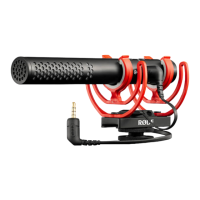
The RØDE VideoMic NTG is a highly versatile on-camera shotgun microphone designed for content creators, offering broadcast-quality sound in a compact, feature-packed form. It combines the signature sound of RØDE's NTG shotgun mic range with the convenience and functionality of a VideoMic, making it suitable for a wide array of recording scenarios.

Function Description:

The VideoMic NTG serves as a primary audio capture device for cameras, smartphones, tablets, and computers. It is engineered to deliver clear, distortion-free audio, even in challenging environments. Its core function is to provide high-quality sound for video production, streaming, and podcasting. The microphone features a highly directional supercardioid polar pattern, which is excellent for isolating the desired sound source and minimizing off-axis noise. This makes it particularly effective as an overhead boom microphone for streamers who prefer the microphone to be out of shot.

Usage Features:

Power and Auto-Power Functionality:

The microphone can be manually turned on or off by pressing and holding the Power/Function button for three seconds. Additionally, it boasts a convenient auto-power feature. By default, the VideoMic NTG will automatically power on when connected to a device or when the connected device turns on. Conversely, it will power off when disconnected from a device or when the device turns off. This auto-power function helps conserve battery life. It's important to note that if the mic is manually switched on and then connected to a device, it will also need to be manually switched off.

Pad and Safety Channel:

To ensure clear and distortion-free audio when recording loud sound sources, the VideoMic NTG includes a -20dB pad and a safety channel.

  • -20dB Pad: Pressing the Power/Function button once engages the -20dB pad, indicated by the illumination of the left LED. This reduces the input gain, preventing clipping with loud audio sources.
  • Safety Channel: Pressing the button a second time disengages the pad and engages the safety channel, with the middle LED illuminating. The safety channel records a second audio track at -20dB, providing a backup that can be used in post-production if the main track distorts.
  • Pad and Safety Channel Combined: A third press engages both the pad and the safety channel, illuminating both LEDs.
  • Disengagement: A fourth press disengages both features, turning off the LEDs.
  • Note: The safety channel is not compatible with devices that have a TRRS input, such as smartphones, as these inputs only support a single audio channel.

EQ Controls:

The second button on the VideoMic NTG provides access to three EQ functions, enhancing its versatility in various recording conditions.

  • High-pass Filters: Two high-pass filters are available to mitigate low-frequency rumble from wind noise, traffic, or air conditioning.
    • 75Hz High-pass Filter: Pressing the EQ button once engages the 75Hz filter, indicated by the left LED. This is suitable for mildly windy conditions or minor low-frequency rumble.
    • 150Hz High-pass Filter: Pressing the button again engages the 150Hz filter, with the middle LED illuminating. This is for windier conditions or more significant low-frequency issues.
    • Disengagement: A third press disengages both filters, turning off the LEDs.
  • High-frequency Boost: To enhance clarity and detail, especially when using a windshield that can muffle sound, a high-frequency boost is available.
    • Engagement: Press and hold the EQ button for three seconds to engage the high-frequency boost, indicated by the right LED.
    • Disengagement: Press and hold again to disengage the boost.

Infinitely Variable Gain Control:

The microphone features an infinitely variable gain control knob, allowing precise adjustment of the output level. It is recommended to set the camera's gain low (around 1 or 2) due to typically noisy preamps. Start with the VideoMic NTG's gain knob set to 10 and adjust as needed, ensuring the level meter on your device stays just below the yellow section at the loudest points. Monitoring with headphones (like the RØDE NTH-100) is crucial to prevent distortion. If distortion persists even with appropriate level meter readings, slightly reduce the VideoMic NTG's output gain and increase the camera's gain.

Peak Warning Light:

A peak warning light flashes red to indicate that the sound source is too loud, causing the signal to clip. In such cases, applying the -20dB pad and considering the safety channel is recommended to reduce input gain and prevent distortion.

USB Output:

The USB output serves multiple purposes:

  • Charging: The internal lithium-ion battery can be charged by plugging the mic into any USB power source (computer, USB wall socket, or portable power pack). A full charge from empty takes approximately two hours.
  • Recording: The VideoMic NTG functions as a fully featured USB microphone for direct recording to computers, smartphones, or tablets. It is a class-compliant device, requiring no drivers or software. Users can select it as their input and output device in system preferences or DAW, and monitor audio via the 3.5mm output while adjusting gain.
  • Firmware Updates: When connected to a computer via USB, the RØDE Central companion app can be used to update the VideoMic NTG's firmware.

3.5mm Output with Auto-sensing:

The 3.5mm TRRS output comes with an SC10 TRRS to TRRS patch cable for connecting to cameras, smartphones, and other recording devices. The output automatically detects whether it's plugged into a TRS input (most cameras) or a TRRS input (most smartphones and tablets) and adjusts accordingly. This output also doubles as a headphone output for monitoring audio when the VideoMic NTG is used as a USB mic.

Shock Mount and Mounting Options:

The VideoMic NTG includes a high-quality Rycote Lyre shock mount made from durable thermoplastic. This mount provides excellent isolation from external physical factors like rumble and vibrations.

  • Cable Management: The shock mount features snug slots for cable management, accommodating various cable types and sizes.
  • Sliding Rail: A sliding rail allows the microphone to be positioned forward or backward by loosening a screw. This is ideal for moving the mic away from the face, out of frame, or balancing it on a gimbal.
  • Threaded Cold Shoe: The cold shoe has a standard 3/8" thread on the bottom, enabling easy mounting onto boom poles, desk stands, or tripods like the RØDE Tripod 2.

Compatibility:

  • iPhone and iPad: For connecting to an iPhone or iPad, the RØDE SC15 (300mm) or SC19 (1.5m) USB-C to Lightning cables are required (ensure the VideoMic NTG has the latest firmware). While the 3.5mm output can be used, the USB-C connection with these cables provides access to advanced features like headphone monitoring, the safety channel, and two-way audio transmission for video calls.
  • Windshields: The VideoMic NTG comes with a high-density foam windshield and is compatible with the WS11 furry windshield. Engaging the high-frequency boost is recommended when using a windshield to counteract any dulling effect.
  • RØDE Connect Compatibility: The VideoMic NTG is compatible with RØDE Connect, a software solution for podcasting and streaming. This unlocks access to built-in compressor, noise gate, and APHEX Aural Exciter and Big Bottom processors, optimized for the VideoMic NTG to add a professional polish to recordings. RØDE Connect also offers streamlined control over microphone audio and external applications, with dedicated output controls for streaming apps like OBS or Xsplit.

Maintenance Features:

Battery Status Indication:

The Power LED indicates the battery status:

  • Green = Full charge
  • Amber = Medium charge
  • Red = Low charge
  • Flashing red = Very low charge
  • Blue = Connection established to a computer or similar device

Firmware Updates:

The VideoMic NTG can be enhanced with firmware updates via the RØDE Central companion app. By connecting the mic to a computer via USB and opening the app, the option to update the firmware will appear.

Warranty:

The internal lithium-ion battery provides 30+ hours of recording time. Although the battery is not user-replaceable, the microphone comes with a 10-year warranty once registered, ensuring long-term support and peace of mind for users.

RODE Microphones VideoMic NTG Specifications

General IconGeneral
TypeShotgun Microphone
Polar PatternSupercardioid
Frequency Response20 Hz - 20 kHz
Output Connection3.5mm TRS
Battery Life30 hours
Bit Depth24-bit
Sample Rate48 kHz
Equivalent Noise Level15 dBA
Power SourceRechargeable lithium-ion battery or USB power
Included AccessoriesUSB-C Cable

Related product manuals