EasyManua.ls Logo

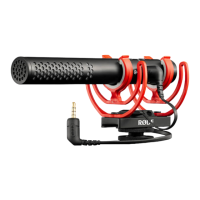
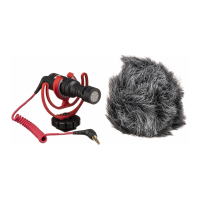
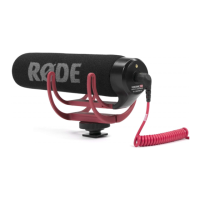
RODE Microphones VideoMic GO - User Manual

RODE Microphones VideoMic GO
2 pages
Print Icon
To Next Page IconTo Next Page
Loading...
TROUBLE-SHOOTING
What cameras don't support the VideoMic GO?-
The VideoMic GO is extremely user-friendly as there's no switches or
battery to worry about - just plug in and go. All microphones need power
however, and in the case of the VideoMic GO it is drawing a very small
voltage commonly referred to as "plug-in power" from your camera (or
recording device) via the audio cable.
Plug-in power has long been a standard for camera manufacturers, and so
the VideoMic GO is compatible with the vast majority of cameras in the
market.
While this is by no means a complete list, following is a list of cameras that
we can confirm do not support the VideoMic GO. Please refer to the
specifications of your particular camera for information on whether it
supplies power via the microphone jack.
If you are experiencing issues getting your VideoMic GO to operate with a
camera not listed above, firstly be sure to update your camera's firmware
to the latest version (available from your camera manufacturer's website).
If you are still experiencing issues please get in touch with us via our
support page.
Will my RØDE VideoMic fit into the hot shoe mount of my camera?-
The RØDE cold shoe adaptor is a standard size adaptor, also known as a
universal shoe mount. This standard shoe is suitable for the majority of
camera attachments.
Question and Answer IconNeed help?

Do you have a question about the RODE Microphones VideoMic GO and is the answer not in the manual?

Summary

Troubleshooting VideoMic GO Issues

Camera Compatibility with VideoMic GO

Identifies cameras that do not support VideoMic GO due to plug-in power requirements.

VideoMic Hot Shoe Mount Compatibility

Explains the standard size of the RØDE cold shoe adaptor for camera attachments.

Addressing Low Level Noise During Recording

Explains low noise is caused by camera's Automatic Gain Control (AGC).

Connecting VideoMic to Tripods and Stands

Details the 3/8 thread on VideoMic for tripod or stand mounting.

Summary

Troubleshooting VideoMic GO Issues

Camera Compatibility with VideoMic GO

Identifies cameras that do not support VideoMic GO due to plug-in power requirements.

VideoMic Hot Shoe Mount Compatibility

Explains the standard size of the RØDE cold shoe adaptor for camera attachments.

Addressing Low Level Noise During Recording

Explains low noise is caused by camera's Automatic Gain Control (AGC).

Connecting VideoMic to Tripods and Stands

Details the 3/8 thread on VideoMic for tripod or stand mounting.

Overview

This document provides troubleshooting information for the RØDE VideoMic GO and other VideoMic range microphones. It addresses common issues related to camera compatibility, audio quality, and mounting options.

VideoMic GO Functionality and Camera Compatibility

The VideoMic GO is designed to be user-friendly, operating without switches or a battery. It draws a small voltage, known as "plug-in power," directly from the camera or recording device via the audio cable. This "plug-in power" is a standard feature for most camera manufacturers, making the VideoMic GO compatible with the vast majority of cameras on the market.

Important Note on Compatibility: While compatible with most cameras, there are specific cameras that do not support the VideoMic GO due to their inability to supply plug-in power via the microphone jack. Users experiencing issues are advised to:

  • Refer to their camera's specifications to confirm if it supplies power via the microphone jack.
  • Update their camera's firmware to the latest version, available from the camera manufacturer's website.
  • If issues persist, contact RØDE support via their support page.

Audio Quality Issues: Low-Level Noise

A common issue encountered by users is a low-level noise sound during recording. This is typically caused by the camera's "Automatic Gain Control" (AGC) function.

Explanation of AGC: When the camera does not detect a sufficient audio input signal, the AGC automatically increases the gain of the input. This amplification can be so significant that the inherent noise floor within the camera's microphone amplifier becomes audible, resulting in unwanted background noise.

Solutions and Recommendations:

  • Disabling AGC: The AGC function can be disabled on some cameras. Users should consult their camera manufacturer for information on how to do this, which may sometimes require a firmware update.
  • Manual Audio Levels: It is recommended to set audio levels manually to achieve an optimum signal-to-noise ratio and to disable the camera's AGC.
  • RØDE VideoMic Pro: RØDE offers the VideoMic Pro as a solution to combat this issue. The VideoMic Pro includes a 20dB pre-amplifier. This pre-amplification boosts the microphone signal, ensuring that the camera receives a strong signal level and does not engage its AGC, thereby reducing the likelihood of audible noise.

Mounting Options for VideoMic Range Microphones

All microphones within the RØDE VideoMic range are designed for versatile mounting.

Hot Shoe Mount: The RØDE cold shoe adaptor, which is a standard size (also known as a universal shoe mount), allows the VideoMic to fit into the hot shoe mount of most cameras.

Alternative Mounting: For cameras with different or custom adaptors, users should contact their camera manufacturer for information on converters that can accommodate the universal shoe connection.

Tripod, Boompole, and Mic Stand Connection: All VideoMic range microphones feature a standard 3/8-inch thread built into the bottom of the cold shoe mount. This allows for direct connection to:

  • Boompoles
  • Mic stands
  • Tripods

This comprehensive overview covers the essential aspects of using and troubleshooting RØDE VideoMic GO and other VideoMic range microphones, focusing on compatibility, audio performance, and mounting flexibility.

RODE Microphones VideoMic GO Specifications

General IconGeneral
BrandRODE Microphones
ModelVideoMic GO
CategoryMicrophone
LanguageEnglish

Related product manuals