16
CHECKMATE™
The instrument will automatically assign the next free ID number. If this is not acceptable
you may press Clr (F2) and manually assign an ID from the keypad. Pressing BkSp (F3)
backs up one space for each time it is pressed so that a change can be made. Pressing
Exit (F4) returns to the Read Probe By display.
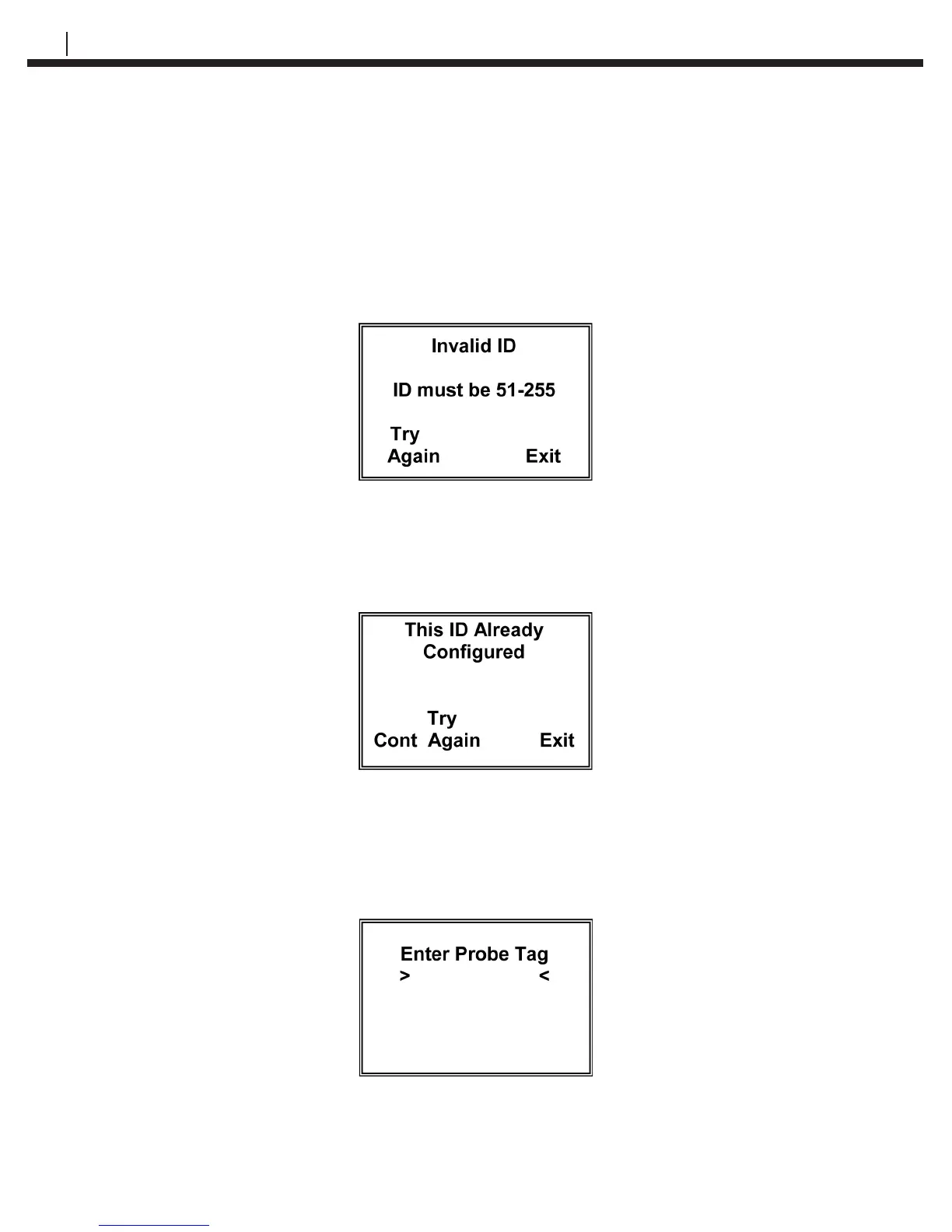
Press Enter (F1) to go to the Enter Probe Tag display
Note: If an invalid ID has been selected, the Invalid ID display appears:
Press Try Again (F1) to return to the Enter Probe ID display. Pressing Exit (F4) returns
to the Read Probe By display.
Note: If the ID selected has already been congured, the This ID Already Congured
display appears:
Press Cont (F1) to continue to the Enter Probe Tag display if you want to continue to
use this ID number.
Press Try Again (F1) to return to the Enter Probe ID display. Pressing Exit (F4) returns
to the Read Probe By display.
Enter Clr BkSp Exit


 To Next Page