These parameters are adjustable to allow a wide variety of
copiers to be used and to e
accurately counted, regardless of the
If you are in any doubt how to change these settings
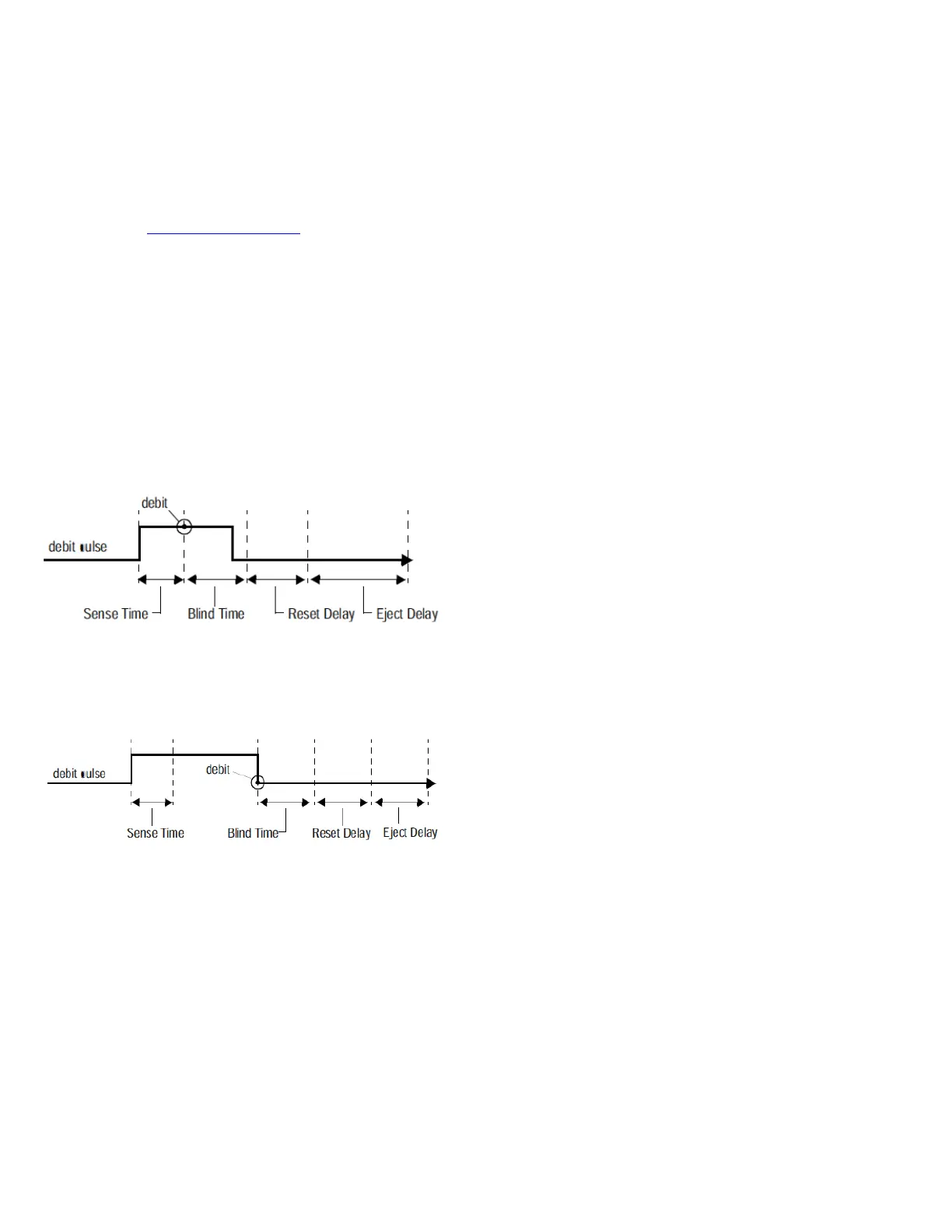
Leading / Trailing Edge debiting
edge debiting (default), the debit occurs after
width time (sense time) is satisfied.
edge debiting, the software delays the debit
until after the debit pulse goe
The preferred method with today’s copiers is leading
Example debit pulse with leading
Example debit pulse with trailing
This is the minimum length of time a debit pu
active for it to be considered a valid debit pulse. The va
0ms increments. If sense time
could interpret noise as a debit
pulse; if it is set too long, the unit may not register all
boots with sense time set to
This is the length of time after a valid pulse when any
further pulses registered by that opto are ignored. The
ulses (i.e., double pulses or
glitches). If this parameter is set too short, double debits
could occur, but if set too long, vends could be missed.
boots with Blind Time set to 1
This is the length of time that the relays stay
after the job is terminated (i.e., the patron pushes the
terminate button or escrow falls below the vend price).
long enough for the job to complete
and the paper to get through
the copier, but not so long
with Reset Delay set to 500ms.
This is the length of time between the end of the Reset
Delay and the moment the account is closed. If Eject
Delay is set too short, the account will be closed while the
unning. If set too long, a customer might
become irritated, waiting for his or
boots with Eject Delay set to 500ms.
If you are experiencing any problems with copies not
counting correctly or copies not regi
please use the debug mode (see page
adjust the copier timing parameters while off
you can determine the correct settings to apply in your
chosen copy and print management software.


 To Next Page