10
Product Operation and Programming
Powering On/Off
Power on: Long press the switch button, the switch button indicator lights up and the
appliance enters standby state.
Shut down: Long press the switch button, the indicator light slowly goes out and
shutdown.
Charging
After cleaning, the robot cleaner will automatically return to clean the base station and
recharge.
If the robot cleaner does not start cleaning from the base station the recharge function
may fail, and you may need to manually place it on the base station.
When the robot cleaner is charging, the switch button is always on and the power-on/off
indicator blinks when it is fully charged.
Overall cleaning
After the first cleaning, the robot cleaner will scan and partition the room into a smart
map and clean it according to the method of first along the walls and then in the bow
shape. After the cleaning is completed the robot cleaner will automatically return to
base station.
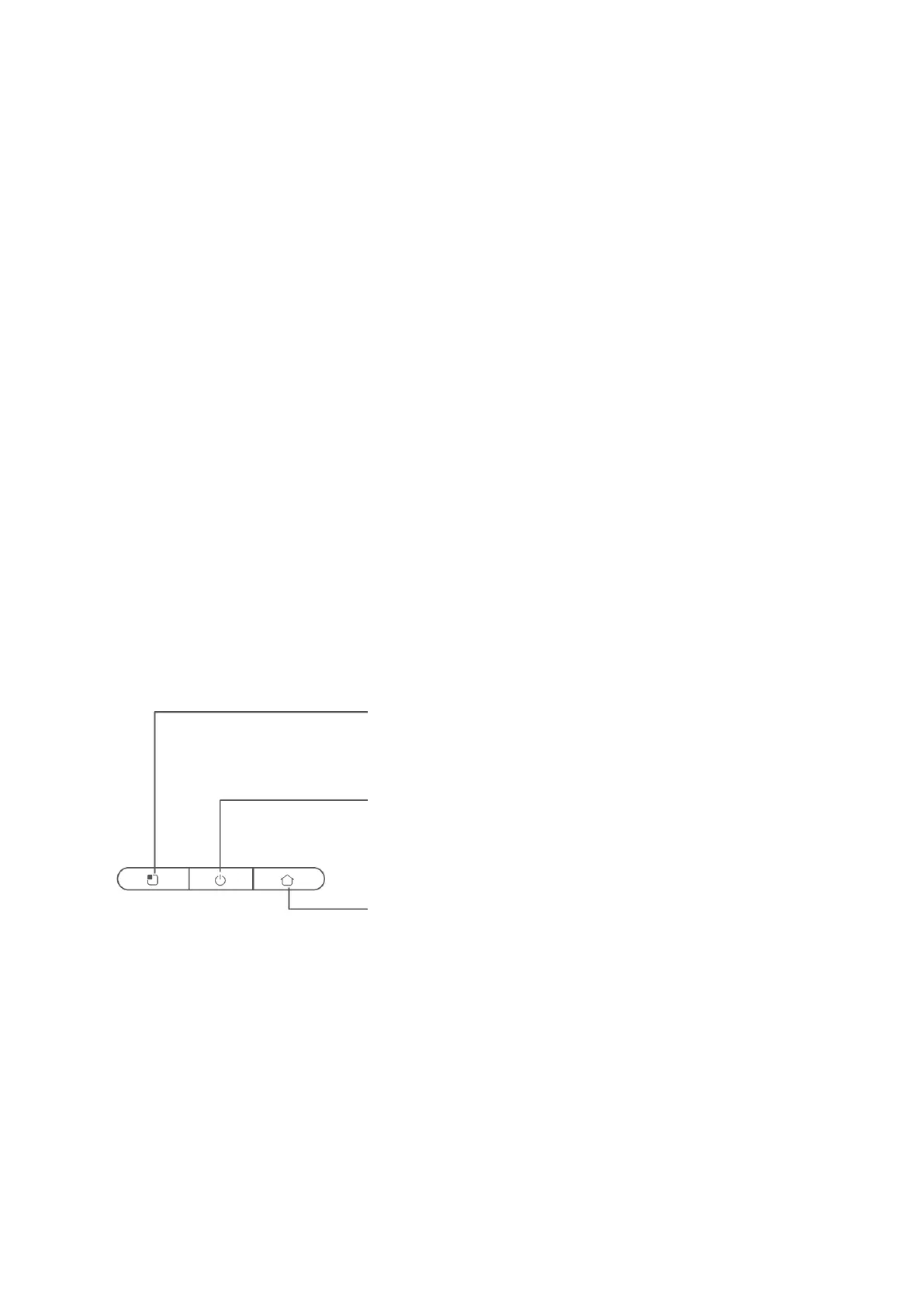
Area cleaning button
• Short press to clean locally, and automatically recharge after
cleaning.
• Short press to pause during operation.
Switch button
• Short press for overall cleaning, and automatically recharge after
cleaning.
• Long press to switch on/off.
• Short press to pause during operation.
Recharge button
• Short press to recharge.


 To Next Page