Product Code:
Product Name:
4
Please read all instructions carefully before assembly, installation and/or use of this product.
59742
Pick-Up-Rack™
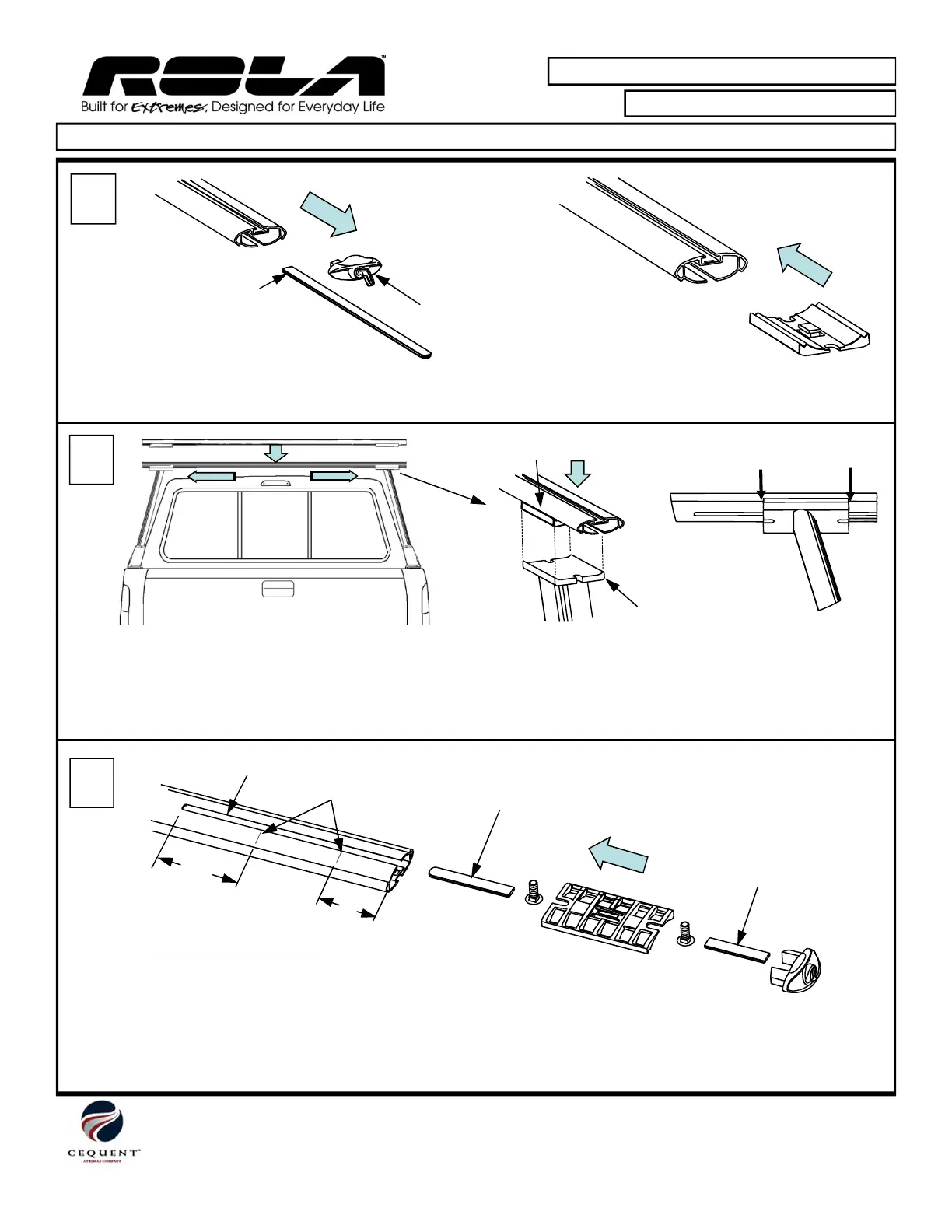
• Remove end cap and under cover from both ends
of crossbars.
5
• Install Adapter Blocks into each end of crossbar.
Under cover
End cap
Adapter Block
Mark
Mark
Flange
Cequent Performance Products, Inc.
Plymouth, MI 48170
Technical Service: (888) 521-0510
59742N Rev D 4-24-13
Page 4 of 6
Printed in China
6
• Place crossbar onto Vertical Supports and center side-to-side.
• Be sure to align the Adapter Blocks with the Vertical Supports Flanges.
• Mark with pencil the crossbar location on each side of Vertical Support Flange for under cover installation.
• Remove crossbar from vertical supports. Remove adapter blocks from crossbars.
• Measure distance “x” from pencil marks to end of slot as shown above.
• Cut inner under cover to length first (rounded end), then cut outer under cover to length.
• Install under covers, 3/8 x 1.25 carriage bolts, adapter block and end cap to both ends of crossbars as shown.
“X”
“X”
Slot
Bottom view of crossbar
Inner under cover
Outer
under cover
Pencil marks


 To Next Page