56
Creating a Rhythm Set
“Initialize” means to return the settings of the currently selected
sound to a standard set of values.
* The Initialize operation will affect only the currently selected sound;
the sounds that are stored in user memory will not be affected. If you
wish to restore all of the Fantom-Xa’s settings to their factory values,
perform a Factory Reset (p. 203).
1.
Press [PATCH/RHYTHM] to access the PATCH PLAY
screen.
2.
Select the part (keyboard or pad) and rhythm set that you
want to initialize (p. 30).
3.
Press [PATCH EDIT] to access the RHYTHM EDIT screen.
Press keys to specify the key that is to be initialized.
4.
Hold down [SHIFT] and press [F5 (INIT)].
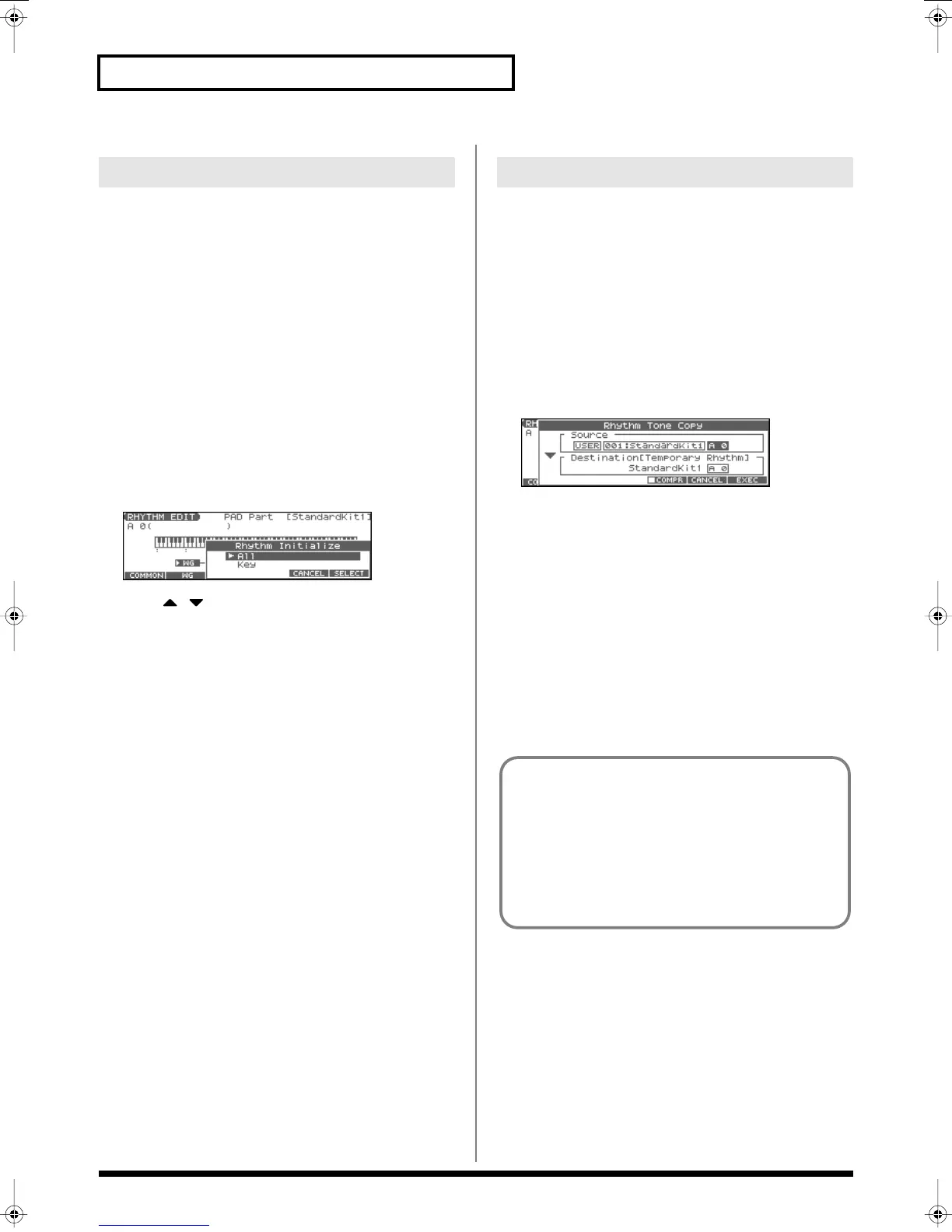
The Rhythm Initialize window appears.
fig.RhythmInit
5.
Press to select the initialization type.
All:
All keys of the rhythm set will be initialized.
Key:
One key will be initialized.
6.
Press [F6 (SELECT)].
A message will ask you for confirmation.
7.
Press [F6 (EXEC)].
The initialization will be carried out.
* To cancel, press [F5 (CANCEL)].
This operation copies the settings of any desired rhythm set to the
currently selected rhythm set.
1.
Press [PATCH/RHYTHM] to access the PATCH PLAY
screen.
2.
Select the part (keyboard or pad) and the copy-destination
rhythm set (p. 30).
3.
Press [PATCH EDIT] to access the RHYTHM EDIT screen.
4.
Hold down [SHIFT] and press [F6 (TONE CPY)].
The Rhythm Tone Copy window appears.
fig.RhyToneCopy
5.
Press [CURSOR] to move the cursor, and use the VALUE
dial or [INC] [DEC] to select the “Source (copy-source)”
group and number, and the rhythm tone number.
* By pressing [F4 (COMPR)] to add a check mark (
✔
), you can check
the copy-source rhythm set (Compare function).
6.
Press [CURSOR] to move the cursor, and select the
“Destination (copy-destination)” rhythm tone number.
7.
Press [F6 (EXEC)].
A message will ask you for confirmation.
8.
Press [F6 (EXEC)] to execute the copy operation.
* To cancel, press [F5 (CANCEL)].
Initializing Rhythm Set Settings
Copying Rhythm Tone Settings
The Compare Function
For the Rhythm Tone Copy operations, you can use the
Compare function.
If you want to play the copy-source rhythm set, press [F4
(COMPR)] to add a check mark (✔). Now you can play the
copy-source rhythm set from the keyboard or pads.
* The rhythm set auditioned using the Compare function may
sound slightly different than when it is played normally.
Fantom-Xa_e.book 56 ページ 2004年10月22日 金曜日 午後2時3分


 To Next Page