72
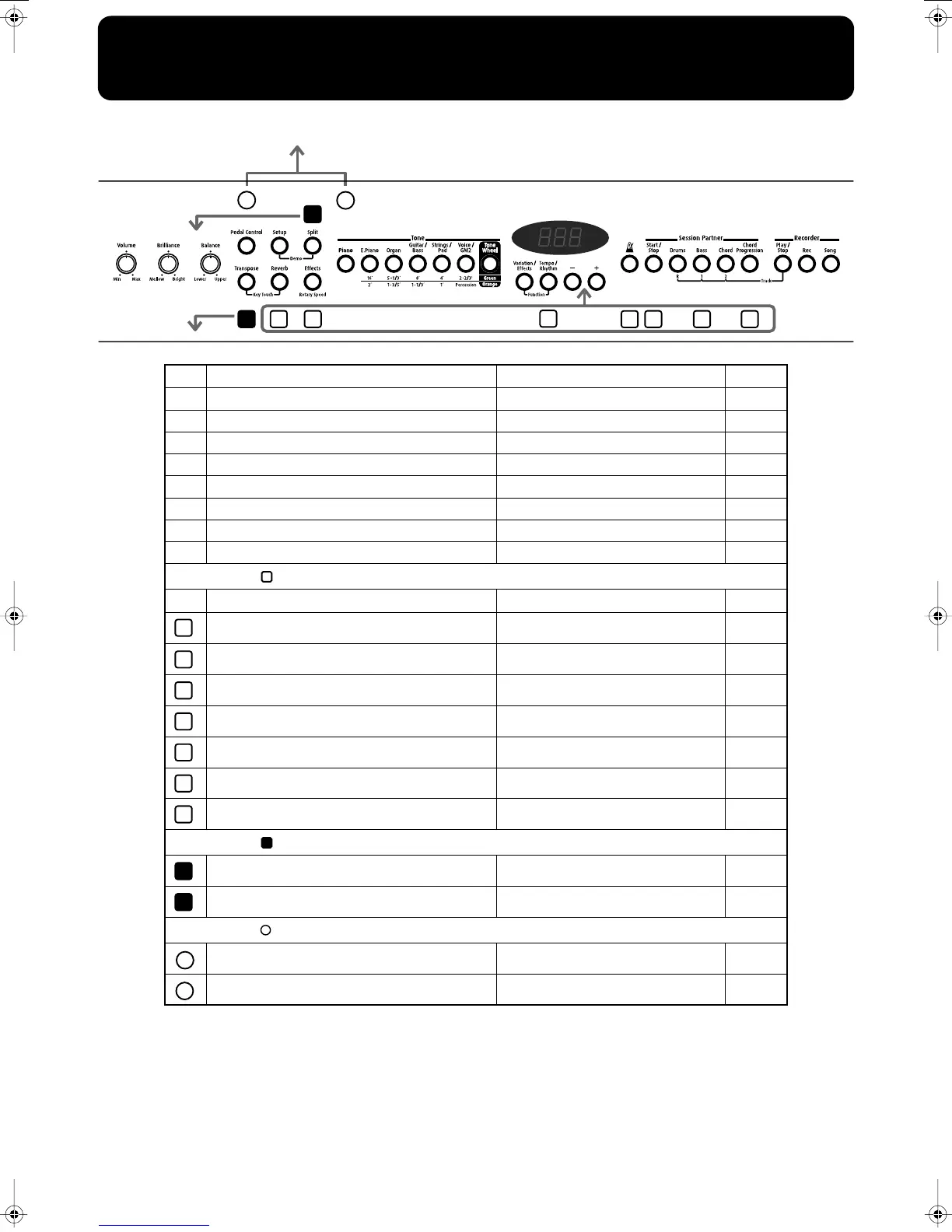
Easy Operation List
1
2
8
9
3
4
5
6
7
11
10
Press the Key
Press the Key
Power ON
No. You want to Buttons Page
Switch to Function mode [Variation/Effects] + [Tempo/Rhythm] p. 42
Key Touch [Transpose] + [Reverb] p. 22
Demo [Setup] + [Split] p. 11
All Song Play [Song] + [Play/Stop] p. 12
Storing settings to Setup [Setup] + Tone p. 37
Recording Chord Progression [Chord Progression] + [Rec] p. 36
Erasing the recorded performance [Song] + [Rec] p. 41
Selecting the Lower Tone in Split play [Split] + Tone p. 20
Hold down the [ ] button and press the [-] or [+] button.
No. You want to Buttons Page
Depth of the Reverb effect [Reverb] + [-] [+] p. 23
Depth of the Effect [Effects] + [-] [+] p. 26
Beat of metronome [Tempo/Rhythm] + [-] [+] p. 30
Volume level of metronome [Metronome] + [-] [+] p. 30
Volume level of Session Partner [Start/Stop] + [-] [+] p. 33
Volume level of individual parts [Drums], [Bass], [Chord] + [-] [+] p. 33
Selecting a Chord Progression Pattern [Chord Progression] + [-] [+] p. 34
Hold down the [ ] button and press the key.
Split Point [Split] + key p. 20
Key Transpose [Transpose] + key p. 28
Hold down the [ ] button and press the [Power] switch.
Factory Reset [Pedal Control] + Power ON p. 53
Panel Lock [Piano] + Power ON p. 53
1
2
3
4
5
6
7
8
9
10
11
FP-5_e.book 72 ページ 2005年1月26日 水曜日 午前10時22分


 To Next Page