100
Editing a Song (MIDI Track)
3.
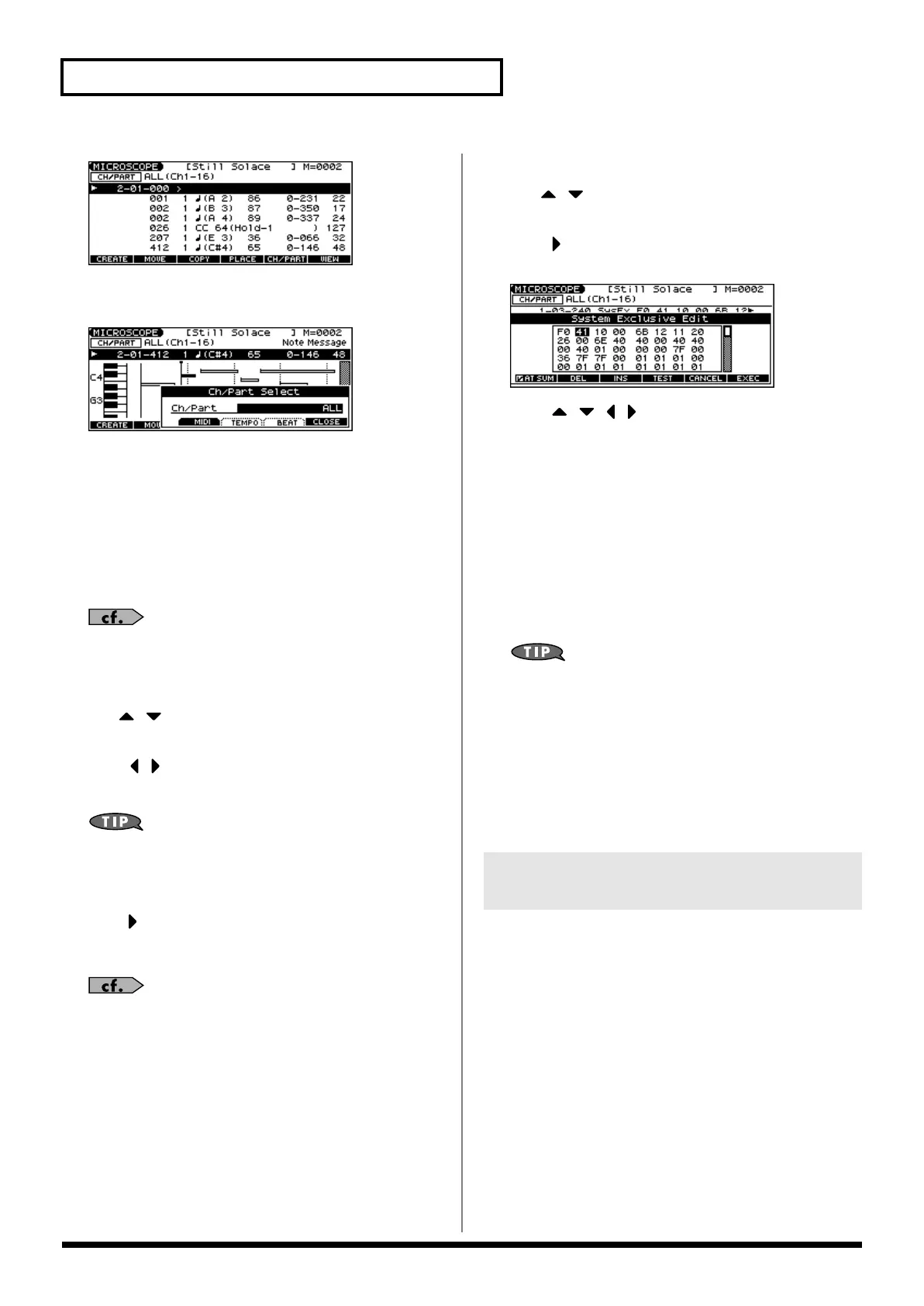
Press [F5 (CH/PART)].
The Ch/Part Select window appears.
4.
Select the track whose performance data you want to view
or edit.
• [F3 (MIDI)]: MIDI track
Use the VALUE dial or [INC] [DEC] to make your selection.
ALL:
Tracks of all MIDI channels
Ch1–Ch16:
The track of the specified MIDI channel
• [F4 (TEMPO)]:
Tempo track
• [F5 (BEAT)]:
Beat track
For an explanation of each type of sequencer data, refer to
“Sequencer Data Handled by a MIDI Track,” below.
5.
Press [F6 (CLOSE)] to close the window.
6.
Use [ ] [ ] or the VALUE dial to select the performance
data that you want to edit.
7.
Press [ ] [ ] to select the parameter that you want to edit.
8.
Use the VALUE dial or [INC] [DEC] to set the value.
When editing the Note Number of note or polyphonic
aftertouch data, or the On Velocity or Off Velocity of a note, you
can also specify the value by playing a key on the keyboard.
• When you press [ENTER], the sequencer data currently shown
at the “ ” will be transmitted from the MIDI OUT connector. In
the case of a note message, the note will sound when you press
[ENTER].
If you want to edit a system exclusive message, refer to “Editing
a System Exclusive Message,” below.
9.
To close the MICROSCOPE screen, press [EXIT].
Editing a System Exclusive Message
1.
Use [ ] [ ] or the VALUE dial to select the system
exclusive message that you want to edit.
2.
Press [ ].
The System Exclusive Edit screen appears.
3.
Press [ ] [ ] [ ] [ ] to move the cursor to the data you
want to edit.
4.
Use the VALUE dial or [INC] [DEC] to edit the value.
• If you want to add data between “F0” and “F7,” move the
cursor to that location and press [F3 (INS)]. A value of “00” will
be inserted. Change this to the desired value.
• To delete data, move the cursor to the relevant location and
press [F2 (DEL)].
5.
When you are finished editing, press [F6 (EXEC)] to finalize
the values of the system exclusive message.
* To cancel, press [F5 (CANCEL)].
If you decide to discard the changes you made to the system
exclusive message and return to the MICROSCOPE screen,
press [EXIT].
• In the case of a Roland type IV system exclusive message, the
checksum can be calculated automatically when you finalize the
values. If you do not want to calculate the checksum
automatically, press [F1 (AT SUM)] to remove the check mark (
✔
).
• When you press [F4 (TEST)], the system exclusive message you
are editing will be transmitted from the MIDI OUT connector.
MIDI tracks can record the following seven types of sequencer data.
The recorded location (measure-beat-tick) is displayed at the far left
of each data item, and the MIDI channel number is displayed beside
it.
Note (
)
These MIDI messages represent notes. From the left, the parameters
are Note Number, which indicates the name of the note; On Velocity,
which specifies the force with which the key is pressed; Duration,
which specifies the duration of the note; and Off Velocity, which
determines the speed with which the key is released.
Program Change
This MIDI message switches sounds. The program number (PC#)
selects the sound.
Sequencer Data Handled by a MIDI
Track
JUNO-G_e.book 100 ページ 2006年2月13日 月曜日 午後2時44分


 To Next Page