63
Chapter 2 Automatic Accompaniment
Chapter 2
Adjusting the Volume Balance for Each
Part (Balance)
You can adjust the volume balance between the accompaniment and the keyboard,
and the volume balance for each of the parts in a Music Style.
■
Changing the Volume Balance Between the
Accompaniment and the Keyboard (Balance Knob)
You can change the volume balance between a song and accompaniment and the
notes you play on the keyboard.
1.
Adjust the volume balance with the Balance knob.
fig.volbal.e
■
Adjusting the Volume Balance for Each
Performance Part (Part Balance)
You can adjust the volume of each performance part in a Music Style, and the
balance between parts when playing multiple Tones on the keyboard.
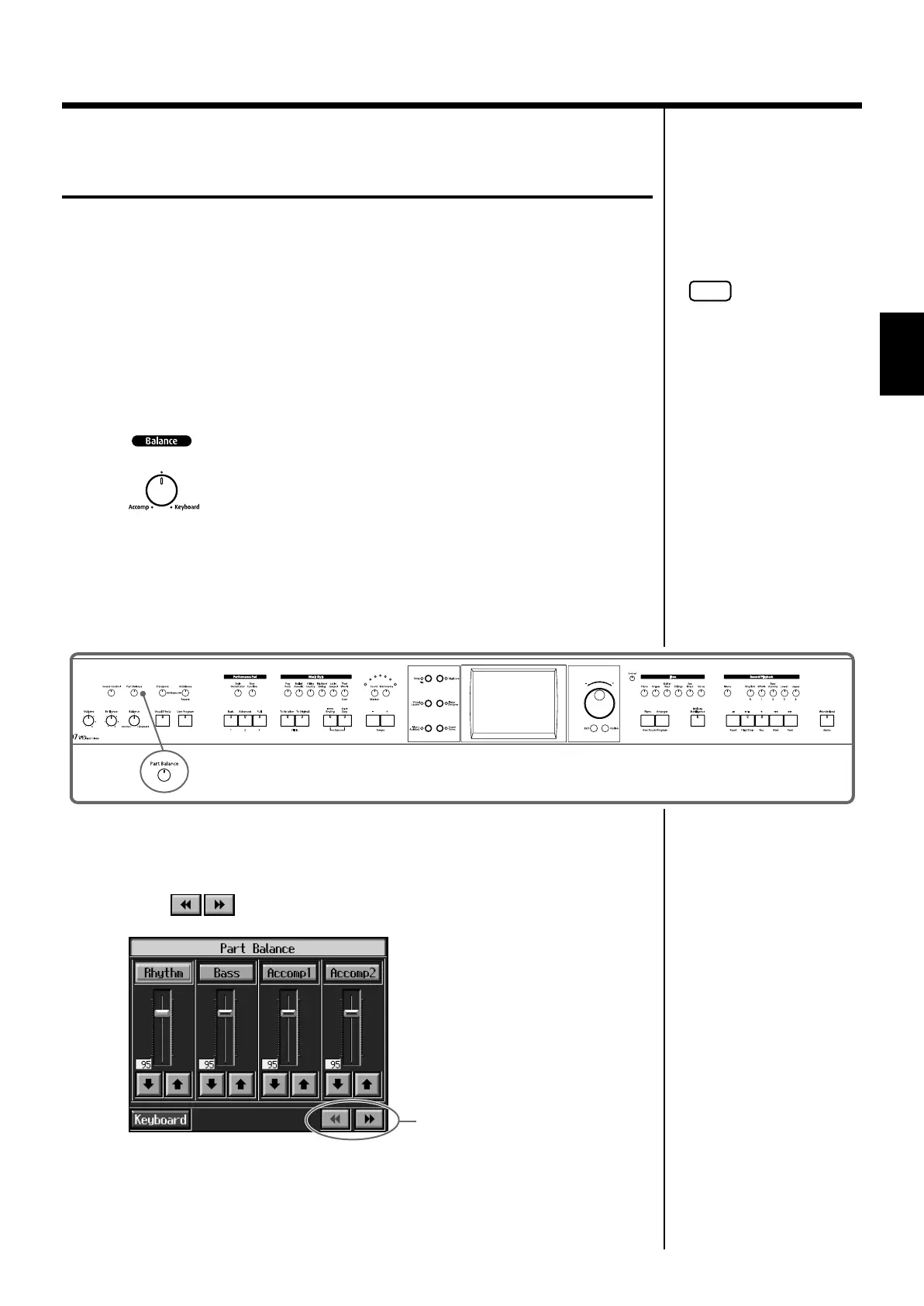
fig.panel2-11
1.
Press the [Part Balance] button and watch the indicator light up.
The following “Part Balance screen” appears.
Touch to switch the screens.
fig.d-partbal2.eps_60
NOTE
When this knob is turned
completely to the
Accompaniment side, no
sounds from the keyboard are
audible, even when the keys
are pressed. You can usually
leave the knob at the center
position.
Switch the screens
KR107_e.book 63 ページ 2005年8月3日 水曜日 午前9時36分



 To Next Page