8
Panel Descriptions
Side Panel (Left)
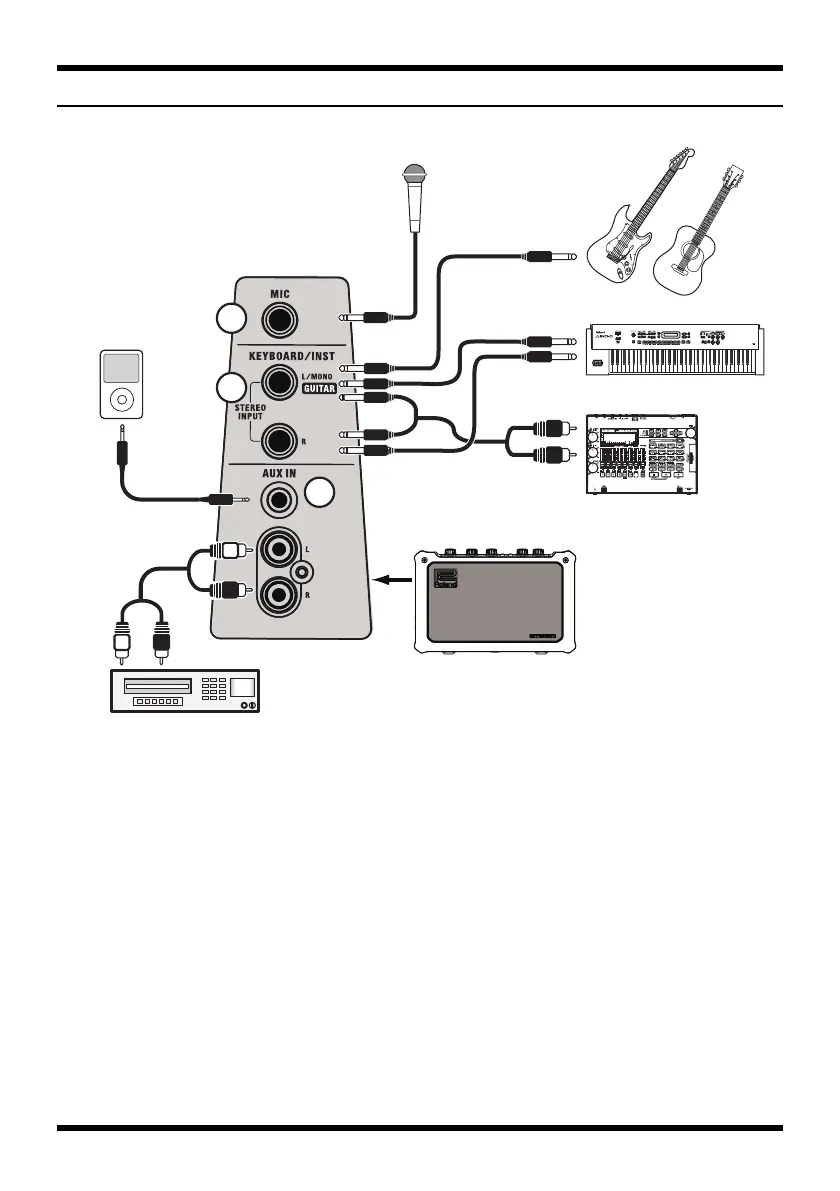
1. MIC (Microphone input Jack)
Connect your microphone here.
2. KEYBOARD/INST (Keyboard /
Instrument / Guitar Jack)
Connect your electronic musical instrument,
guitar, recorder, or audio device to these
jacks. Stereo input is supported.
926a
* When connection cables with resistors are used, the volume
level of equipment connected to the inputs may be low. If
this happens, use connection cables that do not contain
resistors.
3. AUX IN (External Input Jacks)
Connect your portable audio player or
similar device to these jacks.
Either stereo mini-plug or RCA phono
connection is supported.
* To adjust the volume, use the controls of the connected
device.
Keyboard
Guitar
Dynamic Mic
PSC-100PW
1/4" phone plug x 2
1/4" phone plug
Portable
Audio
Player
Stereo Mini plug
CD player
RCA pin plug
Recorder
1
2
3
MOBILE_CUBE_egfiepn.book Page 8 Wednesday, March 5, 2008 10:35 AM






 To Next Page