EasyManua.ls Logo

Roland TM-2 - User Manual

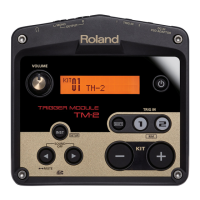
Roland TM-2
23 pages
Print Icon
To Next Page IconTo Next Page
Loading...
Owners Manual (this document)
Read this rst. It explains the basic things you need to
know in order to use the TM-2.
PDF Manual (download from the Web)
Sound List
This lists the TM-2’s internal sounds and the eect
parameters.
To obtain the PDF manual
1.
Enter the following URL in your computer.
http://www.roland.com/manuals/
2.
Choose “TM-2” as the product name.
Look what you can do with the TM-2
By using the TM-2 in conjunction with separately sold pads or acoustic drum triggers, you can easily play the
internal sounds or your own audio les.
Use with acoustic drums to play electronic sounds or percussion
Enhance an acoustic kick, or layer claps onto a snare
Play songs or loops
Connect the TM-2 via MIDI with your V-Drums, and play your favorite drum sounds (WAV les)
English
Deutsch
Français
Italiano
Español
Português
Nederlands

Questions and Answers

  • M
    Martha BowmanJul 27, 2025
    Why is there no sound coming from my Roland Drums?
    • S
      Scott ThomasJul 27, 2025
      There might be a problem with the connection cables, the connected amp, or the speaker. Try checking if you can hear sound through headphones. Also, ensure that muting is disabled.
  • A
    apriljohnsonAug 3, 2025
    What to do if a specific pad on my Roland TM-2 isn't producing sound?
    • R
      Robert MasonAug 4, 2025
      If a specific pad isn't producing sound, the instrument assigned to it might be turned “OFF.” Try assigning an instrument to the pad. Also, check if the instrument’s “Level” is lowered and adjust it if necessary. Ensure that the audio file has not been deleted, moved, or renamed; if it has, assign a different instrument. Verify the pad’s connection cable and confirm that the pad’s “Type” is set correctly.
  • P
    Paul WarrenAug 12, 2025
    What to do if there is no sound from Roland TM-2 and MIDI channel is used?
    • J
      jason92Aug 12, 2025
      If you're not getting any sound and using a MIDI channel, ensure that the MIDI channels of the TM-2 and the external MIDI device are set to the same setting. Also, verify that the note number for the pad has been set properly using the “Note#” setting.
  • P
    pflemingAug 18, 2025
    How to fix Roland TM-2 when audio file does not play or is not shown?
    • G
      Gabrielle SawyerAug 18, 2025
      If an audio file isn't playing or showing up, first check that the audio file format is correct; if not, re-create the audio file in the correct format. Next, verify the location of the audio file. Finally, ensure that the folder containing the audio file has 300 or fewer files and is not a second-level or lower folder.

Summary

TM-2 Quick Start

Connecting Your Equipment

Connecting Pads

Selecting a Kit

Playing Sounds (Instruments)

Assigning Instruments to Pads

Process for assigning internal sounds or audio files to pads.

Playing Audio Files

Editing the Instruments

Restoring the Factory Settings

Saving a Backup to the SD Card

Adjusting the Connected Pads

Formatting an SD Card

Troubleshooting

Problems with sound

Diagnostic steps for addressing issues where no sound is produced.

Error Messages

Explanation of common error messages and their corresponding solutions.

USING THE UNIT SAFELY

Roland TM-2 Specifications

General IconGeneral
Sound Module TypeDrum Trigger Module
Sound EnginePCM
Headphone OutputYes
Sampling Rate44.1 kHz
Number of Trigger Inputs2
InstrumentsDrums, Percussion
EffectsReverb, Delay
StorageSD Card
MIDIMIDI Out
USBYes
Power SupplyAC Adaptor
Weight360 g
Outputs2 (L/MONO, R)
ConnectivityUSB, MIDI

Related product manuals