
 Need help?
Do you have a question about the Rollei Actioncam 310 and is the answer not in the manual?
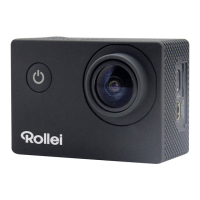
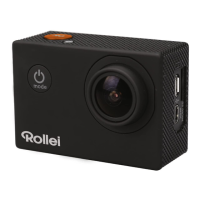
The Rollei Actioncam 310 is a versatile and robust action camera designed to capture your adventures in high definition. It offers a range of features for both still photography and video recording, making it suitable for various activities, from casual use to more demanding outdoor pursuits. The camera is accompanied by a comprehensive set of accessories and a waterproof housing, ensuring its adaptability and protection in diverse environments.
The core function of the Rollei Actioncam 310 is to record video and capture still photos. It supports different modes to cater to various shooting scenarios. The primary video recording function allows users to capture dynamic footage, while the photo mode is designed for single still images. For capturing sequences of action, the camera includes a Burst Photo mode, which takes multiple photos in quick succession. Additionally, a Time Lapse mode is available for creating compelling time-lapse videos by capturing a series of photos at set intervals.
The camera's user interface is designed for straightforward navigation, primarily through a combination of physical buttons and an integrated LCD screen. The Power/Mode Button serves multiple purposes: powering the camera on and off, and cycling through the different camera modes (Video, Photo, Burst Photo, Time Lapse, and Settings). The Shutter/Select Button is crucial for initiating recording or capturing photos, as well as for selecting options within the settings menu. For navigating through options and playback, the Up/Playback and Down/Wi-Fi Buttons are provided.
The Rollei Actioncam 310 is equipped with a MicroSD slot for memory cards, supporting capacities up to 32GB. It requires a Class 10 speed rating for optimal performance, especially during high-vibration activities, to ensure reliable recording and storage of data. Connectivity options include a Micro USB Port for charging and data transfer, and a Micro HDMI Port for connecting to external displays.
The Rollei Actioncam 310 is designed for ease of use across its various functions.
Powering On/Off: To power on the camera, a simple press of the Power/Mode Button is sufficient. To power it off, the Power/Mode Button needs to be pressed and held.
Mode Selection: Once powered on, users can cycle through the different camera modes (Video, Photo, Burst Photo, Time Lapse, Settings) by repeatedly pressing the Power/Mode Button. The current mode is displayed on the LCD screen.
Video Recording: In Video mode, indicated by a video icon on the LCD, recording is initiated by pressing the Shutter/Select Button. The camera provides audio feedback (a beep) and visual cues (flashing Status Indicator Lights) to confirm recording has started. To stop recording, the Shutter/Select Button is pressed again, accompanied by another beep and the cessation of flashing lights. The camera is designed to automatically save video files before powering off if the battery runs out during recording. The camera supports different video resolutions, including 1080p at 30 frames per second (fps) and 720p at 60fps. The Looping Video feature allows for continuous recording, overwriting older footage when the memory card is full.
Photo Capture: In Photo mode, a single press of the Shutter/Select Button captures a still image, accompanied by a shutter sound.
Burst Photo Mode: This mode allows for capturing a series of three photos in 1.5 seconds with a single press of the Shutter/Select Button, ideal for fast-moving subjects.
Time Lapse Mode: In Time Lapse mode, pressing the Shutter/Select Button initiates a countdown, and the camera automatically takes photos at predefined intervals (e.g., 2, 3, 5, 10, 20, 30, or 60 seconds). Each photo capture is accompanied by a shutter sound.
Quick Modes: The camera offers a Quick Modes menu for rapid access to frequently used settings. This menu is accessed by pressing and holding the Shutter/Select Button for three seconds while in Camera modes. Navigation within this menu is done by repeatedly pressing the Power/Mode Button and selecting options with the Shutter/Select Button.
Playback: The Playback menu allows users to review recorded videos and photos. It is accessed by pressing the Up/Playback Button from Camera modes. Within the Playback menu, users can cycle between video and photo playback by repeatedly pressing the Power/Mode Button, select specific files with the Shutter/Select Button, and navigate through files using the Up/Playback or Down/Wi-Fi Buttons. Exiting the Playback menu is achieved by holding down the Up/Playback Button for two seconds.
Settings: The Settings menu provides extensive customization options for the camera. Users can adjust video resolution, looping video settings, time stamp, exposure, photo resolution, burst photo count, time lapse intervals, continuous lapse, power frequency, language, date and time format, sound indicators (shutter sound, startup sound, beep on/off, volume), upside-down recording, screen saver duration, and power saver duration. The menu also allows for formatting the MicroSD card, resetting settings to default, and checking the firmware version. Navigation within the settings is similar to other menus: Power/Mode Button to cycle through options, Shutter/Select Button to select, and Up/Playback or Down/Wi-Fi Buttons for cycling through specific values.
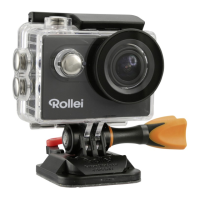
Waterproof Housing: The included waterproof housing is a key feature for protecting the camera in wet environments. It allows the Actioncam 310 to be used underwater or in rainy conditions without damage. The housing maintains access to essential controls like the Select/Shutter Button, Up/Playback Button, Down/Wi-Fi Button, and Power/Mode Button, ensuring full functionality even when protected.
Mounting: The camera comes with a variety of mounts, including a handle bar/pole mount, helmet mounts, and clips, enabling users to attach the camera to helmets, gear, and other equipment. This extensive mounting system allows for capturing footage from diverse perspectives and during various activities.
Battery Charging: The Rollei Actioncam 310 is powered by a rechargeable battery. To charge the battery, the camera is connected to a computer or a USB power supply via the Micro USB Port. A Charging Status Light indicates the charging process: it remains ON while charging and turns OFF once the battery is fully charged. A full charge typically takes about 3.5 hours.
MicroSD Card Management: The camera supports MicroSD, MicroSDHC, and MicroSDXC memory cards. It is recommended to use brand-name Class 10 speed rated cards for optimal reliability, especially in high-vibration environments. The Settings menu includes an option to format the MicroSD card, which can help maintain performance and resolve potential storage issues.
Software Updates: While not explicitly detailed as a user-accessible feature, the presence of a "Version" option in the settings menu suggests that the camera's firmware can be updated. This is a common maintenance practice to improve performance, add features, or fix bugs. Information regarding software updates and the source text for the implemented software can be obtained by contacting Rollei via email.
General Care and Safety: The manual emphasizes several important maintenance and safety guidelines. Users are advised not to attempt to open or modify the camera's case, as this voids the warranty and can only be performed by Rollei. The camera should be kept away from water and other liquids unless it is securely enclosed within its waterproof housing. Handling the camera with wet hands is discouraged unless it is in the waterproof case to prevent malfunction. It is also important to avoid placing heavy objects on the camera and to prevent dropping it. The camera should not be used in extreme temperatures, specifically exceeding 60°C (140°F) or below -15°C (5°F), to ensure its longevity and proper functioning. Proper disposal of the unit in domestic waste is also prohibited, aligning with environmental regulations.
 General
| Video Resolution | Full HD 1080p |
|---|---|
| Image Sensor | 5MP CMOS |
| Frame Rate | 30 fps |
| Battery Life | Up to 90 minutes |
| Wi-Fi | Yes |
| Connectivity | USB, HDMI |
| Waterproof Case | Yes (up to 30m) |
| Storage Media | MicroSD (up to 32GB) |
| Battery | 900mAh Lithium-Ion |
| Display Size | 2.0" LCD |


 To Next Page