EasyManua.ls Logo

Rollei Actioncam 310 - Video Mode

Rollei Actioncam 310
10 pages
Print Icon
To Next Page IconTo Next Page
To Previous Page IconTo Previous Page
Loading...
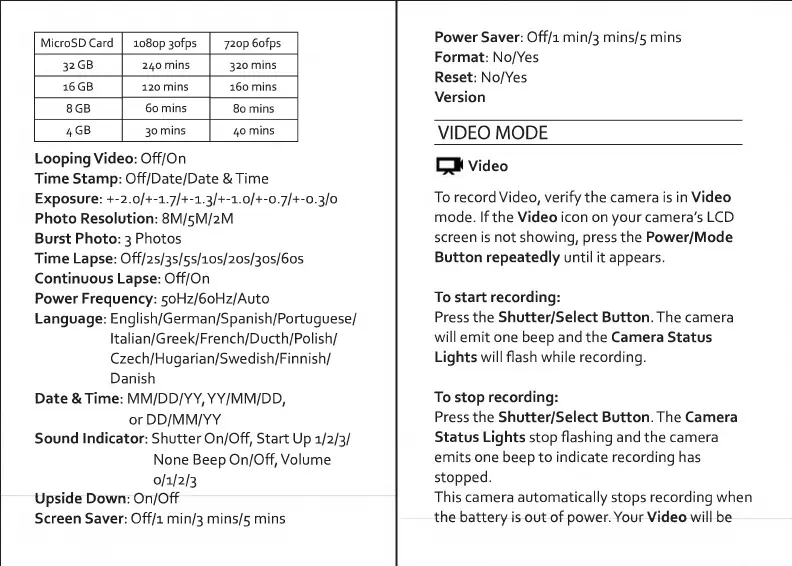
MicroSD
Card
io8op
3ofps
72op
6ofps
32GB
240
mins
320
mins
16
GB
120
mins
160
mins
8GB
60
mins
80
mins
4GB
30
mins
40
mins
Looping
Video:
Off/On
Time
Stamp:
Off/Date/Date
&
Time
Exposure:
+-2.0/+-1.7/+-1.3/+-1.0/+-0.7/+-0.3/0
Photo
Resolution:
8M/5M/2M
Burst
Photo:
3
Photos
Time
Lapse:
Off/2s/3s/5s/ios/2os/30s/6os
Continuous
Lapse:
Off/On
Power
Frequency:
5oHz/6oHz/Auto
Language:
English/German/Spanish/Portuguese/
Italian/Greek/French/Ducth/Polish/
Czech/Hugarian/Swedish/Finnish/
Danish
Date
&Time:
MM/DD/YY,
YY/MM/DD,
orDD/MM/YY
Sound
Indicator:
Shutter
On/Off,
Start
Up
1/2/3/
None
Beep
On/Off,
Volume
0/1/2/3
Upside
Down:
On/Off
Screen
Saver:
Off/i
min/3
mins/5
mins
Power
Saver:
Off/i
min/3
mins/5
mins
Format:
No/Yes
Reset:
No/Yes
Version
VIDEO
MODE
Video
To
record
Video,
verify
the
camera
is
in
Video
mode.
If
the
Video
icon
on
your
camera's
LCD
screen
is
not
showing,
press
the
Power/Mode
Button
repeatedly
until
it
appears.
To
start
recording:
Press
the
Shutter/Select
Button.
The
camera
will
emit
one
beep
and
the
Camera
Status
Lights
will
flash
while
recording.
To
stop
recording:
Press
the
Shutter/Select
Button.
The
Camera
Status
Lights
stop
flashing
and
the
camera
emits
one
beep
to
indicate
recording
has
stopped.
This
camera
automatically
stops
recording
when
the
battery
is
out
of
power.
Your
Video
will
be

Related product manuals