Product Operation
Battery Charging
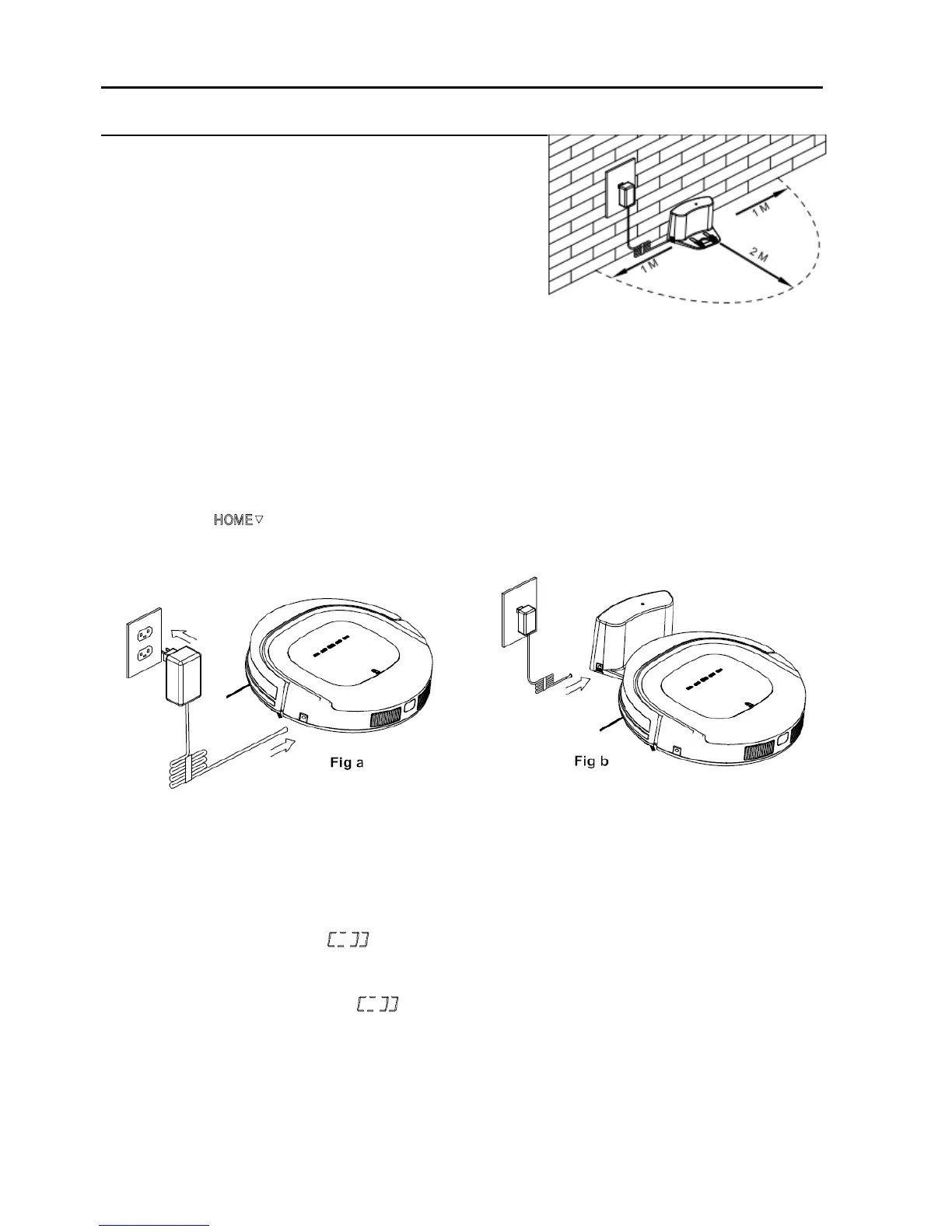
1. Charging station placement
Place charging station against the wall and
Remove obstacles from within 1 meter at two
sides and about 2 meters in front of the station,
as shown in the right figure.
2. If the robot has been shut down, power on the robot by pressing the power switch at the right side
of the robot for more than 3 seconds.
3. Charge the robot in either way as shown below:
a. Insert the adaptor into the robot and the plug at the other end to power socket as shown in Fig
a.
b. Press on robot or remote control to operate the robot to go back to charging station for
recharging as shown in Fig b.
Note:
a. When robot is being charged, LED panel will gradually show 11:11, from left to right.
b. Once charging is complete, LED panel will show FULL.
c. In the standby status, the robot will broadcast voice “please charge” when battery power is low,
and LED panel will show .
d. In the working status, the robot will return to charging station automatically when battery power is
low and LED panel will show .
For extending battery life:
a. Before first use, charge the robot for 12 hours.
b. Charge the robot as soon as battery power is low.


 To Next Page