Product Operation
Note:
a. Before scheduling, please set the robot time to be the same with real time.
b. The robot will start cleaning at the scheduled time of Robot Clock every day. If the power switch is
turned off, the robot needs to be reset.
2. Scheduling by remote control (note: setting by remote control will work every day)
A. Setting scheduling time
a. In standby or charging status, keep pressing PLAN button on remote control for seconds to
enter scheduling mode.
b. The numbers on LCD display of the remote control will flash, press UP or DOWN button to set
the number, after set one number, press LEFT or RIGHT button to set another one you wanted.
c. Once set, point the remote control towards the robot, then press ON/OFF on remote control,
after successfully scheduled, the LED panel of robot will show the exact scheduled time.
Note: The scheduling time setting by remote control is counted by delayed, e.g. the current time of
robot is 08:00, if the scheduling time is 01:00, after successfully scheduled, the robot will start
cleaning one hour later. That is to say, the robot will start cleaning at 09:00, and will start cleaning
at 09:00 every day.
B. Cancel scheduling
Press ON/OFF on remote control in scheduling mode.(If the LED panel of robot shows 00:00, it
means the scheduling had been successfully cancelled, otherwise, please press ON/OFF again. )
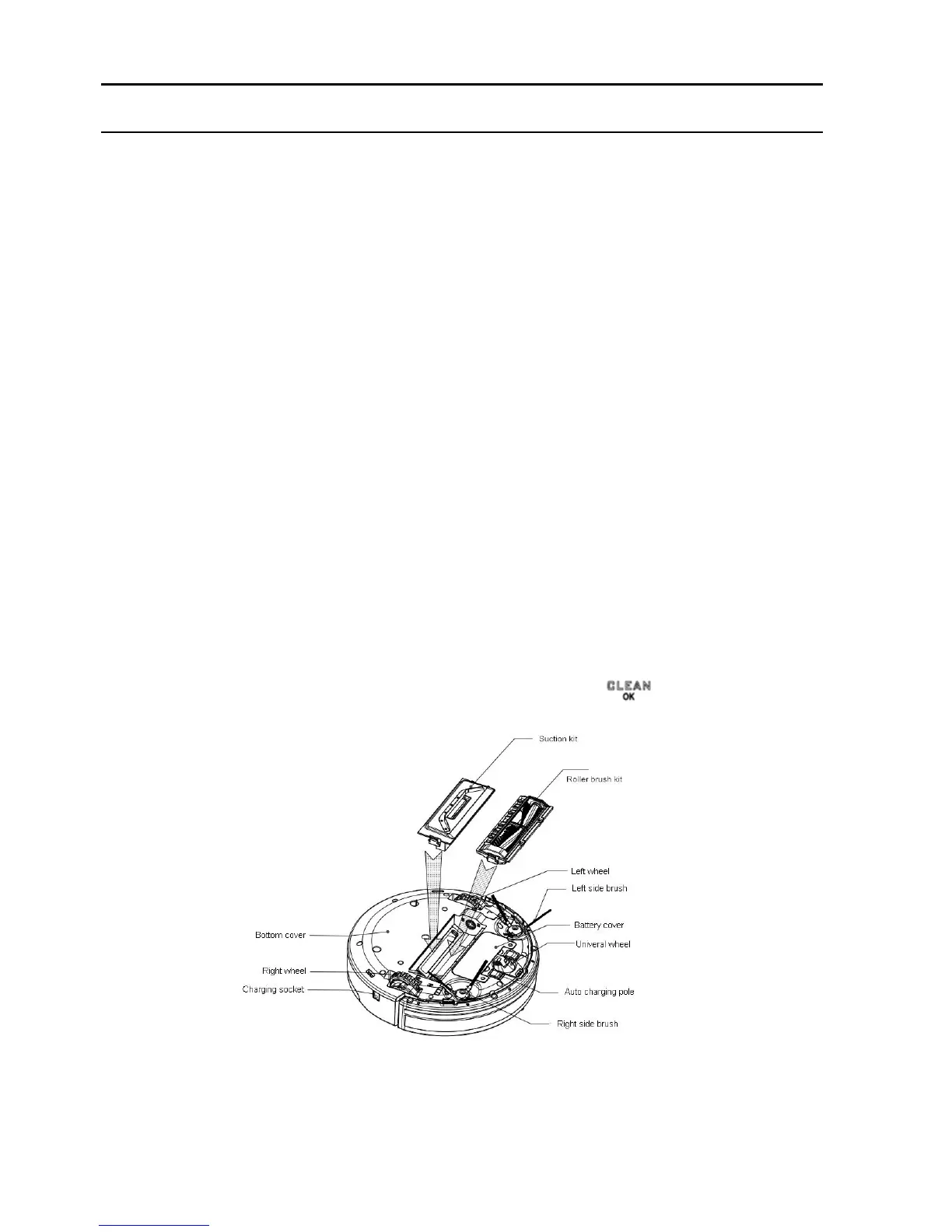
Suction kit and Roller brush kit are exchangeable
Suction kit and roller brush kit are exchangeable and installed in appropriate place
at bottom, (as shown in below figure), you just need to gently press button, the robot
will bring you unprecedented cleaning.


 To Next Page