13
RolliBot RolliCool 310 Portable AC with Heater User Manual
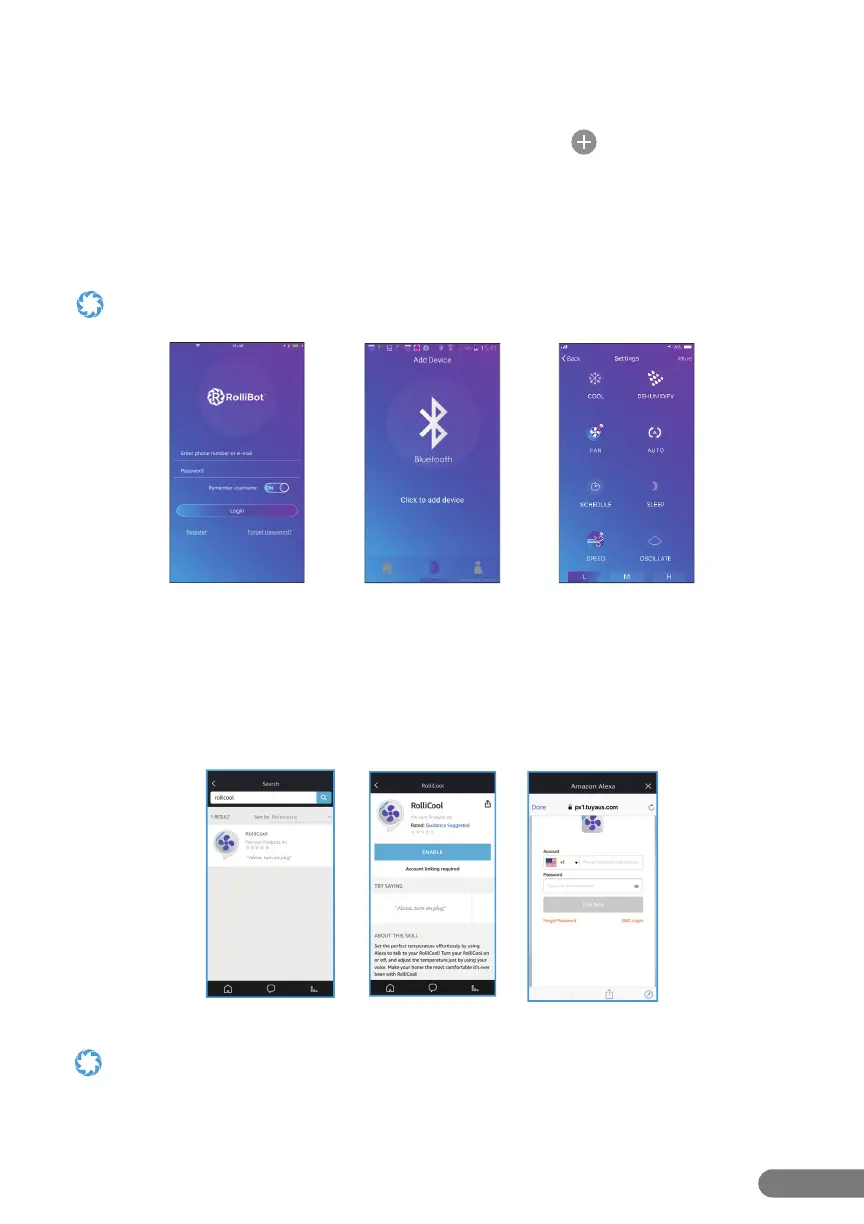
Step 1. Turn on the AC unit then use your phone to turn on Bluetooth® and open the app.
Step 2. Register for an account and return to the app ( g.1).
Step 3. After logging in, select the desired device type and tap the icon.
Step 4. Select the access mode and enter wi- and Bluetooth® info as needed ( g.2).
Step 5. Turn o the AC unit then press and hold the mode button on the unit’s control panel for
~5 seconds. The app will begin pairing.
Step 6. After connecting successfully, the app can be used to set schedules, change modes, and
more ( g.3).
Your device may be set to a di erent model name by default. To change the device name, tap “More” in the upper corner
then select “Rename device” to enter a new name for your COOL310.
g.1 g.2 g.3
4.3 – Amazon Alexa Setup
Step 1. Search “RolliCool“ in the Amazon Alexa app home screen ( g.4).
Step 2. Select the RolliCool app and tap “ENABLE“ ( g.5).
Step 3. Login your RolliCool account and tap ”Link Now”. Follow any additional in-app
instructions as needed ( g.6).
g.4 g.5
g.6
• Make sure Amazon Alexa app and RolliCool are connected to the same wi- otherwise Alexa may not be able to
discover your AC unit.
• Connect both your AC unit and Alexa to a stable wi- network. If your wi- is unstable, Alexa may disconnect and not
work correctly with your RolliCool.


 To Next Page