8
RolliBot RolliCool 310 Portable AC with Heater User Manual
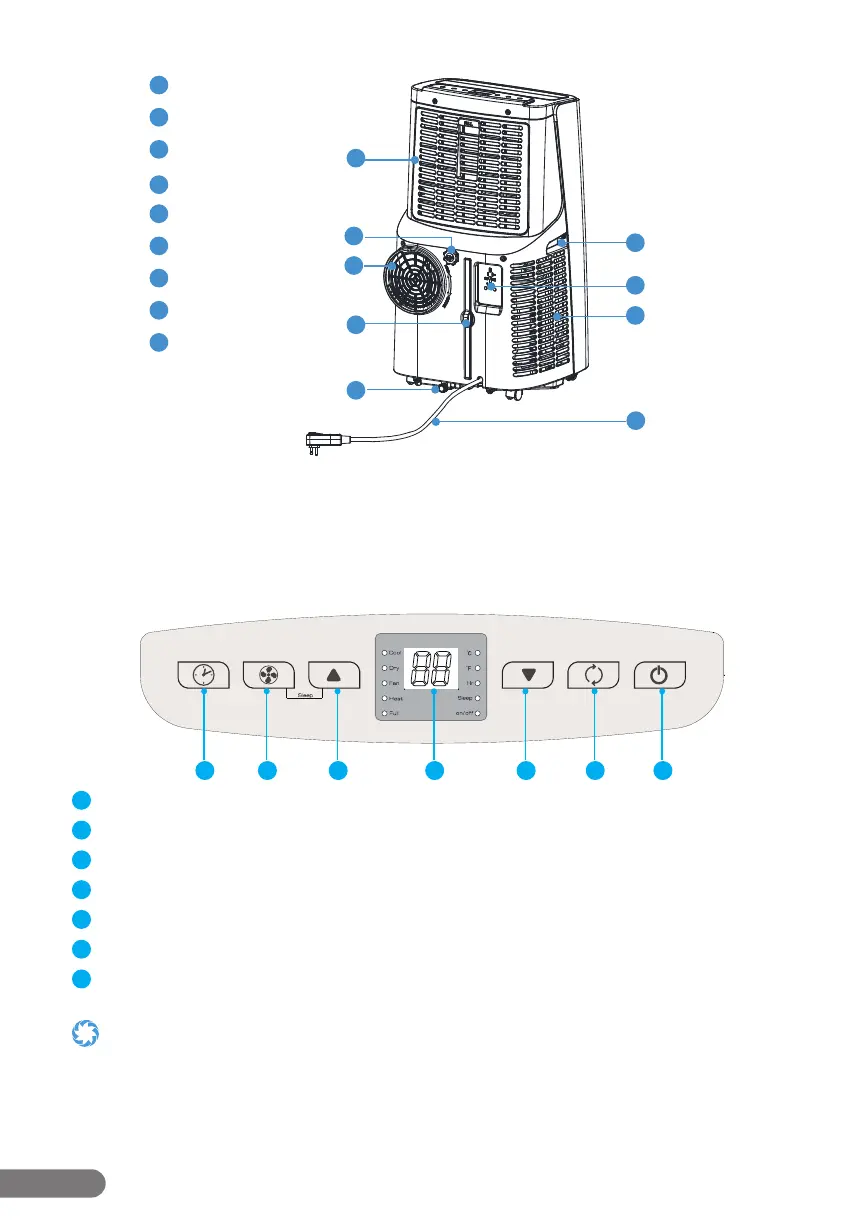
2.3 – Control Panel
The 310 features a digital control panel which turns on when the unit turns on and includes
buttons.
Buttons & Parts
1 2 3 4 5 6 7
1
Timer Button: Press to turn timer mode on or o .
2
Fan Button: Press to turn on fan mode and cycle through 3 fan speeds.
3
Up Button: Press to raise temperature or adjust timer duration.
4
Display: This section will light up to show temperature and other information.
5
Down Button: Press to lower temperature or adjust timer duration.
6
Mode Button: Press to cycle between cool, dehumidify, fan, and heat modes.
7
Power Button: Press to turn the unit on or o .
• Scheduling can be done and/or adjusted via the control panel, remote, or the app. See the following section for more
information about the remote. See Section 4 for information about the app.
• Press the up and down buttons together on the control panel to switch between Celsius and Fahrenheit.
7
8
10
9
11
12
13
15
14
7
Upper Filter
8
Upper Drainage Opening
9
Air Vent
10
Lower Filter
11
Lower Drainage Opening
12
Handle
13
Power Plug Fixture
14
Air Vent
15
Power Cord


 To Next Page