10 RolliBot 2-in-1 Electric Mop
Section 5 : Using the Battery
5.1 – Charging the battery
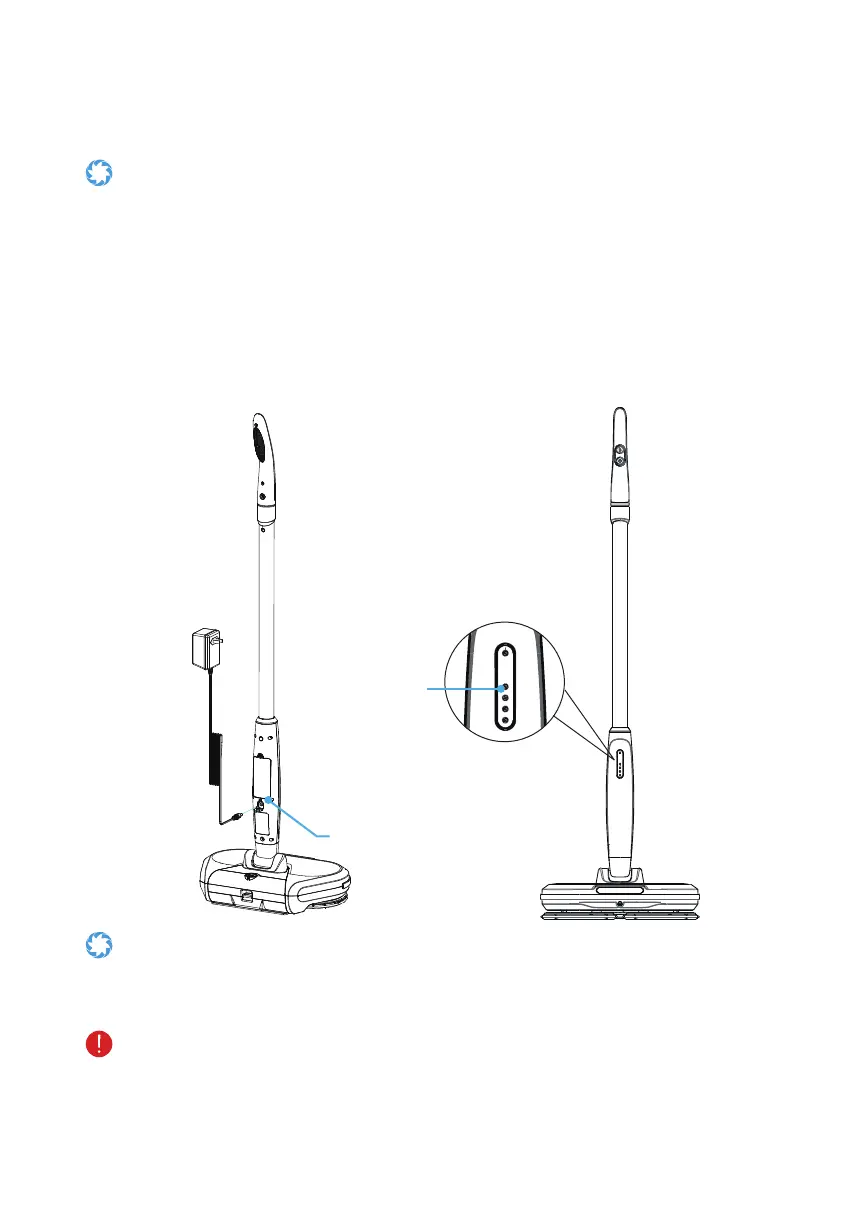
The battery is running low when the lowest light on the battery LED indicator blinks
at a frequency of 3Hz (approx. three blinks per second). Charge frequency, charge
the battery before using it again.
Step 1. Press the power button to turn off the Rollibot electric mop.
Step 2. Plug the charger into a wall outlet (100V-240V) then plug the other end into the
charging port. Remove the cap as needed.
Step3. ThebatteryLEDindicatorwillashatafrequencyof1Hz(approx.oneblinkper
second), indicating normal charging operation.
Step 4. Allow
approximately
2.5 hours for charging. After the battery is fully charged, all
batteryLEDindicatorswilllightup.Disconnectallcableoncechargingisfinished.
Battery LED Indicators
Adapter
Charging Port
Top LED Indicator
• Keep your charging environment clean and dry at all times.
• If the charging port is damp or has any liquid on it, do not charge your mop.
•
Inorderforthebatterytooperateatmaximumefficiency,avoidchargingyourmopin
extremely hot or extremely cold environments.
• DO NOT, under any circumstances, use the mop while it is charging.
• The charging time is approximately 2.5 hours. Charging longer than that may affect
battery life and/or performance.
• Use only the adapter provided with your Rollibot mop. If you have lost or misplaced
your charger, contact customer support to obtain a replacement.


 To Next Page