14 RolliBot 2-in-1 Electric Mop
Section 7 : Maintain
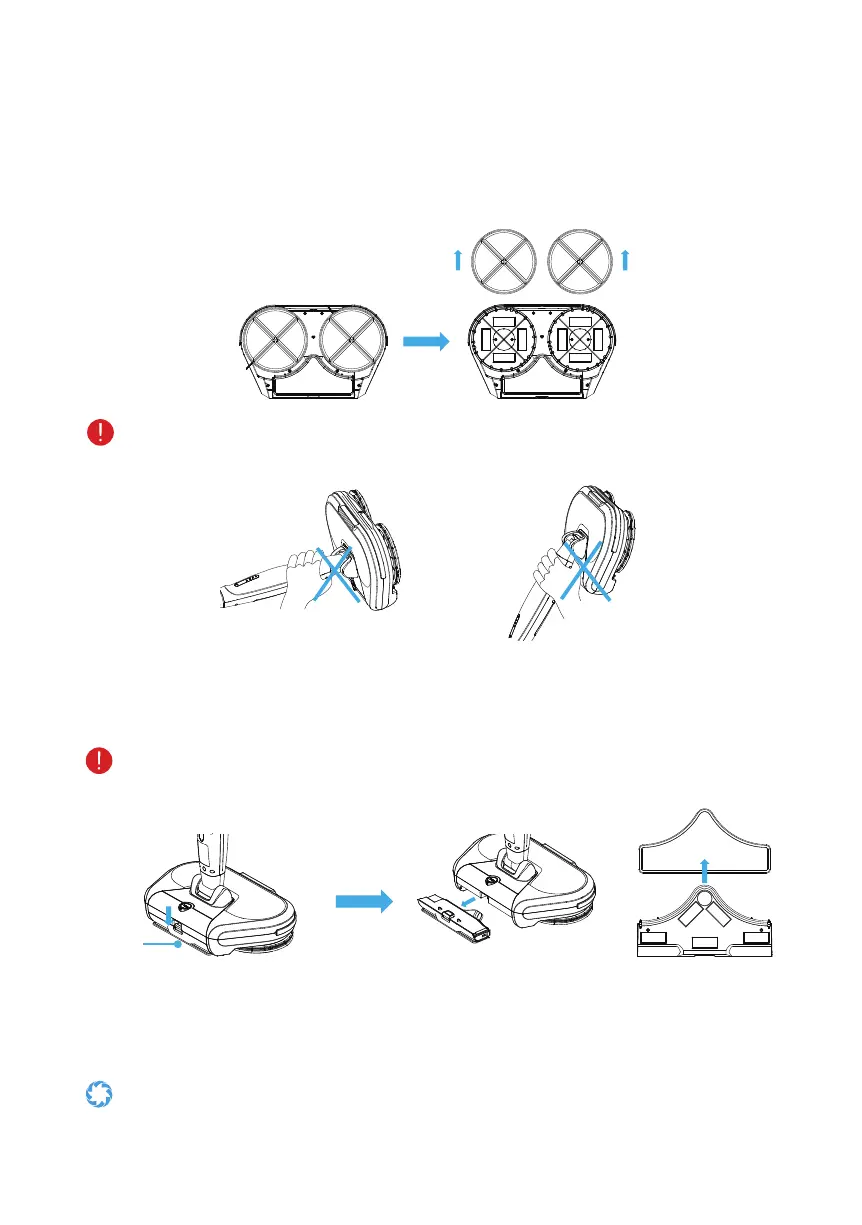
7.1 – Changing the rotation mop
1. Press the power button to turnoffthemopandipoverthemainbody.
2. Remove the rotation mops and replace new ones if needed.
When inverting or lifting the mop, keep your hands away from the main body to
minimize risk of bodily harm.
7.2 – Changing the rear mop
1. Press the button at the bottom of the dust bin, and pull out the dust bin horizontally.
2. Take off the rear mop and replace a new mop if need.
Remove the dustbin before taking off the back mop. The edge of the mop must be
aligned to the rubber edge of the dust bin when assembling it.
Button
7.3 – Cleaning the mop
Clean the dirty mops with the water below 40
o
C. The mops are dishwasher safe. (Do not
use high temperature settings.)
Foravoiddamagingoor,removeanyhardobjectspickedupbythemopsbefore
working.


 To Next Page