17
RolliBot RolliCool Mini-Split AC User Manual
5.2 – Cooling Mode
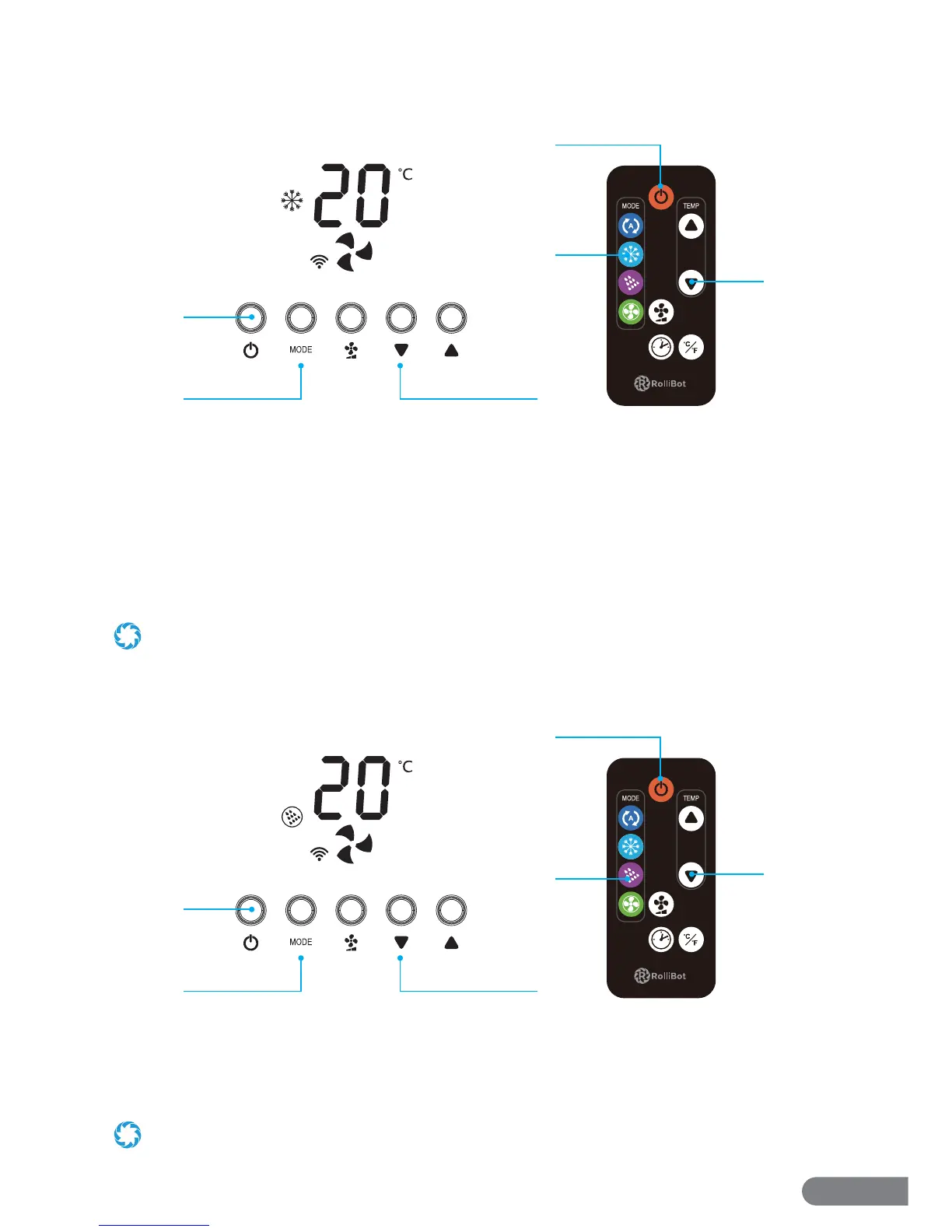
With this mode, the unit will turn on and regulate temperature as selected.
1. Press the Power Button on the Control Panel or the remote.
2. Press the Mode Button on the Control Panel until the Cool Mode light turns on. Press it
multiple times to cycle through di erent modes. Or simply press the Cool Button on the
remote.
3. Use the Up and Down Buttons to set the desired temperature between 61~88°F (16~31C ).
4. Use the Fan Speed Button to change fan speed. Press it multiple times to cycle through 3 fan
speeds.
When Cool Mode is active, the unit will not turn on if the chosen temperature is higher than the indoor temperature.
5.3 – Dehumidify Mode
With this mode, the unit will turn on and begin removing moisture from the air.
1. Press the Power Button on the Control Panel or the remote.
2. Press the Mode Button on the Control Panel until the Dehumidify Mode icon appears. Press it
multiple times to cycle through di erent modes. Or simply press the Dehumidify Button on
the remote.
In Dehumidify Mode, the fan speed is automatically set low and cannot be adjusted.
1
23
2
1
3
1
23
2
1
3


 To Next Page