18
RolliBot RolliCool Mini-Split AC User Manual
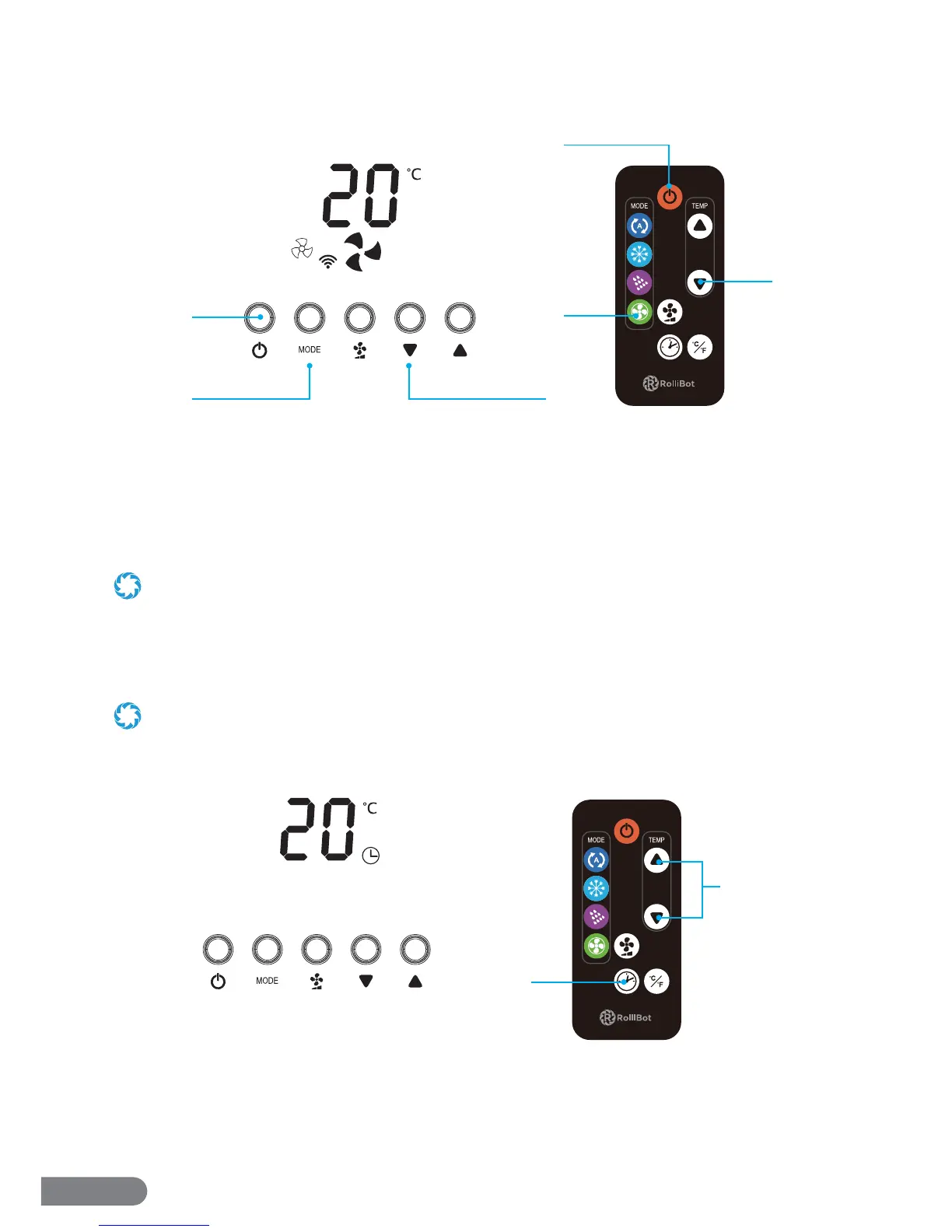
5.4 – Fan Only Mode
With this mode, the unit will turn on and begin using the fan to promote air circulation.
1. Press the Power Button on the Control Panel or the remote.
2. Press the Mode Button on the Control Panel until the Fan Only Mode icon appears. Or simply
press the Fan Only Button on the remote.
3. Use the Fan Speed Button to change fan speed. Press it multiple times to cycle through 3 fan
speeds.
In Fan Only Mode, the fan speed is automatically set low and cannot be adjusted.
5.5 – Timer
With this mode, the unit will automatically turn on or o and regulate temperature according to
the selected times.
• Setting the schedule when the unit is o means setting the time the unit will turn on.
• Setting the schedule when the unit is on means setting the time the unit will run before it shuts o .
TO SET A TURN ON TIME
1. When the unit and remote are o , press the Timer Button on the Control Panel or the remote.
2. Use the Up and Down Buttons to select the time the AC unit will turn on i.e. selecting “03” will
prompt the unit to turn on in 3 hours’ time etc.
3. After the selection is complete, the display will show the Timer icon.
1
23
2
1
3
1
2


 To Next Page