10
RolliBot RolliCool Mini-Split AC User Manual
Before Using the Remote
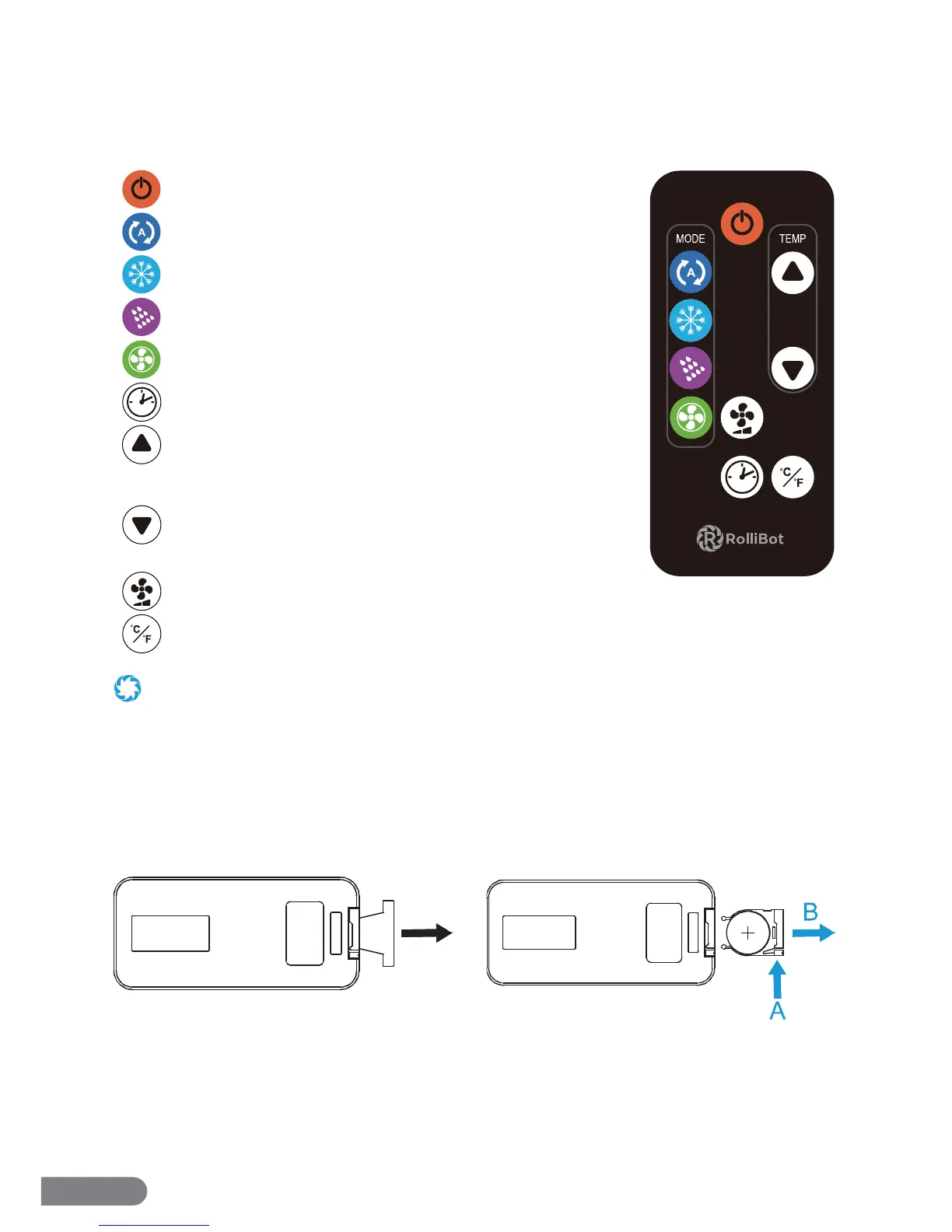
Pull the tab to remove the protective lm.
2.4 – Remote Overview
The RolliCool Mini-Split AC features a remote which may be used with the unit.
REMOTE BUTTONS
Power Button: Press to turn the unit on or o .
Auto Button: Press to turn on Auto Mode.
Cool Button: Press to turn on Cool Mode.
Dehumidify Button: Press to turn on Dehumidify Mode.
Fan Only Button: Press to turn on Fan Only Mode.
Schedule Button: Press to turn on Schedule Mode.
Up Button: Press to raise temperature or adjust schedule
duration.
Down Button: Press to lower temperature or adjust schedule
duration.
Fan Speed Button: Press to cycle between 3 fan speeds.
°C/°F Button: Press to switch between Celsius and Fahrenheit.
• Avoid pressing two buttons simultaneously as this may cause malfunctions.
• Avoid using the remote in areas with extreme temperature uctuations.
• If the remote will not be used for extended periods of time, remove the battery.
• The remote control’s range is approximately 23 ft. Use it within this range.
• The remote uses one CR2 (CR2035 3V) battery. This battery is included.
To Change the Battery
Pull part A in towards the remote then pull
part B out to remove the battery tray. Remove
any dead battery and replace with a new
battery, + side up.


 To Next Page