13
Part names and functions
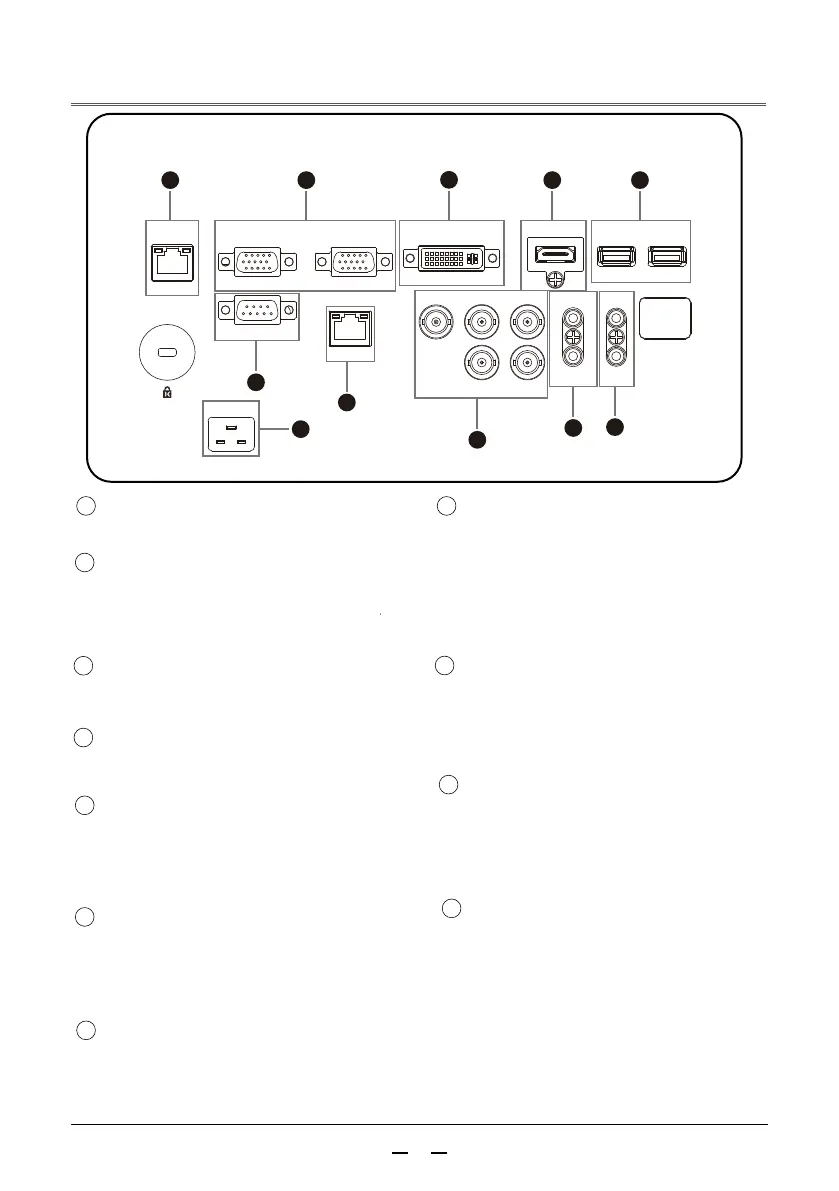
Terminal Panel
AC IN
~
COMPUTER IN
RS-232C
COMPUTER OUT
DVI
R/PR G/Y/VIDEO
H V
B/PB
USB1
USB2
AUDIO IN
R/C OUT
HDMI
AUDIO OUT R/C IN
HDBT
LAN
1 2
6
7
11
8
9
10
3
4 5
11
COMOUTER IN
/ COMPUTER OUT
DVI
HDMI
RS-232C
HDBT
R/C IN R/C OUT
10
9
8
4
5
6
7
3
2
1
LAN
Connect the network cable.
Connect the computer output VGA
signal to this terminal.
Connect an external display device.
Connect the DVI digital output
signal to this terminal.
Connect the HDMI output signal to
this terminal.
USB Port(Type A)
When using the [USB DIAPLAY]
function, connect the USB
storage device to this terminal.
RS-232C compatible control
interface. Connect the RS-232C
interface of the computer to the
RS-232C cross cable.
AUDIO OUT
Connect an external audio device
to this terminal.
Connect the computer audio signal
to this terminal.
AUDIO IN /
Connect the supplied power cord.
AC IN(~)Socket
When using the wired remote control,
connect the wired remote control to
this jack with a remote control cable
(not supplied)
BNC INPUT
Connect the component or composite
video output signal from video
equipment to VIDEO / Y , PB , PR
jacks or connect the computer output
signal(BNC Type Gerrn,Blue,Red,Horiz,
Sync,and Vert.Sync.)
Connect the HDBT output signal to
this terminal.



 To Next Page