S
TARTUP AND
O
PERATION
3-10
June 1997 Rosemount Analytical 748332-DNGA 2000 Non-Dispersive Infrared Analyzer
The Analyzer Module will not allow the user to increase the upper limit of a range
beyond the "maximum range" software setting. To change the "maximum range"
value, select the following from the Main Menu: Technical Configuration Menu,
Service Menu, Manufacturing Data, Analyzer Manufacturing Data. Select Maximum
Range, and use the arrow keys to scroll the indicated value. The same applies for
"minimum range" setting.
F
IGURE
3-9. D
ISPLAY
S
CREENS
(1
OF
5)
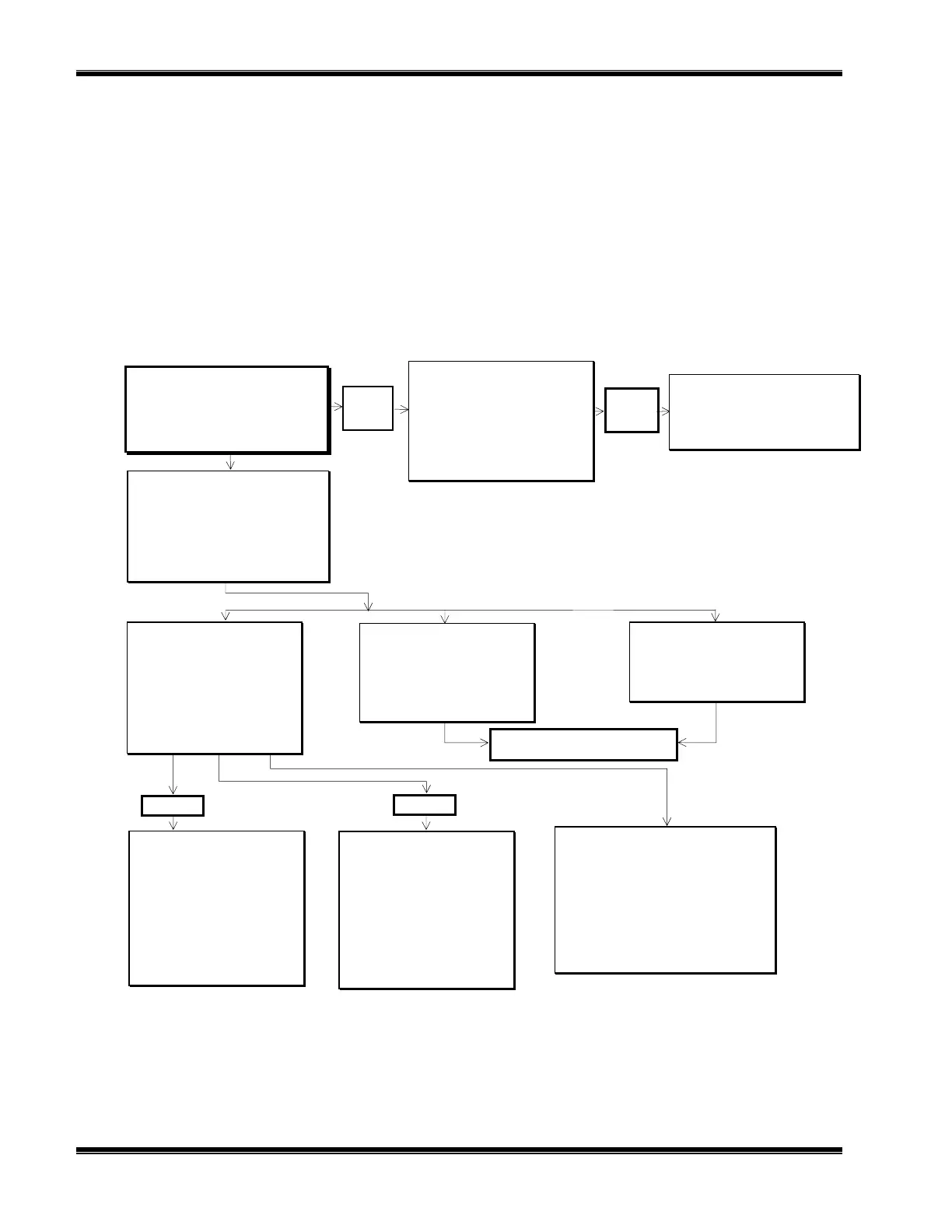
Analyzer Span
Are you sure?
You must have zero gas flowing
through the analyzer.
This control does NOT control any
auto-cal. Module bound to this
analyzer!
If you are sure, press SPAN again now.
Press left arrow key when you are
done.
Calibration status: Ready
Error message for last zero: 24-08-94
Technical configuration menu
System set up...
Service menus...
Diagnostic menus...
Other module diagnostic menus...
Listing of all modules...
Basic controls
Measurement range number: 1
Range upper limit: 10 ppm
Range and functional control: LOCAL
Zero gas concentration: 0 ppm
Span gas concentration: 9.89 ppm
Ranges with valid calibration: 1&2
Calibration status: Ready
If it won’t calibrate...
Status: Ready
Expert and Technical menus follow in
succeeding flow charts.
If it won’t calibrate...
Check that you are flowing the correct gas, and
the gas concentration is what it is supposed to be.
Make sure that the reading is stable before
starting. If you have changed the range fullscale
value or any linearizer coefficients, or enabled or
disabled it, or done anything else that would affect
how it measures the gas, you may have made it
hard for the analyzer to calibrate. If so, manually
adjust the coefficients until the readings are close
to correct, and try again.
Analyzer Zero
Are you sure?
You must have zero gas flowing
through the analyzer.
This control does NOT control any
auto-cal. Module bound to this
analyzer!
If you are sure, press ZERO again now.
Press left arrow key when you are
done.
Calibration status: Ready
Error message for last zero: 24-08-94
ZERO
Main Menu
Basic controls...
Expert controls and setup...
(Operational configuration)
Technical level configuration...
(Diagnostic and manufacturing/service)
MORE
Current measurement parameters
Response time: 2.0 Secs
Sample flow: 1000 ml/min.
Sample pressure: 12.3 kPa
Case Temperature: 55.3
°
C
Basic level security
(expert, technical)
Enter your security code with softkeys.
Security codes are set in the system setup
menu in the Technical level menus.
Press five characters when Security code
says READY. Press six to return to “READY”.
Security code: 54321
PARMS
Current measurement parameters
Measurement range number: 1
Range change control: Local
Measured Gas: CO2
Linearization mode: ON
Gas Measurement Setup: ON
Analyzer operational state: Normal
Analyzer alarm state: Normal
Alarms report: Failure
SPAN
Expert controls and setup
Expert analyzer controls...
Auxiliary module controls...
System set up...
Analyzer module set up...
Auxiliary module set up...
Local I/O set up...


 To Next Page