5
English
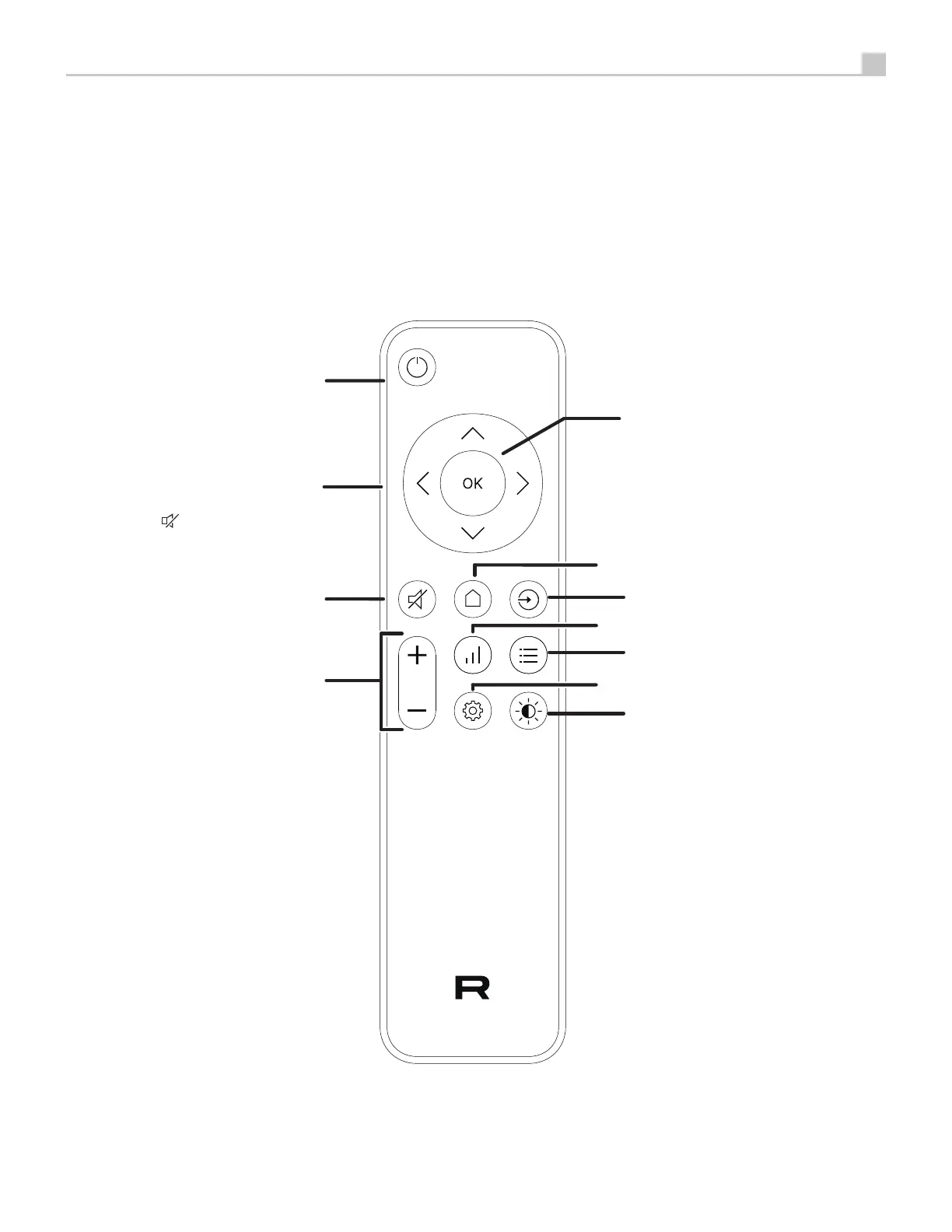
Figure 2: RR-DX1 Remote Control
Télécommande infrarouge RR DX1
Fernbedienung RR-DX1
Mando a Distancia RR-DX1
Afstandsbediening RR-DX1
Telecomando RR-DX1
RR-DX1 fjärrkontroll
Пульт ДУ RR-DX1
D
E
F
H
G
A
B
C
J
I
K
A
: Power Button
Activate the unit or put it into
standby mode.
B
: Navigation Buttons
Access the various menus and
operate the unit settings.
C
: Mute Button
Mute the audio.
D
: Volume Buttons
Adjust the volume output level.
K
: Enter Button
Confirm the selected and desired
settings.
E
: Home Button
Go to the Main Home screen.
F
: Source button
Select the input signal source.
G
: Function button
Display alternate main screen view.
H
: Display button
Display alternative audio playback
information.
I
: Setup button
Activate the setup screen on the
front display.
J
: Dim Button
Dim the front display.


 To Next Page
 Loading...