C
C
H
H
A
A
P
P
T
T
E
E
R
R
:
:
M
M
A
A
N
N
A
A
G
G
E
E
D
D
o
o
c
c
.
.
N
N
a
a
m
m
e
e
:
:
U
U
s
s
e
e
r
r
M
M
a
a
n
n
u
u
a
a
l
l
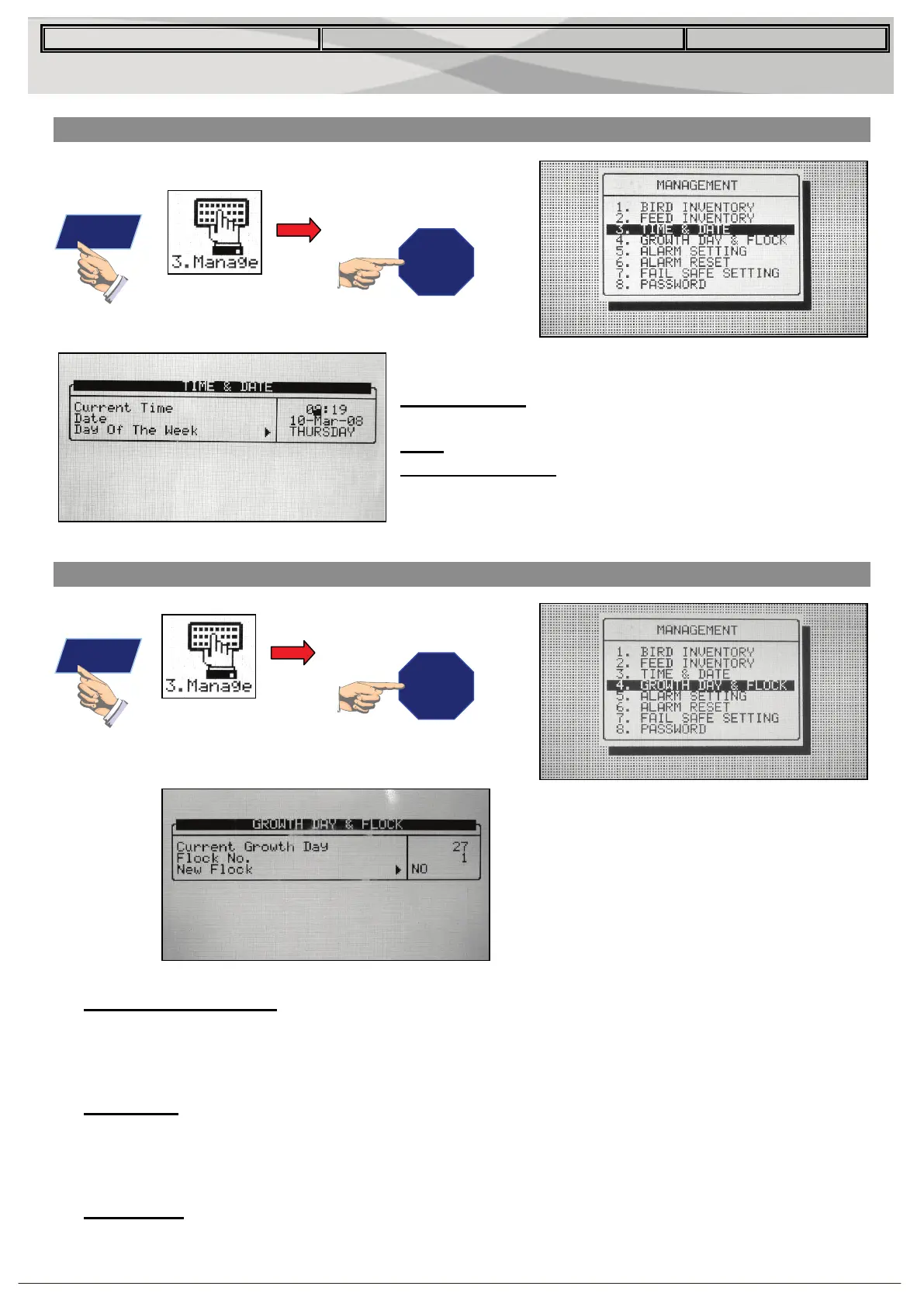
3.3 Time & Date
Set the current time and date for the controller.
Current Time: Enter the current time in 24 hour, or
military format.
Date: Enter the date in day-month-year format.
Day of the Week: Select the day of the week from
the drop down menu.
3.4 Growth Day & Flock
• Current Growth Day: Enter the current growth day, if necessary. It is possible to enter
negative growth days up to -2. If you reset the growth day for a new flock using this tool,
your old history data will not clear. Use the New Flock function to clear out old history in
preparation for new birds.
• Flock No.: The controller automatically increments the flock number each time you
choose New Flock. You can edit the flock number. Since this field accepts six digits,
some producers enter a flock number that is made of the day, month and year the birds
arrived.
• New Flock: Use the new flock function on arrival of a new set of birds to set the growth
day back to 1, and to clear out old history data.
Enter
Enter


 To Next Page