C
C
H
H
A
A
P
P
T
T
E
E
R
R
:
:
G
G
E
E
N
N
E
E
R
R
A
A
L
L
D
D
o
o
c
c
.
.
N
N
a
a
m
m
e
e
:
:
U
U
s
s
e
e
r
r
M
M
a
a
n
n
u
u
a
a
l
l
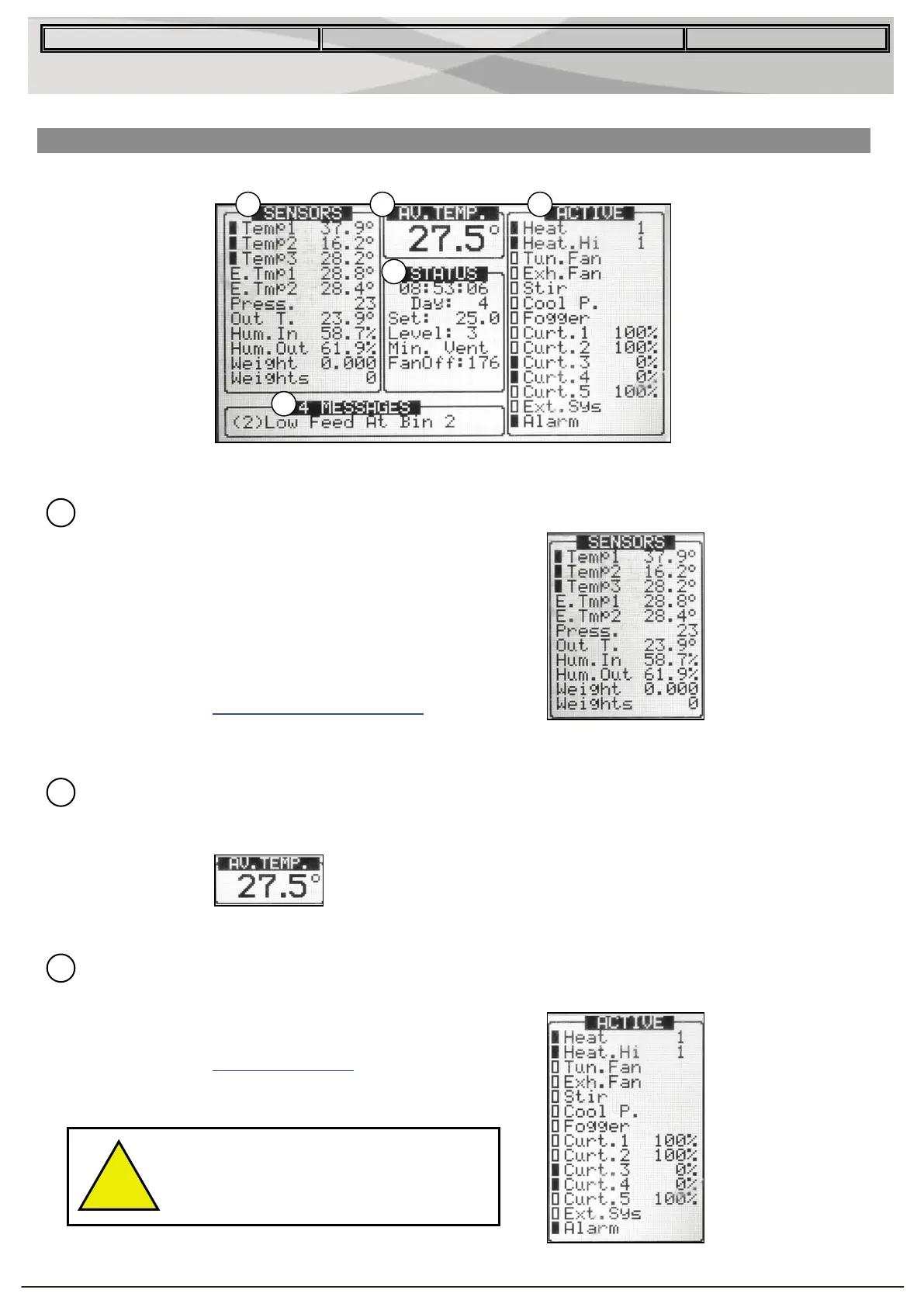
Standard Display
The main screen consists of five parts.
1 Shows individual sensor readings. Temperature sensors marked with dark squares form
the current average temperature.
Filled square – indicates the sensor
participates in the average calculation.
Empty square - indicates the sensor does
not participate in the average calculation.
NOTE: Go to the
USENSOR READINGSU section to
view all the possible sensors.
2 Reports the current average temperature. This example is in Celsius, but yours may be
in Fahrenheit.
3 Shows the output relay list. The filled black boxes indicate active outputs. Controller also
informs the position of inlets and curtains, as well as the number of operating heaters or
fans.
NOTE: Go to the UOUTPUT LISTU section to view all
the available readings (ACTIVE).
The ACTIVE screen shows rectangular
markers by the outputs. Filled rectangles
indicate operating outputs; empty
rectangles indicate outputs that are off.


 To Next Page