27User manual
SAVA wired controller
EN
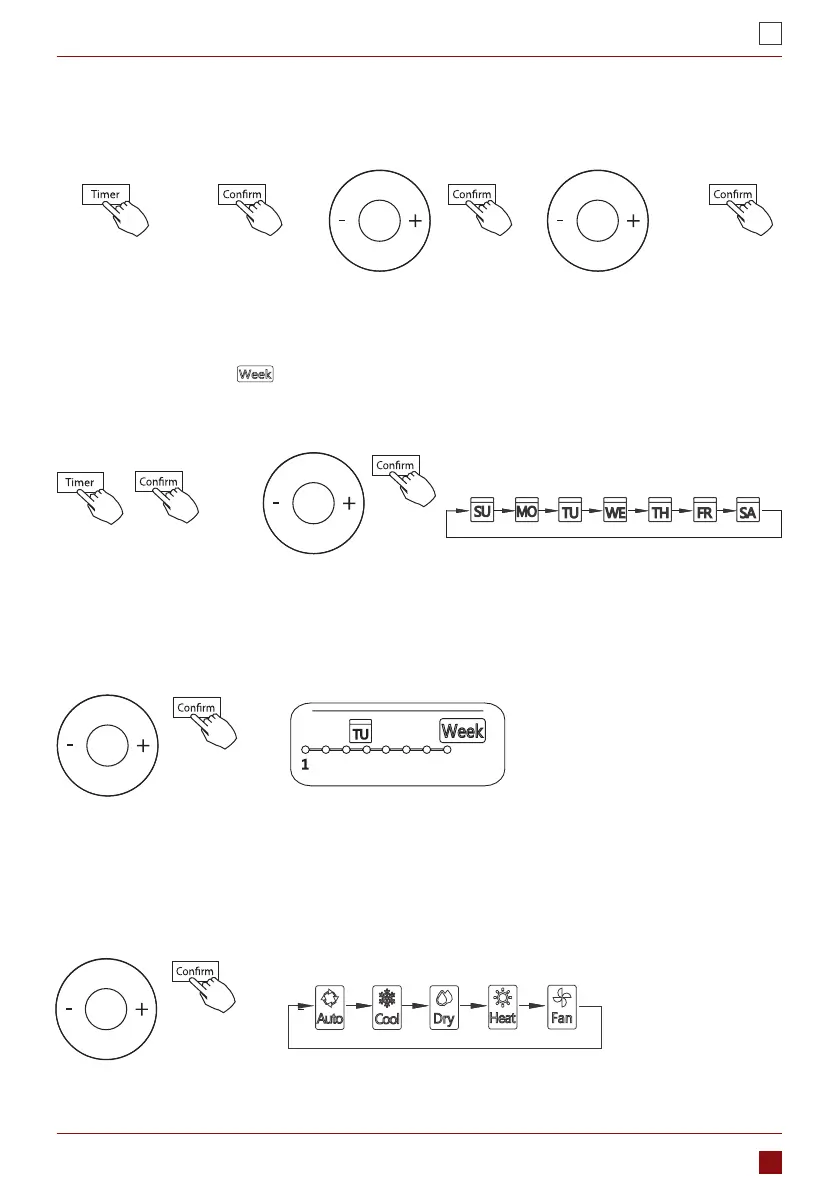
STEP 1 STEP2 STEP 3 STEP 4 STEP5
7. WEEKLY TIMER
ex.Tuesday time scale 1
IMPORTANT: Up to 8 scheduled events
can be set on one day. Various events
can be scheduled in either MODE,
TEMPERATURE and FAN speeds.
1. Weekly timer setting.
Press Timer to select the
and press CONFIRM.
2. Day of the week setting
Press + or − to select the day of the week and then press CONFIRM.
3. ON timer setting of timer setting 1
Press + and − to select the setting time. The setting time, mode, temperature and fan speed appear on the
LCD. Press CONFIRM to enter the setting time process.
4. Time setting
Press + and − to set the time then press CONFIRM.
5. Operation mode setting
Press + and − to set the operation mode then press CONFIRM. Room temperature setting
WIRED CONTROLLER SUPPORT


 To Next Page
 Loading...


