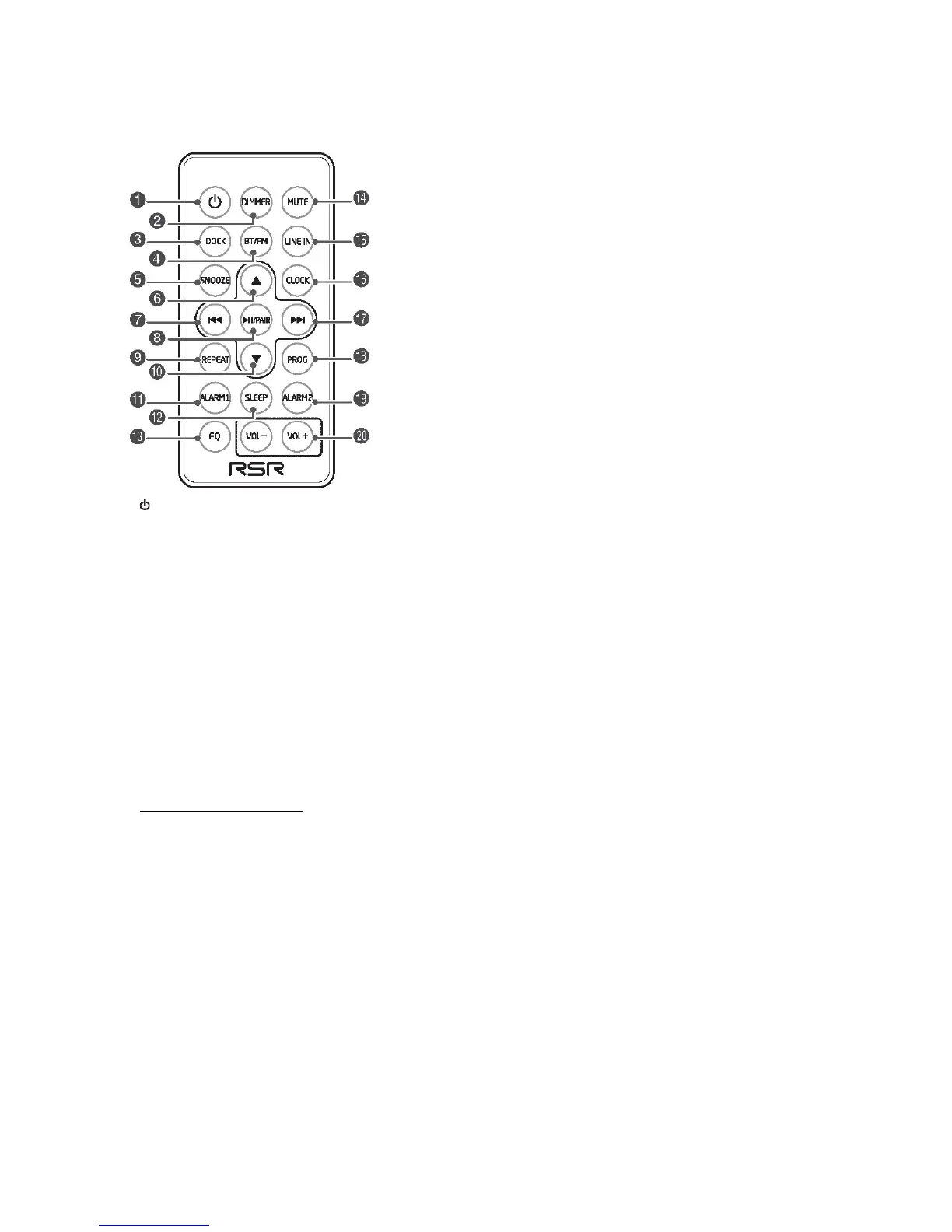
Remote Control
1
Turn on or turn off the unit.
2 DIMMER
Adjust display brightness.
3 DOCK
Select DOCK function.
4 BT/FM
Select FM or Bluetooth function.
5 SNOOZE
Repeat the alarm.
In the standby mode, press and hold to switch to the CLOCK SYNC mode.
6
Select a next preset station.
Adjust the time.
7
H
Skip to previous track.
Search radio stations manually.
Press and hold this button to search radio stations.
8
BF
/
PAIR
In Bluetooth / DOCK mode: Start or pause play.
Press and hold this button to connect/disconnect to your Bluetooth device.
9 REPEAT
Select the repeat play mode (only in DOCK mode).
10
Select a previous preset station.
Adjust the time.
11 ALARM 1
Set the alarm 1 timer.
View alarm 1 settings.
12 SLEEP
Set the sleep timer.
13 EQ
Select a preset sound effect: POP, CLASSIC, ROCK, JAZZ, FLAT.
14 MUTE


 To Next Page