Mute or resume volume.
15 LINE IN
Select LINE function to play from device connected through LINE IN socket
16 CLOCK
Press and hold this button in the standby mode to set the clock.
17
G
Skip to next track.
Press and hold this button to search radio stations.
18 PROG
Preset stations for tuner.
Press and hold to scan for radio stations.
19 ALARM 2
Set the alarm 2 timer.
View the alarm 2 settings.
20 VOL+ /VOL-
Increase/decrease the volume level.
Preparations
Prepare the Remote Control
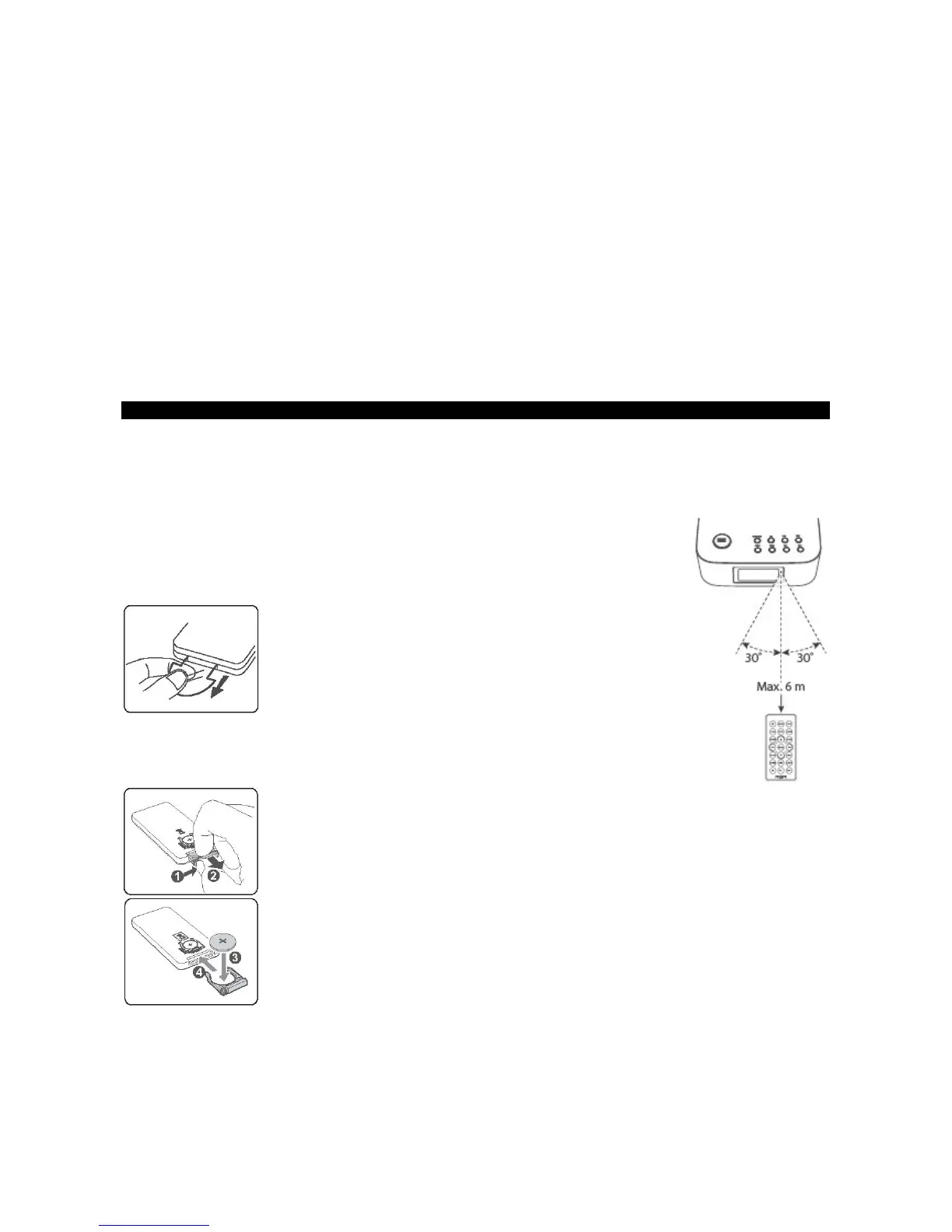
The Remote Control allows the unit to be operated from a distance.
• Even if the Remote Control is operated within the effective range 19.7 feet (6m) inch, remote control operations may be disrupted if
there are any obstacles between the unit and the remote control.
• If the Remote Control is operated near other products that generate infrared rays, or if other remote
control devices using infrared rays are used near the unit, it may operate incorrectly. Conversely, the
other products may operate incorrectly.
First-time use:
The unit has a pre-installed lithium CR2025 battery. Remove the protective tab to activate the remote control
battery.
Replacing the Remote Control Battery:
1 Pull out the battery tray and remove the old battery.
2 Place a new CR2025 battery into the battery tray with correct polarity (+/-) as indicated.
3 Insert the battery tray back into the slot.
Precautions Concerning Batteries
• When the Remote Control is not to be used for a long time (more than a month), remove the battery from the Remote Control to
prevent it from leaking.
• If the batteries leak, wipe away the leakage inside the battery compartment and replace the batteries with new ones.


 To Next Page