• Do not use any batteries other than those specified.
• Do not heat or disassemble batteries.
• Do not carry or store batteries with other metallic objects. Doing so could cause batteries to short circuit, leak or explode.
• Never recharge a battery unless it is confirmed to be a rechargeable type.
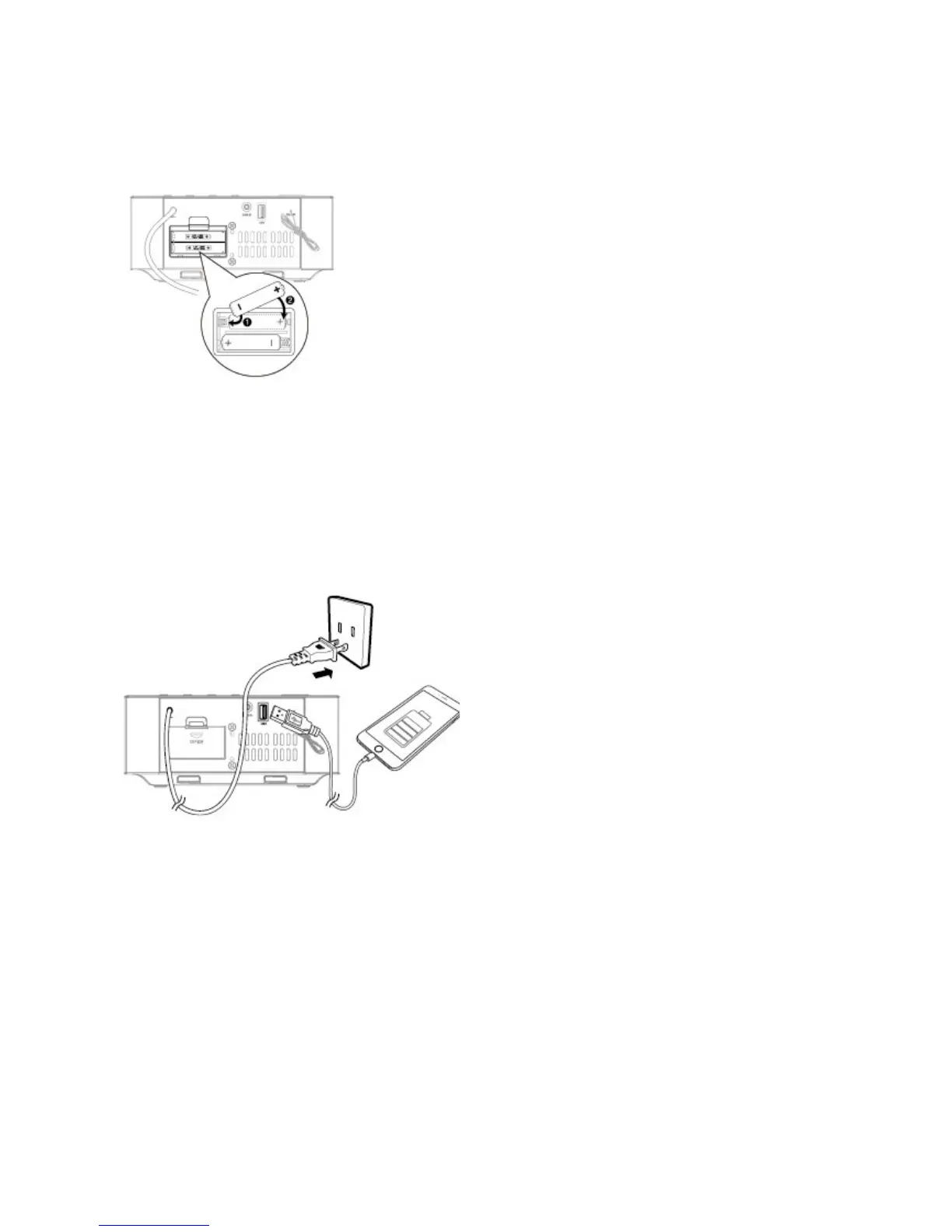
Install BACKUP Batteries (Optional)
Caution:
• Use AC power as primary power supply.
Batteries (not supplied) are for backup purposes.
• If the system is unplugged or if a power failure occurs, all settings in the unit will be erased unless there are batteries installed and you
do not change them while disconnected from a power source. Once settings have been erased, you will need to reset all desired
settings.
1 Open the batteries compartment.
2 Install two AAA batteries (not supplied) with correct polarity.
3 Close the battery compartment.
Connect the Power
Caution:
Risk of product damage! Ensure that the power supply voltage corresponds to the voltage printed on the rating label on the back or the
underside of the unit.
Before connecting the AC power cord, ensure you have completed all other connections.
• Connect the AC power cord to the wall socket.
Use USB Charge socket
Connect a USB cable (not supplied) to the USB socket to charge your smartphone or tablet PC.
Connect to Headphone


 To Next Page