Copyright ©2022 Ruko All Rights Reserved.
16
F11GIM User Manual
Power Button
Short-press once to start; Short-press + long-press for more than 2
seconds to turn off the Transmitter.
Control Sticks
Mode 1: (Default mode ) Use a control stick to control Aircraft
movements. The left control stick is the throttle lever, which can
adjust the Aircraft's altitude and nose direction. The right control
stick is a directional stick that controls the Aircraft's flight direction
(forward/back/left/right).
Mode 2: Control stick functions in reverse to the Mode 1.
Adjust the Aircraft Speed
Three different kinds of speed mode: Camera mode, Normal mode,
Sport mode.
Emergency Landing
Press and hold the button for 3 seconds to make the aircraft land in
an emergency effective within 49.21 feet(15 meters height). After
pressing the emergency stop button, the aircraft will lose power and
fall out of sky directly. It is recommended to use it only in an
emergency to avoid loss.
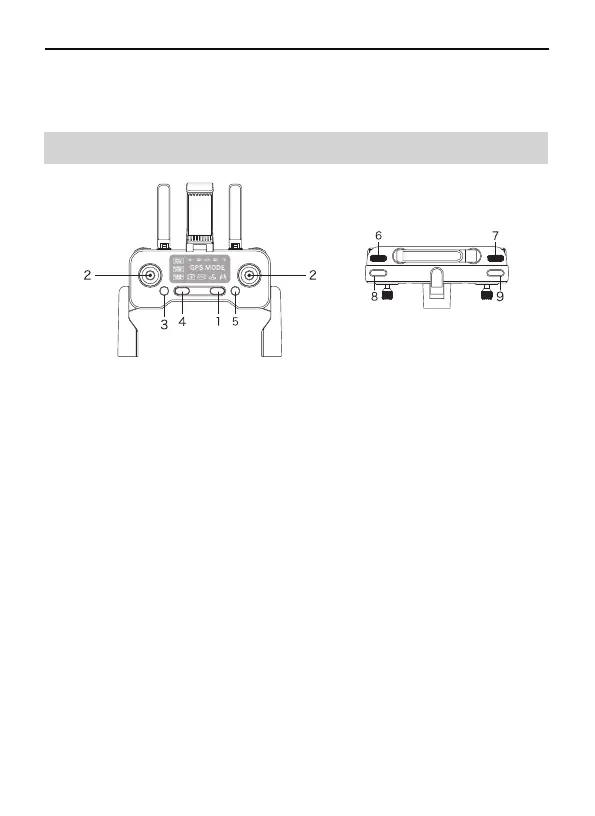
2.5 Transmitter Diagram
①
②
③
④
⑦
⑧
⑨
Battery Level LED
Camera SD Card Slot
Landing Gear



 To Next Page