Copyright ©2022 Ruko All Rights Reserved.
29
F11GIM User Manual
3.7 Camera Overview
Camera Overview
The camera uses an upgraded 5GHz Wi-Fi
FPV real-time transmission function, equipped
with 2-Axis Gimbal 4K EIS , 100°FOV lens and
a 80° adjustable camera, which can stably shoot
4K ultra-clear videos and images, providing you
with a broad field of vision for unforgettable moments.
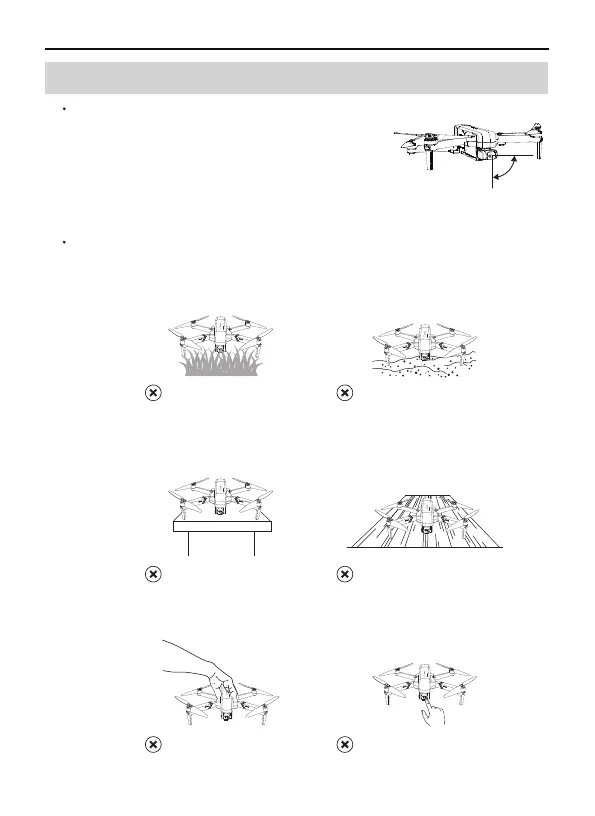
Camera Guideline
Please take off the gimbal camera cover before flight.
When taking off from grass or sand, please place the aircraft on
the landing pad or cardboard to keep it level.
Do not turn on the aircraft when it is on desk or hollow wooden
floor. They will amplify the small vibrations into high-frequency
vibrations, which will cause the gimbal cannot work.
Do not interfere with the gimbal by external forces or pick up the
aircraft during calibration. Otherwise, the gimbal will stop to work.
①
②
③
④
On the sand
On the grass
On the hollow wooden floor
On the desk
Picking up the Aircraft
(during self-inspection)
Touching the camera
0°
-80°



 To Next Page