Copyright ©2022 Ruko All Rights Reserved.
30
F11GIM User Manual
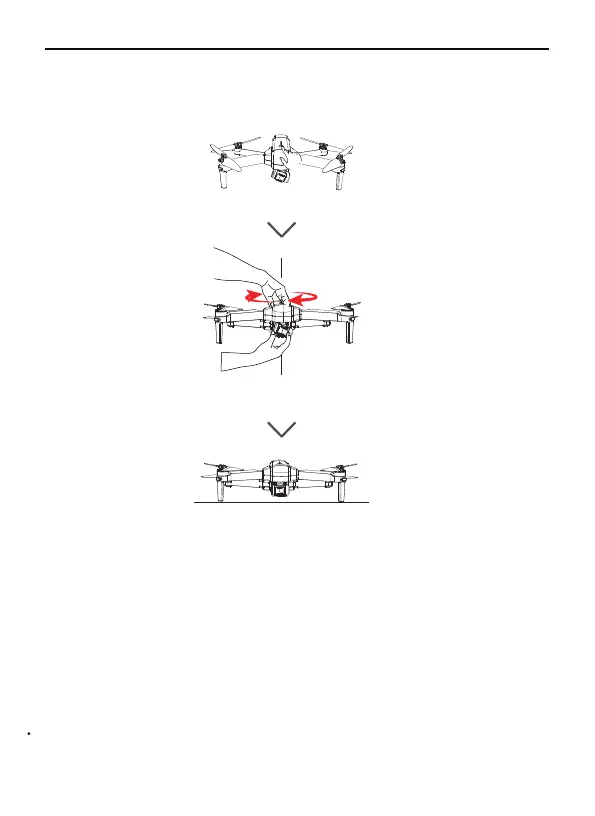
Do not place the Aircraft on rough ground and turn it on, coz the
camera will adjust up and down for self-calibration, please place it on
a horizontal position to make sure there is enough gap under the
camera, otherwise the camera would be stuck.
If the camera is stuck, please place the aircraft on horizontal
position without obstacles and restart the Aircraft. then check if it can
make self-calibration, or make gyroscope calibration to check camera
self-calibration.
If not, turn off the Aircraft, then move the camera up and down by
hand. If still stuck, please contact us for technical support.
The Gimbal cannot work before/ during the compass and gyro
calibration, and it's normal to see that the gimbal is not kept horizontal.
Put the Aircraft on a level surface after calibration, then the gimbal will
start to work after 20 seconds.
⑥
⑦
⑧
Storing Photos and Videos
F11GIM is equipped with a micro SD card slot for storage space
expansion.Card speed: 10M/s;
⑤
Before Start
During Compass and Gyro calibration
Put on a level surface and wait for 20 seconds



 To Next Page