Copyright ©2022 Ruko All Rights Reserved.
20
F11GIM User Manual
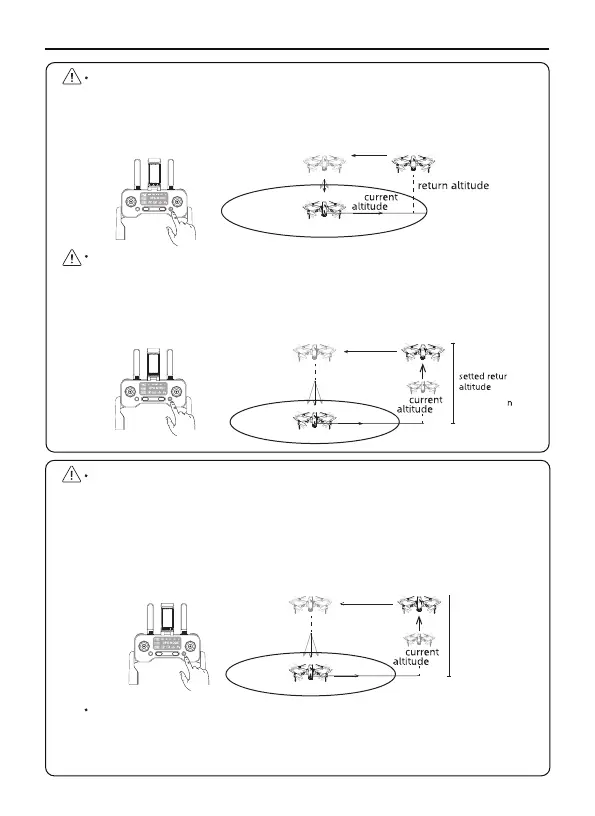
When the Aircraft executes smart RTH within a radius of 98 feet
(30 meters), the Aircraft will return from the current altitude to
the take-off point. (Pay attention to maintaining the flying height to
avoid hitting people or obstacles)
When the Aircraft returns to the Home Point beyond the 98 feet (30
meters) radius, if the return altitude is not set and the aircraft is
flying below 65 feet (20 meters), it will automatically fly up to the
default return altitude of 65 feet (20 meters) before returning home.
<98ft
>98ft
16ft
16ft
16ft
65ft
When the aircraft returns to the Home Point beyond the 98.43
feet(30 meters) radius, and the RTH altitude is set (before flight),
if the current altitude of the aircraft is lower than the RTH altitude,
the aircraft will ascend to the altitude already set before returning
to the take-off point then return to the Home Point; if the current
altitude of the aircraft is higher than the RTH altitude, the aircraft
will return to the Home Point from the current altitude.
The Aircraft is not equipped with obstacle avoidance function.
Please judge the flight status reasonably during the flight. Avoid
obstacles in time, and set the corresponding flight and return
altitude according to the flight environment.
>98ft
16ft
setting
altitude



 To Next Page