8
9
● In any mode, press the Power Button for at
least 1 second and release. Indictor A will turn
Red and blink Three times. The camera will then
completely shut down.
Shutdown:
Connect the Camera to PC:
● Using a standard USB cable, the camera can
be used as a removable storage device.
Connect the camera to PC with the USB cable
when it is turned off or in Standby status, you
can directly read or write the files in the TF
card.
Angle of Field F.O.V 120°
Photo Resolution 3MP
Video Resolution
1080P 30FPS FULL HD, 720P
60FPS, 720P 30FPS HD
Video/Photo Files Format
* . MOV / *.JPG
Live TV Video Output
NTSC / PAL
Interface
Mini USB
Max Micro SD Supported
64G(Suggest using Class 6 or above)
Image Flip
180 Deg Roation
Weight
41 g
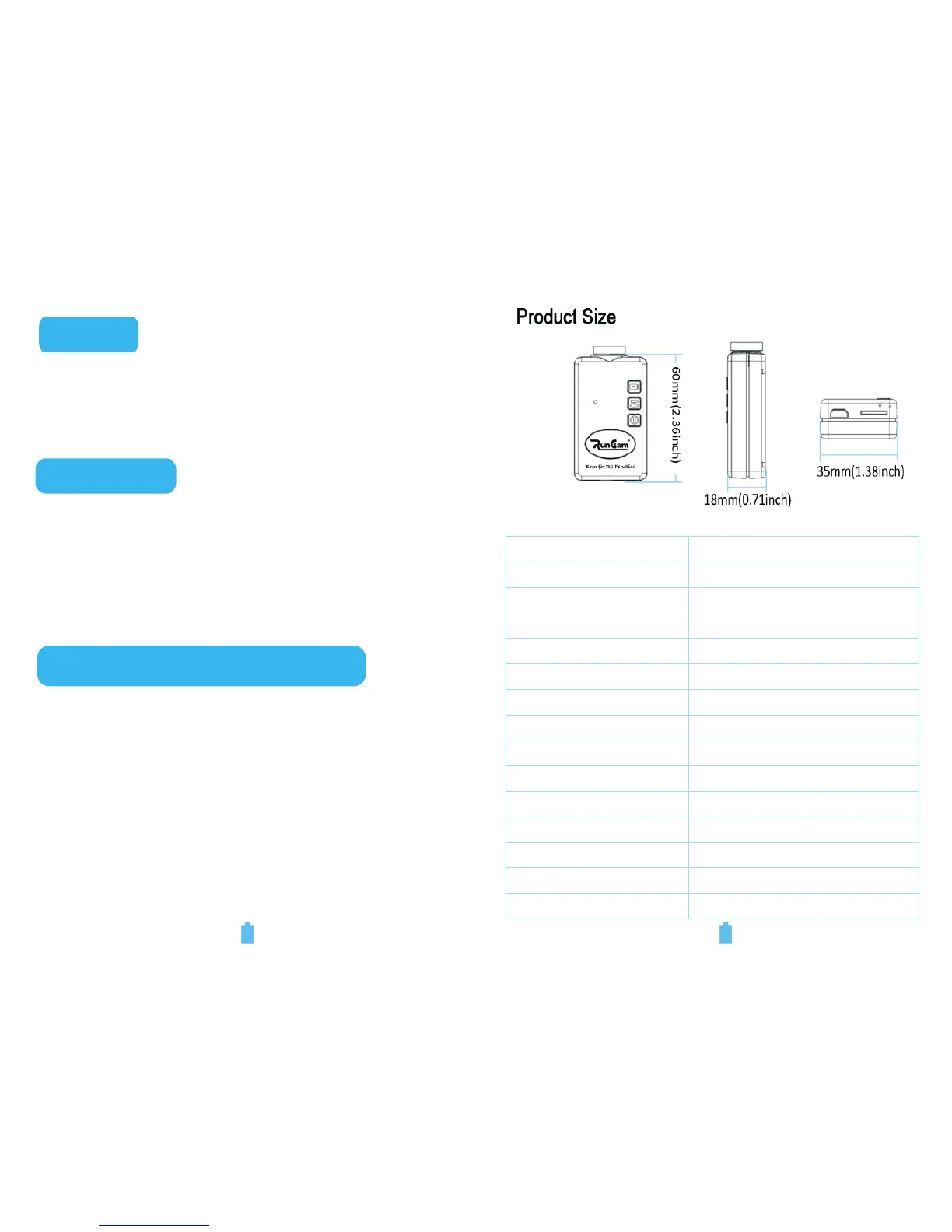
Dimension
60mm(L) * 35mm(W) * 18mm(H)
Rechargeable LIPO Battery
850mAH
Continuous Recording Time
About 120 Minute
Working Voltage
DC 5V
Working Current
< 500mAH
Reset:
● Turn the camera on, press the Reset Button to
restore it to factory settings.


 To Next Page