4 support@ruptela.com | +370 5 2045030 www.ruptela.com
Preparation
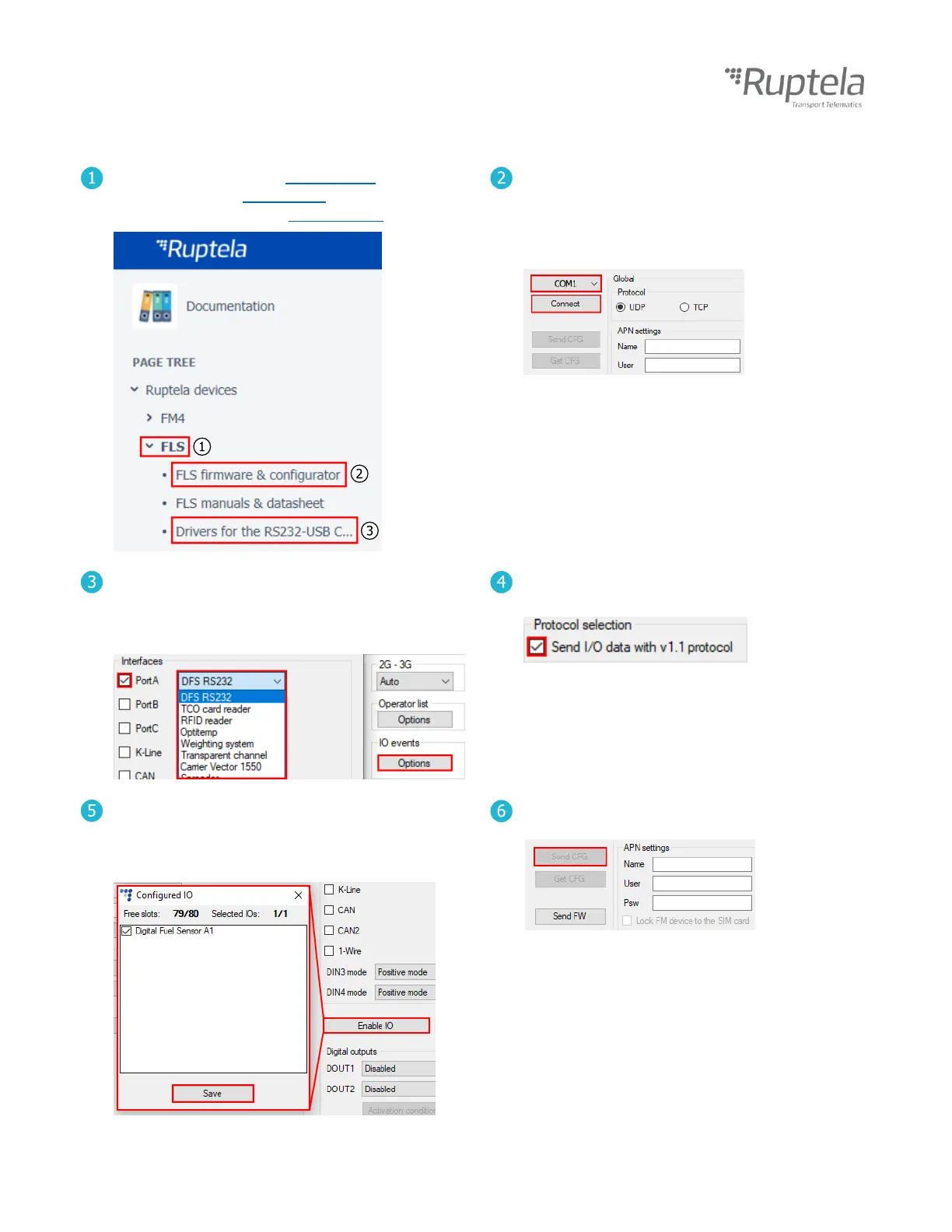
Go to the FLS section in doc.ruptela.lt. (1)
Download the FLS configurator. (2)
Download and install the RS232 drivers. (3)
Connect the FM device to your computer using a
USB cable.
Start the FM device configurator.
Select the port you connected your FM device to.
Click Connect in the configurator.
Click Options in IO events.
In Interfaces, tick the interface you will connect
the FLS to (PortA is recommended).
Select
DFS RS232
from the drop-down list.
Enable the v1.1 protocol on the top right side of
IO settings.
Click the Enable IO button.
Enable the Digital Fuel Sensor parameter in the
Configured IO window.
Click the Save button.
Click Send CFG to upload the config to the FM
device.


 To Next Page