13
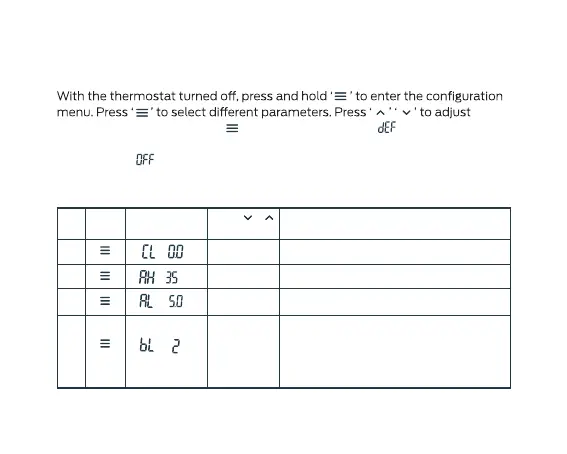
Configuration menu
parameters. Press and hold ‘ ’ for 3 seconds, display ‘ ’, indicates all the
configuration settings have reverted to factory default setting. The thermostat
will return to ‘ ’ mode if no buttons are pushed within 10 seconds.
( )
Item
Press
button
Displayed
(factory default)
Press or
to select
Descriptions
1
-6°C
~+
6°C
2
20°C
~
50°C
( )
5°C
~
20°C
3
( )
1/2/34
( )
°C
°C
°C
Backlight mode
1: Backlight always bright
2: When a button is pressed, the backlight
is bright for 15 seconds
Select minimum setting temperature
Select maximum setting temperature
Temperature correction value
3: Backlight is o


 To Next Page