13
Jr.
Sodcutter
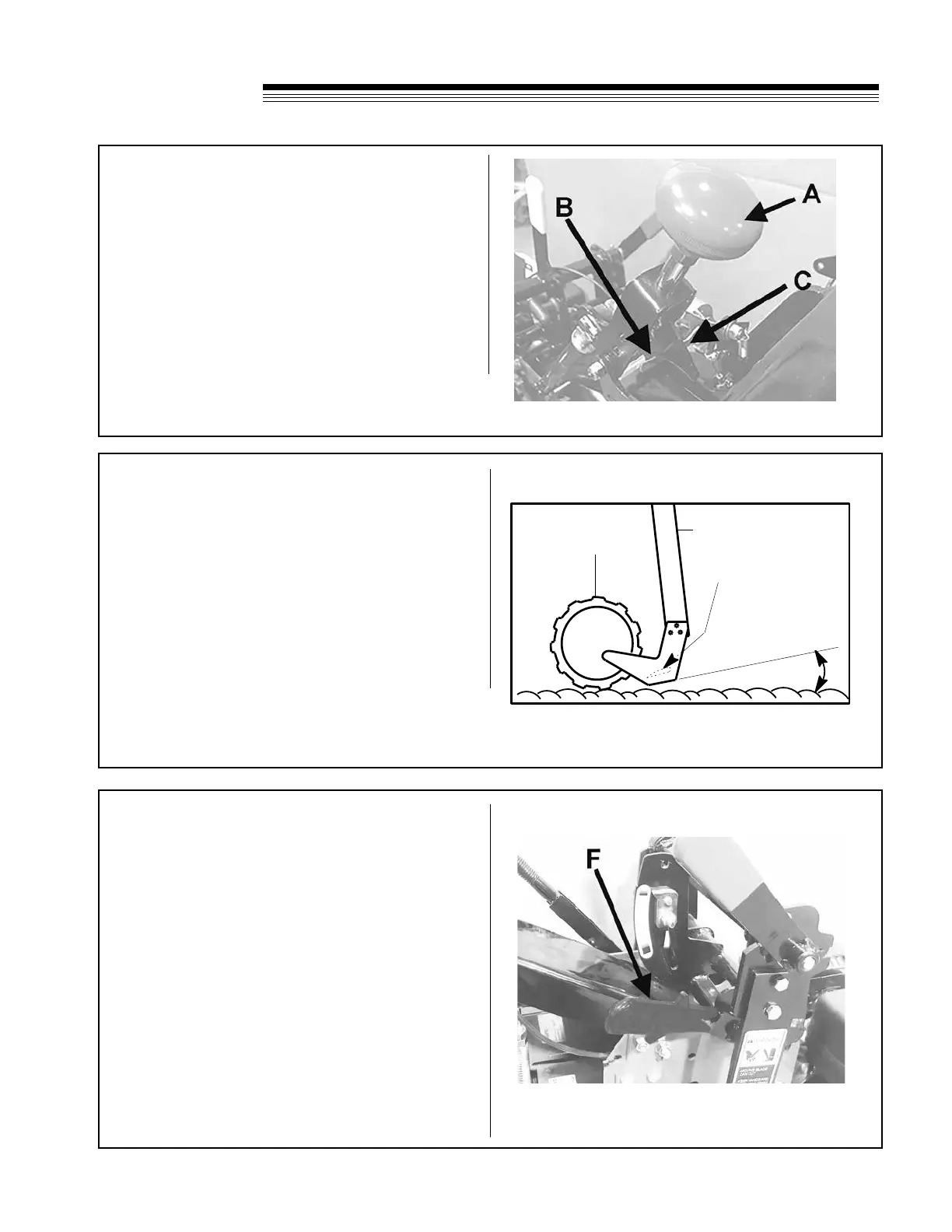
ADJUSTING OPERATOR PRESENCE CONTROL
1. To adjust operator presence cable, pull red clutch
control handle A rearward as far as possible.
2. Press operator presence handle (right handlebar)
down as far as possible.
3. Adjust cable until the pivot arm C contacts the
arm extending from the operator presence switch
B.
4. Tighten cable clamp to secure cable. Check for
proper operation.
ADJUSTMENTS
ADJUSTING BLADE ANGLE (PITCH)
1. Loosen black blade angle control locking lever
F and move H-frame forward or backward until
blade is at desired angle (pitch).
2. Tighten black blade angle control locking lever F.
SIDE ARM
DRIVE
WHEEL
BLADE
BOTTOM
BLADE
ANGLE
(Pitch)
BLADE ANGLE (PITCH)
Under normal operating conditions, blade angle
is minimal (blade bottom is at). In extremely
hard soil or when cutting with a dull blade, the
blade may want to ride out of the ground. It may
then help to adjust blade angle forward (see
Adjusting Blade Angle below). A short trial run
will indicate which is the best blade angle.
NOTE: Extreme blade angles put extra stress on
the side arms. To reduce stress on the machine,
operate with the attest blade angle that gives
satisfactory results.
Cover removed for clarity



 To Next Page