R5 SUPREME - Navigation System
OPERATION
7000 118-301, A Page 72
5.8.6.2 Skip Next Waypoint
To skip the next waypoint and manually switch leg on the active route, press the
button ‖Skip Waypoint‖.
The right part of the Navigation Info view can show several different sub views which
can be accessed by pressing the button ―Next Page‖. The sub views are described
below.
5.8.6.3 Estimated Time of Arrival (ETA)
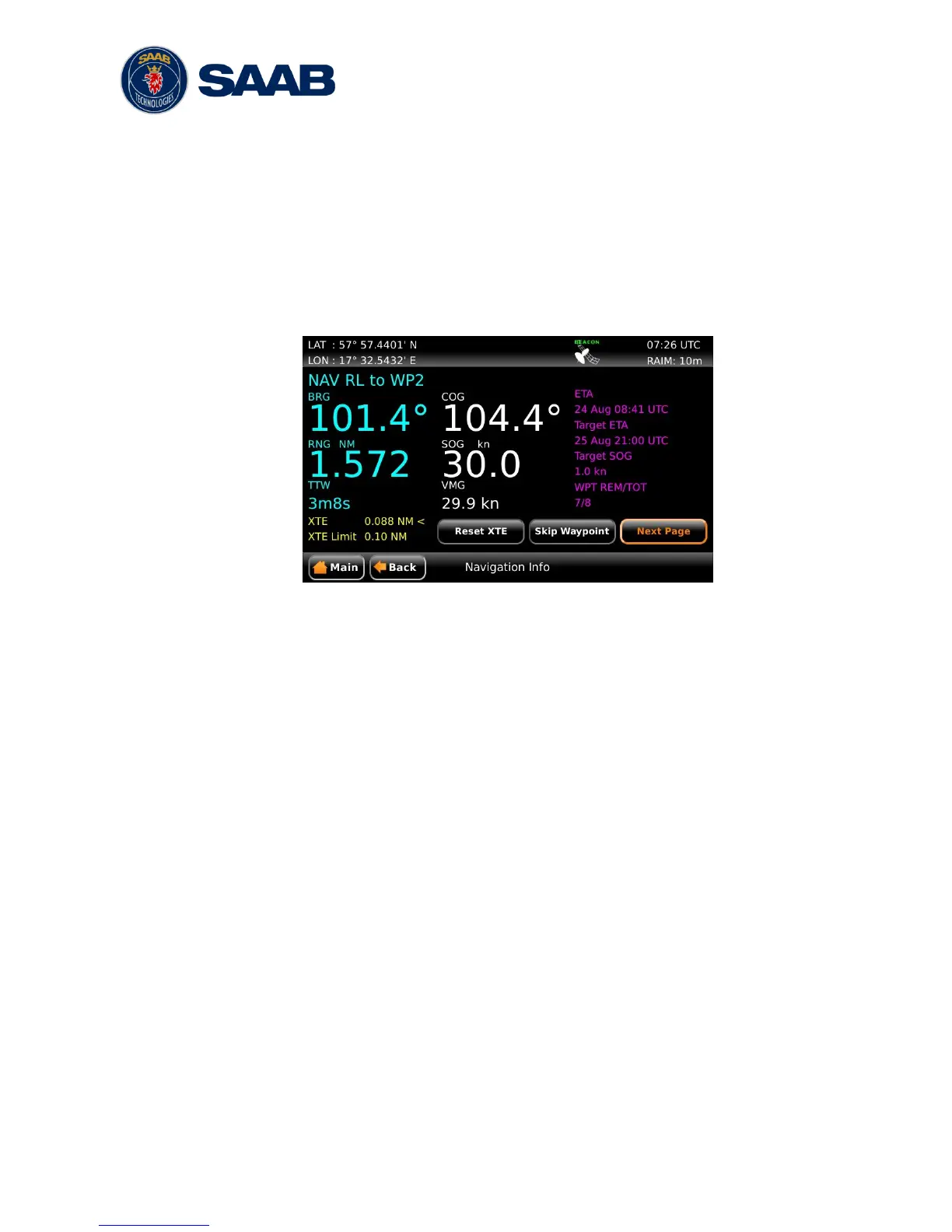
Figure 41 – Navigation Info View - ETA
This sub view show the estimated time of arrival (ETA) to the last waypoint in the
current route if the current speed over ground (SOG) is maintained.
It is also possible for the user to set a ―Target ETA‖, i.e. a desired time when the last
waypoint in the current route should be reached. If a ―Target ETA‖ is set, the sub
view will show a ―Target SOG‖ which is the average speed that must be maintained
to reach the last waypoint of the route at the time specified by ―Target ETA‖. The
―Target ETA‖ setting is accessed from Main Menu Navigate Active Route
Set Target ETA.
5.8.6.4 Waypoint Information
The waypoint information sub view shows the names of the active route, next
waypoint and previous waypoint.


 To Next Page