T120C
39
4.7 OPERATING CYCLE
4.7.1 Spindle start
To start the spindle, operate as follows:
00
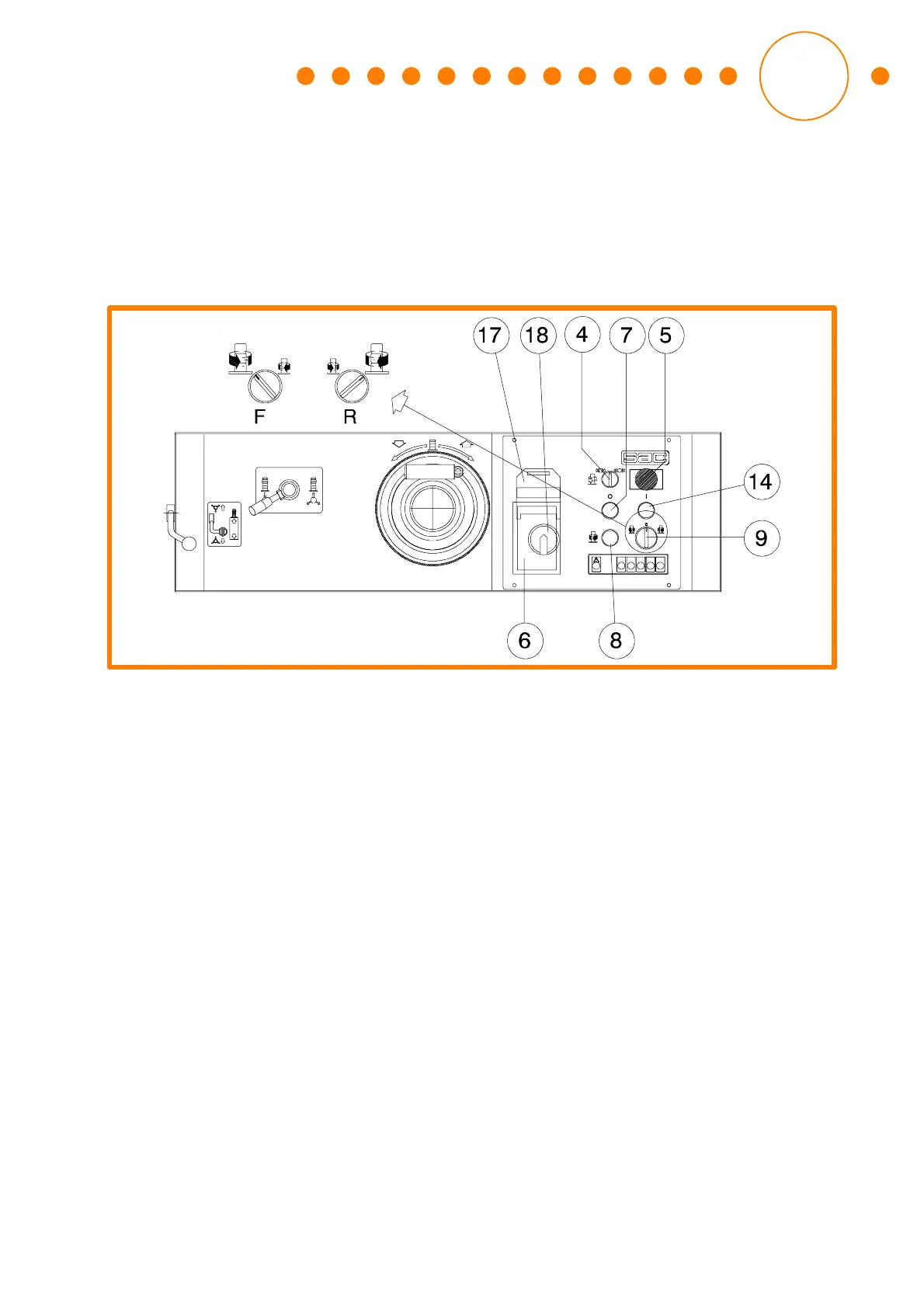
Fig. 20: Control panel
• Carry out the checks indicated at § 4.3;
• power the machine turning the knob (18);
• set the switch (4) in brake release position;
• the machine is equipped with spindle shaft rotation inverter:
select the spindle rotating direction acting on the switch (9), the position F corre-
sponds to the counterclockwise rotation d irection, while the position R corre-
sponds to the clockwise rotation direction.
It is not possible to start the spindle if a rotating direction has not been selected
before.
The machine stops immediately if the rotating direction switch is operated while
working.
• To choose the clockwise rotating direction or the simultaneous machining
direction [position R of the switch (9)] keep the light push button (8) pressed
while starting the spindle; the relevant pilot light switches on.
Do not operate with simultaneous machining because the rejection risk in-
creases.
• Press the push button (14) to start the spindle motor.
• Press the push button (7) to stop the spindle motor.
4.7.2 Use of the machining guid e
• A protecting device must always be used for the guide machining, so as to avoid
piece sliding and swinging.


 To Next Page