SaeboStim Pro
21
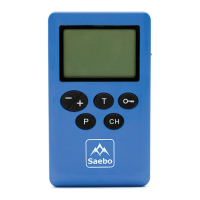
- Trigger Mode:OncethedesiredChannelKeyispressedandashing,pressand
hold the Pause/Trigger Key for 3 seconds to activate the Trigger Mode. An “arrow”
symbol will appear below the corresponding Channel. The stimulator enters a
contraction period for as long as the Key is pressed. When the Key is released the
stimulator enters the relaxation period (stimulation is not on).
To stop using the Trigger Mode and return to the programmed contraction/
relaxationcycle,pressthedesiredChannelKeyrst,followedbythedesiredintensity
keys. The Trigger Mode will be deactivated.
Note: Trigger Mode is available in programs 1, 2, 4, 6, 7, 9.
4. Lock: Press the Lock Key and hold for 2 seconds to prevent unwanted changes to
the output intensity. The Lock icon will display on the screen. Press and hold for 2
seconds to unlock the intensity keys. The lock icon will disappear from the screen.
5. Intensity:OncethedesiredChannelKeyispressedandashing,pressthe
Intensity Keys (-/+) to the corresponding Channel to adjust the intensity levels in
the treatment. The intensity increment is 1 mA. Pressing (+) button during treatment
increases the intensity level by a factor of one for that channel. Pressing (-) button
during treatment decreases the intensity level by a factor of one. The user can feel
the stimulation when he or she increases or decreases the intensity level. Intensity
rangeis0-60mAattheloadof500Ω.
6. Program:OncethedesiredChannelKeyispressedandashing,Pressthe
Program Key (P) to select the required treatment program. Refer to page 42 for a list
of the available programs.
Note: program 1 to 14 are preset, however, program 15 allows for customization.


 To Next Page