SaeboStim Pro
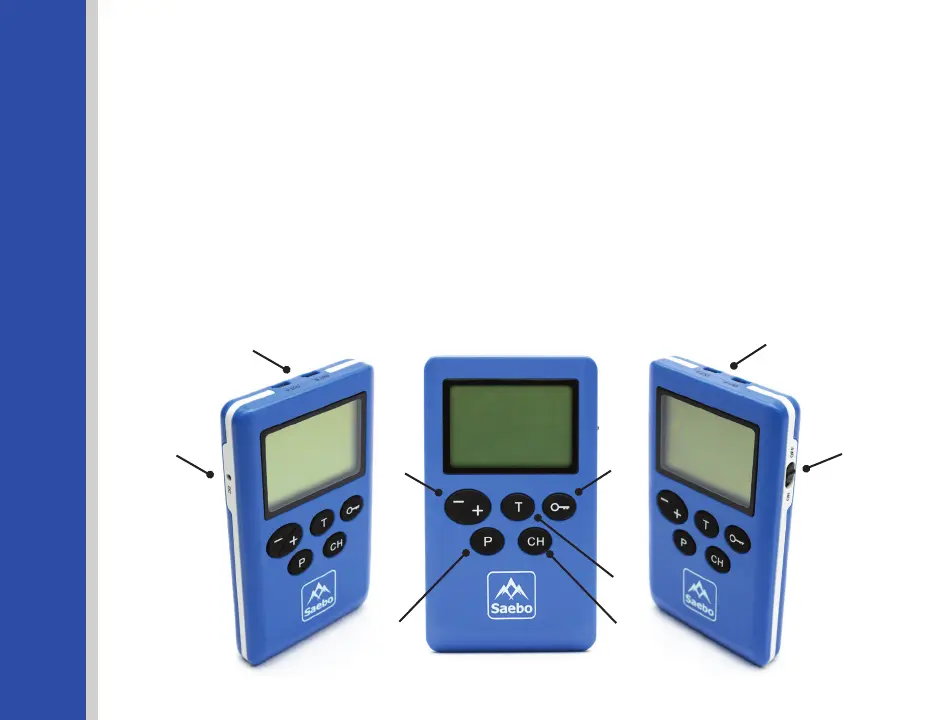
Description of Device and Controls
1. On/O Switch:Slidetheswitchtoturnthedeviceon/o.
2. Channel Key: Press the Channel Key (CH) to switch between the 2 channels. If icon
Aisashingonthescreen,theusercansettheIntensityleveloractivatetheTrigger
ModeinChannelA.IficonBisashingonthescreen,theusercansettheIntensity
leveloractivatetheTriggerModeinChannelB.Theashingwillstopfollowing10
seconds of no operation.
3. Pause/Trigger Key: The Pause/Trigger Key (T) serves both functions.
- Pause: When the stimulator is running a treatment program, press the
Pause/Trigger Key once to pause the treatment.
20
Figure 11
1
2
3
45
6
7
7
8
Figure 1


 To Next Page